SQL Server Integration Services
A Microsoft platform for building enterprise-level data integration and data transformations solutions.
This browser is no longer supported.
Upgrade to Microsoft Edge to take advantage of the latest features, security updates, and technical support.
' cx='32' cy='32' r='32' /%3E%3Ctext x='50%25' y='55%25' dominant-baseline='middle' text-anchor='middle' fill='%23FFF' %3EJ2%3C/text%3E%3C/svg%3E)
How to use expression in excel connection manager?Why i cant edit the string,i can only change the file path when click the connection string

Hi @Jefferson-2765 ,
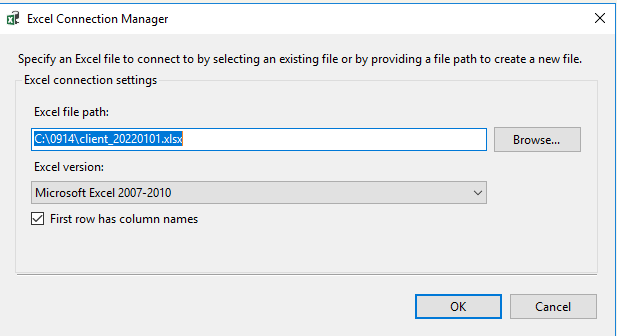
Not really sure about your issue, do you mean the situation like shown below?

When you click more, you could only choose the path.
If you want to use expression in excel connection, you may roll down the manager connection.
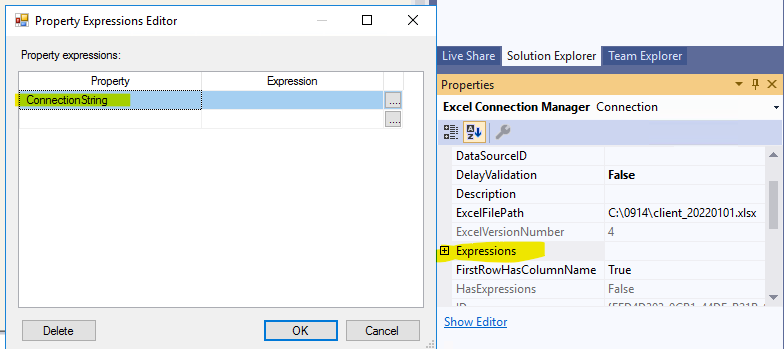
If I misunderstand your issue, please incorrect me.
Regards,
Zoe
If the answer is the right solution, please click "Accept Answer" and kindly upvote it. If you have extra questions about this answer, please click "Comment".
Note: Please follow the steps in our documentation to enable e-mail notifications if you want to receive the related email notification for this thread.
' cx='32' cy='32' r='32' /%3E%3Ctext x='50%25' y='55%25' dominant-baseline='middle' text-anchor='middle' fill='%23FFF' %3EYK%3C/text%3E%3C/svg%3E)
Hi @Jefferson-2765 ,
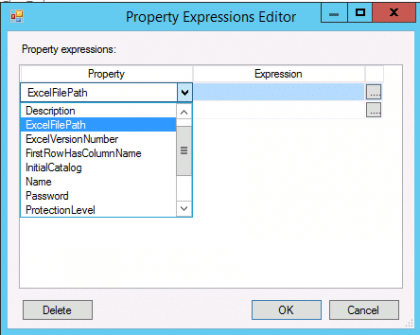
Excel file connection is controlled via ExcelFilePath property in the Expressions.
It should be a fully qualified file path.
Please see below.
Thanks all for your support!!!