Microsoft Security | Microsoft Graph
An API that connects multiple Microsoft services, enabling data access and automation across platforms

This browser is no longer supported.
Upgrade to Microsoft Edge to take advantage of the latest features, security updates, and technical support.
' cx='32' cy='32' r='32' /%3E%3Ctext x='50%25' y='55%25' dominant-baseline='middle' text-anchor='middle' fill='%23FFF' %3EML%3C/text%3E%3C/svg%3E)
I am following the tutorial here and am using the source code they have provided.
https://learn.microsoft.com/en-us/azure/active-directory/develop/tutorial-v2-react and am using the settings for Redirect URI: MSAL.js 2.0 with auth code flow
When I click on Request Profile Information, the user details and id are completely different from when I hit the same odata.context at https://developer.microsoft.com/en-us/graph/graph-explorer
userPrincipalName: "BLAH_MAIL.com#EXT#@BLAHMAIL.onmicrosoft.com <----bad / from the provided code linked.
id: XYZ <---
vs
userPrincipleName: ******@MALIL.COM <-----good. / the one I want / from graphexplorer
id: ABC
Is there a step or setting that I am missing?

Hi @Mark Lynn
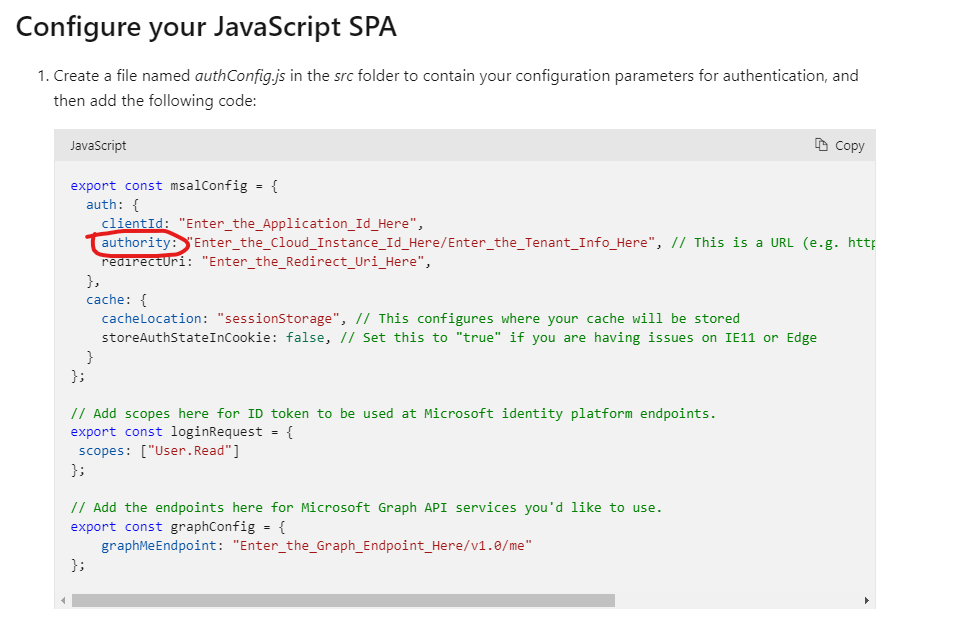
This is because you have added your personal account to the tenant as a guest, so if you authorize a user with the tenant id, it will log in as your guest by default.
If you still want to log in as a personal account, then you need to change /tenant id to /common to skip tenant-wide authentication.
https://login.microsoftonline.com/common
If the answer is helpful, please click "Accept Answer" and kindly upvote it. If you have extra questions about this answer, please click "Comment".
Note: Please follow the steps in our documentation to enable e-mail notifications if you want to receive the related email notification for this thread.
Please note that I can access what I believe is the correct email, but it is via the beta and it appears in the 'otheremails' parameter.