Log Shipping not working

Peter Babic 21 Reputation points
2020-09-14T18:54:47.327+00:00

Hello guys,

I'm not able to successfully setup log shipping between two servers in one domain.
After configuration, DB full backup and restore to secondary is completed fine.
On primary LS_Backup_DBNAME scheduled job is failing with following errors>

2020-09-13 21:13:07.38 ----- START OF TRANSACTION LOG BACKUP -----
2020-09-13 21:13:07.48 Error: Could not retrieve backup settings for primary ID '682f25fc-7e6e-4886-9d9a-06bb2d275293'.(Microsoft.SqlServer.Management.LogShipping)
2020-09-13 21:13:07.48 Error: Failed to connect to server XXXXXX.(Microsoft.SqlServer.ConnectionInfo)
2020-09-13 21:13:07.48 Error: A connection was successfully established with the server, but then an error occurred during the login process. (provider: SSL Provider, error: 0 - The certificate chain was issued by an authority that is not trusted.)(.Net SqlClient Data Provider)
2020-09-13 21:13:07.48 Error: The certificate chain was issued by an authority that is not trusted()
2020-09-13 21:13:07.48 ----- END OF TRANSACTION LOG BACKUP -----

Exit Status: 1 (Error)

This error I get when I tried to run job command from LS_BACKUP_XXX in cmd sqllogship.exe -Backup 9CB190E0-E70C-45DA-8EE4-93C4370E0F48 -server XXXX

Forced protocol Encryption set to NO
There is no Certificate in Configuration Manager for SQL server
SQL server agent running under domain account which is sysadmin with full rights in shared folder for backup/restore

SQL Server | Other
{count} votes

8 answers

Sort by: Most helpful
  1. m 4,281 Reputation points
    2020-09-15T09:03:44.4+00:00

    Hi anonymous user,

    1. Please make sure your account under sql service have the full permission.Use domain\Administrator restart bother server's all services;
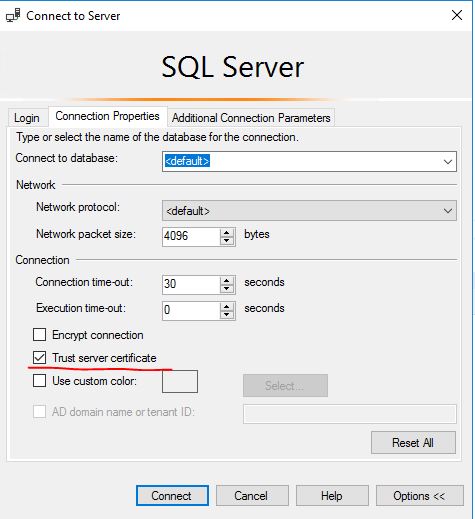
    2. You can choose option: trust server cetificate as next.
      24769-20200915choosethisoption.jpg

    And then follow steps as this doc to create log shipping step by step: step-by-step-sql-server-log-shipping
    More information:

    BR,
    Mia


    If the answer is helpful, please click "Accept Answer" and upvote it.
    Note: Please follow the steps in our documentation to enable e-mail notifications if you want to receive the related email notification for this thread.

    0 comments No comments

  2. Peter Babic 21 Reputation points
    2020-09-15T14:54:39.313+00:00

    Hello Yuximiao, thanks for comment I don't have issue to connect via SSMS that is ok, initial configuration, backup on primary and restore on secondary works fine. ![24730-image.png][1] [1]: /api/attachments/24730-image.png?platform=QnA But then scheduled backup on primary is failling.

    0 comments No comments

  3. Guoxiong 8,216 Reputation points
    2020-09-15T15:53:03.837+00:00
    0 comments No comments

  4. Peter Babic 21 Reputation points
    2020-09-15T16:05:55.87+00:00

    Hi GuoxiongYuan thanks for reply and for suggestion but my issue is bit different my secondary instance is visible and connectable from primary. The ERROR which I get is Error: A connection was successfully established with the server, but then an error occurred during the login process. (provider: SSL Provider, error: 0 - The certificate chain was issued by an authority that is not trusted.)(.Net SqlClient Data Provider) While Force Encryption is "NO" in Configuration manager connections. When I query sys.dm.exec.connections I get that connections are not encrypted. ![24857-image.png][1] [1]: /api/attachments/24857-image.png?platform=QnA

    0 comments No comments

  5. m 4,281 Reputation points
    2020-09-16T03:17:33.167+00:00

    Hi anonymous user,

    Please double check as next:

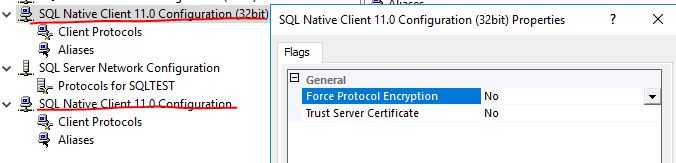
    1.Both SQL Native Client 11.0 Configuration(32bit) and SQL Native Client 11.0 Configuration are all set "NO".

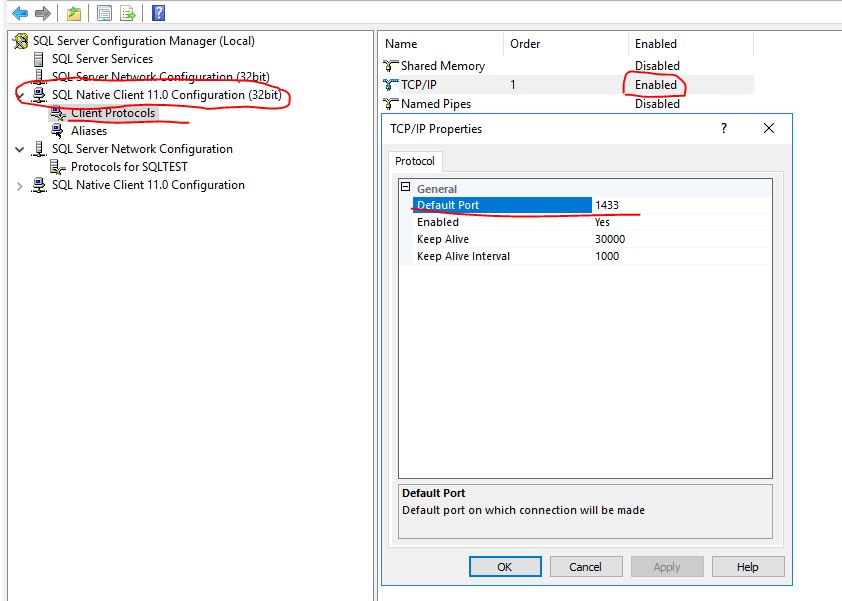
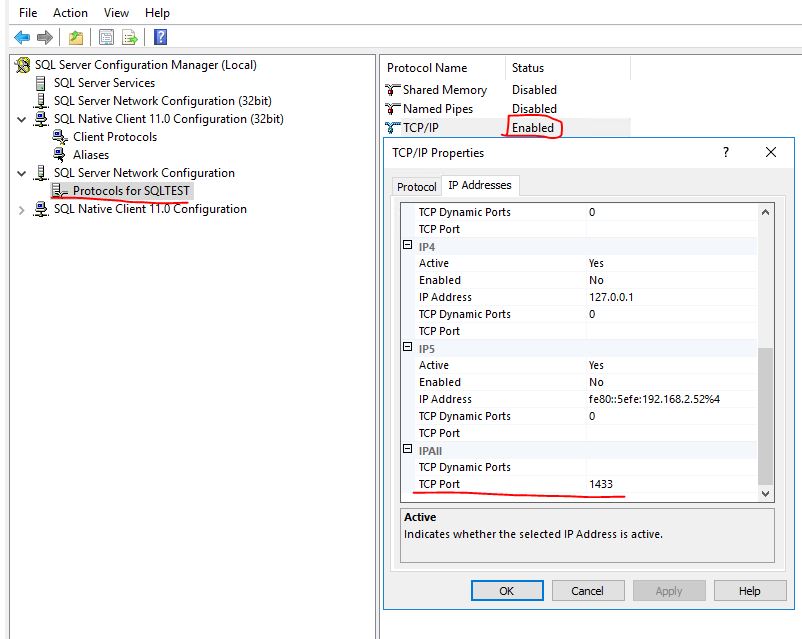
    2.Both Client Side and Server side in your both servers's : TCP/IP protocol are enabled and port:1433.

    You should restart the sqlserver service when you finish the changing each time.

    25102-no2.jpg
    25004-clientside.jpg
    25006-serverside.jpg

    BR,
    Mia


    If the answer is helpful, please click "Accept Answer" and upvote it.
    Note: Please follow the steps in our documentation to enable e-mail notifications if you want to receive the related email notification for this thread.

    0 comments No comments

Your answer

Answers can be marked as 'Accepted' by the question author and 'Recommended' by moderators, which helps users know the answer solved the author's problem.