Developer technologies | Windows Presentation Foundation
A part of the .NET Framework that provides a unified programming model for building line-of-business desktop applications on Windows.
This browser is no longer supported.
Upgrade to Microsoft Edge to take advantage of the latest features, security updates, and technical support.

How do I take Monaco editor text, and use it in the C# application as a string?
As of right now I am using WebView2 to display Monaco inside the WPF app, I need to take the text from the editor and process it with app.
' cx='32' cy='32' r='32' /%3E%3Ctext x='50%25' y='55%25' dominant-baseline='middle' text-anchor='middle' fill='%23FFF' %3EHL%3C/text%3E%3C/svg%3E)
Hi,@Aidan Kinzie . Welcome Microsoft Q&A. Could you show the complete code of your project?

@Hui Liu-MSFT I believe the OP is following my guide on How to use Monaco editor in a WPF application.
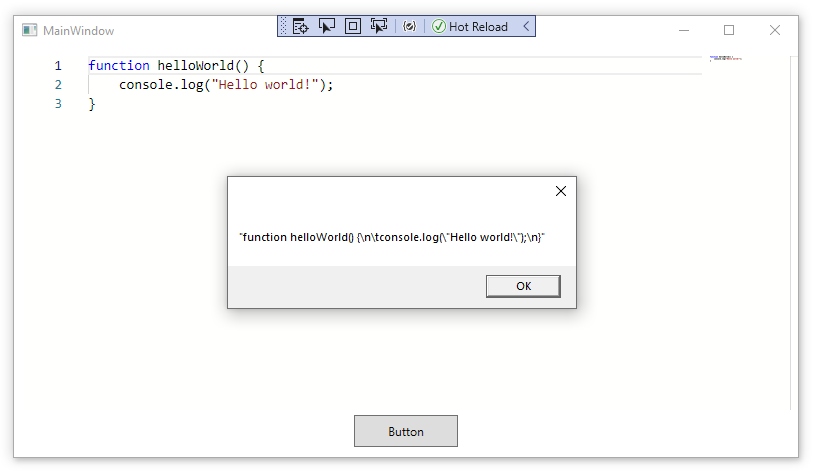
Assuming you have already followed the instructions to How to use Monaco editor in a WPF application, then you can use javascript editor.GetValue and editor.setValue functions to work with the editor.
For example, to get the value of the editor:
var value = await webView21.ExecuteScriptAsync("editor.getValue();");
MessageBox.Show(value);
Or to set the value of the editor:
await webView21.ExecuteScriptAsync("editor.setValue('Hi!');");
Note:
Thank you so much for helping me with my programming project. If it wasn't for you, I would had given up :) Tysm
' cx='32' cy='32' r='32' /%3E%3Ctext x='50%25' y='55%25' dominant-baseline='middle' text-anchor='middle' fill='%23FFF' %3EHS%3C/text%3E%3C/svg%3E)
how do i do for message box to show the editor text without the quotation mark?