I‘m sorry my Emglish is pool , But I have e Question. Windows Server 2012R2 Daily timing Automatic restart without reason。After checking the server hardware, there is no fault. Connect the monitor, the mouse and keyboard are unresponsive, and the monitor has no data display. You can only turn off the power manually, and then restart it.Did anyone meet before inviting someone? Is there a solution?
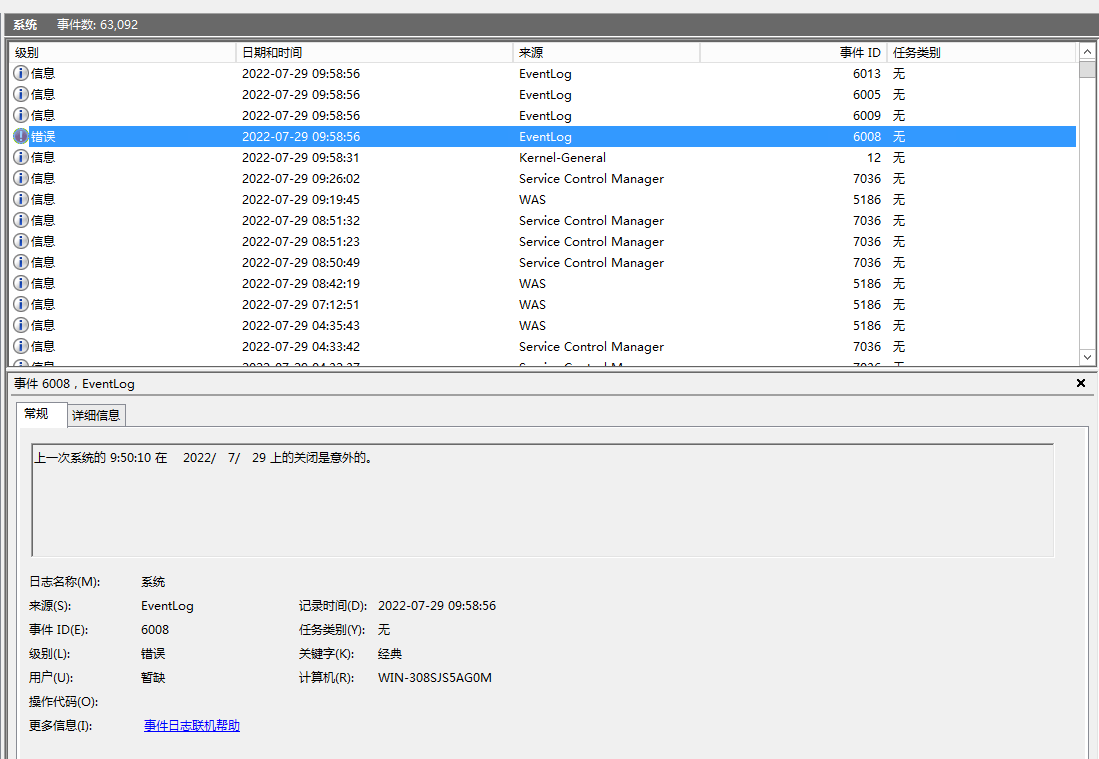
-------------------------------------------------------
View with WinDbg C:\Windows\Minidump\ :
Microsoft (R) Windows Debugger Version 6.3.9600.16384 X86
Copyright (c) Microsoft Corporation. All rights reserved.
Loading Dump File [C:\Windows\Minidump\072922-34843-01.dmp]
Mini Kernel Dump File: Only registers and stack trace are available
Symbol search path is: *** Invalid ***
Symbol loading may be unreliable without a symbol search path.
Use .symfix to have the debugger choose a symbol path.
After setting your symbol path, use .reload to refresh symbol locations.
Executable search path is:
Symbols can not be loaded because symbol path is not initialized.
**
The Symbol Path can be set by:
using the _NT_SYMBOL_PATH environment variable.
using the -y <symbol_path> argument when starting the debugger.
using .sympath and .sympath+
Unable to load image \SystemRoot\system32\ntoskrnl.exe, Win32 error 0n2
WARNING: Unable to verify timestamp for ntoskrnl.exe
ERROR: Module load completed but symbols could not be loaded for ntoskrnl.exe
Windows 8 Kernel Version 9600 MP (56 procs) Free x64
Product: Server, suite: TerminalServer SingleUserTS
Built by: 9600.16384.amd64fre.winblue_rtm.130821-1623
Machine Name:
Kernel base = 0xfffff803c0674000 PsLoadedModuleList = 0xfffff803c093b9b0
Debug session time: Fri Jul 29 10:14:41.637 2022 (UTC + 8:00)
System Uptime: 0 days 0:16:10.086
Symbols can not be loaded because symbol path is not initialized.
**
The Symbol Path can be set by:
using the _NT_SYMBOL_PATH environment variable.
using the -y <symbol_path> argument when starting the debugger.
using .sympath and .sympath+
Unable to load image \SystemRoot\system32\ntoskrnl.exe, Win32 error 0n2
WARNING: Unable to verify timestamp for ntoskrnl.exe
ERROR: Module load completed but symbols could not be loaded for ntoskrnl.exe
Loading Kernel Symbols
...............................................................
................................................................
...........
Loading User Symbols
Loading unloaded module list
.....
************* Symbol Loading Error Summary **************
Module name Error
ntoskrnl The system cannot find the file specified
You can troubleshoot most symbol related issues by turning on symbol loading diagnostics (!sym noisy) and repeating the command that caused symbols to be loaded.
You should also verify that your symbol search path (.sympath) is correct.
The call to LoadLibrary(ext) failed, Win32 error 0n2
"系统找不到指定的文件。"
Please check your debugger configuration and/or network access.
The call to LoadLibrary(exts) failed, Win32 error 0n2
"系统找不到指定的文件。"
Please check your debugger configuration and/or network access.
The call to LoadLibrary(kext) failed, Win32 error 0n2
"系统找不到指定的文件。"
Please check your debugger configuration and/or network access.
The call to LoadLibrary(kdexts) failed, Win32 error 0n2
"系统找不到指定的文件。"
Please check your debugger configuration and/or network access.
The call to LoadLibrary(ext) failed, Win32 error 0n2
"系统找不到指定的文件。"
Please check your debugger configuration and/or network access.
The call to LoadLibrary(exts) failed, Win32 error 0n2
"系统找不到指定的文件。"
Please check your debugger configuration and/or network access.
The call to LoadLibrary(kext) failed, Win32 error 0n2
"系统找不到指定的文件。"
Please check your debugger configuration and/or network access.
The call to LoadLibrary(kdexts) failed, Win32 error 0n2
"系统找不到指定的文件。"
Please check your debugger configuration and/or network access.
**
Bugcheck Analysis
**
Bugcheck code 0000007F
Arguments 0000000000000008 ffffd0002151dc70 ffffd00021539f60 fffff803c06a07b7
RetAddr : Args to Child : Call Site
fffff803c07cfbe9 : 000000000000007f 0000000000000008 ffffd0002151dc70 ffffd000`21539f60 : nt+0x1500a0
000000000000007f : 0000000000000008 ffffd0002151dc70 ffffd00021539f60 fffff803`c06a07b7 : nt+0x15bbe9
0000000000000008 : ffffd0002151dc70 ffffd00021539f60 fffff803c06a07b7 00000000`00000000 : 0x7f
ffffd0002151dc70 : ffffd00021539f60 fffff803c06a07b7 0000000000000000 00000000`00000000 : 0x8
ffffd00021539f60 : fffff803c06a07b7 0000000000000000 0000000000000000 0000000000000000 : 0xffffd0002151dc70
fffff803c06a07b7 : 0000000000000000 0000000000000000 0000000000000000 0000000000000000 : 0xffffd00021539f60
0000000000000000 : 0000000000000000 0000000000000000 0000000000000000 00000000`00000000 : nt+0x2c7b7
------------------------------------------------------
View with WinDbg C:\Windows\MEMORY.DMP
Microsoft (R) Windows Debugger Version 6.3.9600.16384 X86
Copyright (c) Microsoft Corporation. All rights reserved.
Loading Dump File [C:\Windows\MEMORY.DMP]
Kernel Bitmap Dump File: Only kernel address space is available
Symbol search path is: *** Invalid ***
Symbol loading may be unreliable without a symbol search path.
Use .symfix to have the debugger choose a symbol path.
After setting your symbol path, use .reload to refresh symbol locations.
Executable search path is:
Symbols can not be loaded because symbol path is not initialized.
**
The Symbol Path can be set by:
using the _NT_SYMBOL_PATH environment variable.
using the -y <symbol_path> argument when starting the debugger.
using .sympath and .sympath+
***ERROR: Symbol file could not be found. Defaulted to export symbols for ntkrnlmp.exe -
Windows 8 Kernel Version 9600 MP (56 procs) Free x64
Product: Server, suite: TerminalServer SingleUserTS
Built by: 9600.16384.amd64fre.winblue_rtm.130821-1623
Machine Name:
Kernel base = 0xfffff803c0674000 PsLoadedModuleList = 0xfffff803c093b9b0
Debug session time: Fri Jul 29 10:14:41.637 2022 (UTC + 8:00)
System Uptime: 0 days 0:16:10.086***
Symbols can not be loaded because symbol path is not initialized.
**
The Symbol Path can be set by:
using the _NT_SYMBOL_PATH environment variable.
using the -y <symbol_path> argument when starting the debugger.
using .sympath and .sympath+
***ERROR: Symbol file could not be found. Defaulted to export symbols for ntkrnlmp.exe -
Loading Kernel Symbols
...............................................................
................................................................
...........
Loading User Symbols
Loading unloaded module list
.....***
********** Symbol Loading Error Summary **************
Module name Error
ntkrnlmp The system cannot find the file specified
You can troubleshoot most symbol related issues by turning on symbol loading diagnostics (!sym noisy) and repeating the command that caused symbols to be loaded.
You should also verify that your symbol search path (.sympath) is correct.
The call to LoadLibrary(ext) failed, Win32 error 0n2
"系统找不到指定的文件。"
Please check your debugger configuration and/or network access.
The call to LoadLibrary(exts) failed, Win32 error 0n2
"系统找不到指定的文件。"
Please check your debugger configuration and/or network access.
The call to LoadLibrary(kext) failed, Win32 error 0n2
"系统找不到指定的文件。"
Please check your debugger configuration and/or network access.
The call to LoadLibrary(kdexts) failed, Win32 error 0n2
"系统找不到指定的文件。"
Please check your debugger configuration and/or network access.
The call to LoadLibrary(ext) failed, Win32 error 0n2
"系统找不到指定的文件。"
Please check your debugger configuration and/or network access.
The call to LoadLibrary(exts) failed, Win32 error 0n2
"系统找不到指定的文件。"
Please check your debugger configuration and/or network access.
The call to LoadLibrary(kext) failed, Win32 error 0n2
"系统找不到指定的文件。"
Please check your debugger configuration and/or network access.
The call to LoadLibrary(kdexts) failed, Win32 error 0n2
"系统找不到指定的文件。"
Please check your debugger configuration and/or network access.
**
Bugcheck Analysis
**
Bugcheck code 0000007F
Arguments 0000000000000008 ffffd0002151dc70 ffffd00021539f60 fffff803c06a07b7
RetAddr : Args to Child : Call Site
fffff803c07cfbe9 : 000000000000007f 0000000000000008 ffffd0002151dc70 ffffd000`21539f60 : nt!KeBugCheckEx
fffff803c07cdcf4 : 0000000000000000 0000000000000000 0000000000000000 00000000`00000000 : nt!setjmpex+0x37e9
fffff803c06a07b7 : 0000000000000000 0000000000000000 0000000000000000 00000000`00000000 : nt!setjmpex+0x18f4
fffff803c06a0109 : 0000000000000000 ffffe000054205d8 ffffe000054205d8 00000000`00000000 : nt!SeAccessCheckWithHint+0x13b7
fffff803c069f8e6 : ffffd0002153a2b0 0000000000000000 ffffd0002153a418 00000000`00000000 : nt!SeAccessCheckWithHint+0xd09
fffff803c069f2ec : 0000000000000000 0000000000000600 ffffd0002153a380 ffffffff`00000001 : nt!SeAccessCheckWithHint+0x4e6
***ERROR: Symbol file could not be found. Defaulted to export symbols for NETIO.SYS -
fffff80000768a9a : 0000000000000000 ffffffff00000000 0000000000000001 00000000`00000000 : nt!SeAccessCheckFromStateEx+0x88
fffff8000076908c : ffffe000017d91f0 0000000000001f24 0000000000000000 00000000`00000000 : NETIO!NetioFreeCloneNetBufferList+0x10a
fffff80000765f7b : ffffe000047dd280 ffffd0002153a9d8 0000000000000003 ffffd000`2153a720 : NETIO!NetioFreeCloneNetBufferList+0x6fc***
ERROR: Module load completed but symbols could not be loaded for tcpip.sys
fffff80001025886 : 0000000000000000 0000000000000000 0000000000000000 00000000`00000000 : NETIO!KfdClassify+0x49b
fffff80001026346 : ffffe0001e9fad70 ffffe0001e9fad70 0000000000000002 00000000`0000002c : tcpip+0x21886
fffff80001024d0c : ffffe00005495dc0 ffffd0000000002c ffffd0002153af60 ffffe000`1e9fad70 : tcpip+0x22346
fffff80001061f08 : 0000000000000000 ffffe00005495ec0 0000200000000001 ffffe000`1ea1720c : tcpip+0x20d0c
fffff8000107f960 : ffffd0002153b408 0000000000000000 ffffd0002153b490 00000000`00000000 : tcpip+0x5df08
fffff8000107da60 : 0000000000002a00 0000000000000000 0000000000000000 00000000`00000000 : tcpip+0x7b960
fffff8000107c164 : ffffe00000001001 ffffd00000000048 ffffe0001eb32001 ffffd000`2153ba40 : tcpip+0x79a60
fffff800010b1a29 : ffffe0001efad850 ffffe0001e9fa640 ffffe000020f33c0 00000000`00000000 : tcpip+0x78164
fffff800010b1ccb : ffffe0001e9fa600 0000000000000000 ffffe00020804040 ffffe000`020f33c0 : tcpip+0xada29
fffff80001082fbd : fffff80000000000 fffff80000000001 ffffd00000000006 ffffd000`2153be38 : tcpip+0xadccb
fffff800010798ff : ffffe00001877770 0000000000000000 ffffd0002153bff8 fffff800`011d93b0 : tcpip+0x7efbd
fffff80001078ad3 : 0000000000000001 ffffd0002153c310 0000000000000006 ffffd000`2153c2a8 : tcpip+0x758ff
fffff800010795f7 : ffffe0001ef25cc0 ffffe0001ef25c00 0000000000000000 00000000`00000000 : tcpip+0x74ad3
fffff80001027b20 : 0000000000000006 ffffe0002013fbb0 0000000000000002 ffffd000`2153c1a8 : tcpip+0x755f7
fffff800010267fe : ffffe0002013fbb0 ffffe0001ef877c0 0000000000000000 00000000`00000000 : tcpip+0x23b20
fffff8000103dc7c : ffffe000045bac10 ffffe000027f0c70 346dc5d63886594b 00000000`00000002 : tcpip+0x227fe
fffff80001041874 : fffff800011d5180 0000000000000000 ffffe0001ef87700 ffffd000`21530800 : tcpip+0x39c7c
fffff80001042a6d : fffff800011d5180 0000000000140005 0000000000000000 fffff800`01083000 : tcpip+0x3d874
fffff80001040722 : 0000000000000000 0000000000000002 ffffd0002153d1d0 ffffe000`022df498 : tcpip+0x3ea6d
fffff80001051312 : ffffe00005ec6940 ffffd0002153d007 fffff800011d5180 ffffe000`05cda570 : tcpip+0x3c722
fffff80001057489 : 0000000000000010 fffff800006551ce 0000000000000014 00000000`00000004 : tcpip+0x4d312
fffff80001047865 : 0000000000000000 0000000000000001 0000000000000006 fffff800`011d5180 : tcpip+0x53489
fffff800010452b3 : ffffe00002087f30 0000000000000054 ffffe0001f1a74c0 ffffe000`027f0dd0 : tcpip+0x43865
fffff8000101dd9a : ffffe00000000000 00fffffff0000000 ffffe0000464d001 00000000`00000000 : tcpip+0x412b3
fffff8000101eb5f : ffffe0000627c050 ffffe0001ee24608 ffffe0001ee24608 00000000`00000000 : tcpip+0x19d9a
***ERROR: Module load completed but symbols could not be loaded for afd.sys
fffff80000b68ba2 : 0000000000000000 fffff803c06e1211 ffffd0002153da00 ffffe000`0628c150 : tcpip+0x1ab5f***
ERROR: Symbol file could not be found. Defaulted to export symbols for srvnet.sys -
fffff80001ea1a08 : ffffe0001f03fb80 0000000000000002 ffffd00000000000 ffffd000`21515180 : afd+0x3ba2
fffff80000b67d2c : ffffd0002153dda8 000000000000000a 000000000003767a ffffe000`026e2930 : srvnet!SrvNetSendData+0x878
fffff8000104cb55 : ffffe000026e2930 0000000000000030 0000000000000000 fffff800`01051312 : afd+0x2d2c
fffff8000104354a : ffffd0002153dff0 ffffe0001ee24608 ffffe0000464d000 ffffe000`1ee244b0 : tcpip+0x48b55
fffff800010447cb : 0000000000000011 0000c95e0000d43e ffffe00000000000 00ffffff`ffffffff : tcpip+0x3f54a
fffff80001063ca5 : ffffd00021515180 ffffe0000540f080 ffffd0002153e239 fffff803`c06b708f : tcpip+0x407cb
fffff80001068a90 : 0000000000000000 fffff80000b836c0 00000000ffffffff 00000000`00000000 : tcpip+0x5fca5
fffff800010690d7 : ffffe00003d3aea8 0000000000000001 0000000000000000 ffffe000`0039b608 : tcpip+0x64a90
fffff80001069bf5 : ffffe00004285c2c ffffe0000221ea00 0000000000000000 ffffe000`02139d60 : tcpip+0x650d7
fffff800010798ff : ffffe000018a3080 ffffd0002153e9c9 ffffd0002153bd01 00000000`00000000 : tcpip+0x65bf5
fffff80001078ad3 : ffffe000042ebdf0 fffff800010b08d0 ffffe0001f43d030 ffffe000`0221f7c0 : tcpip+0x758ff
fffff800010791ac : ffffe0000221f7c0 ffffd0002153e9c9 0000000000000006 ffffd000`2153e968 : tcpip+0x74ad3
fffff80001076829 : ffffe000042979e0 ffffe000042ebdf0 ffffe0000221e000 00000000`00000000 : tcpip+0x751ac
fffff8000103a97d : ffffe000045ca240 0000000000000000 ffffe000017dbf01 00000000`00000000 : tcpip+0x72829
fffff8000107601d : ffffe000045ca240 ffffd0002153f260 ffffe00002800006 fffff800`01830000 : tcpip+0x3697d
fffff803c0710fa9 : 000000000000ffff 0000000000000000 ffffe00001a9ec10 ffffd000`2153a000 : tcpip+0x7201d
fffff8000107897e : fffff80001075ec0 ffffd0002153f200 0000000000000010 00000000`60bcc7c7 : nt!KeExpandKernelStackAndCalloutEx+0x105
***ERROR: Symbol file could not be found. Defaulted to export symbols for NDIS.SYS -
fffff8000064f5fe : 0000000000000000 ffffd0002153f2b1 0000000000000014 fffff800`01860142 : tcpip+0x7497e
fffff8000065caa8 : fffff80001861f02 fffff80001860008 fffff80000000000 fffff800`00000014 : NDIS!NdisReturnNetBufferLists+0x73e
fffff8000064e927 : ffffe0000243f1a0 0000000000000001 0000000000000000 ffffe000`00000014 : NDIS!NdisTryAcquireNicActive+0x2d8***
ERROR: Module load completed but symbols could not be loaded for e1i63x64.sys
fffff80001b161c4 : ffffe00003d3a000 fffff80001b16efc ffffe00003d3ae00 ffffe000`042ebdf0 : NDIS!NdisMIndicateReceiveNetBufferLists+0xba7
fffff80001b16a9d : 0000000000000001 ffffe000042c6490 ffffe00003d3a000 00000000`00000014 : e1i63x64+0x251c4
fffff80001b09150 : 0000000000000000 ffffe00002035f30 0000000000000000 ffff0001`00000000 : e1i63x64+0x25a9d
fffff80001b0957e : ffffe00002035f30 ffffe00003d3a000 ffff000100000000 ffff0001`00000000 : e1i63x64+0x18150
fffff80001b08b78 : ffffd0002153f829 ffff000100000000 fffff80001b08af0 ffffe000`0243f1a0 : e1i63x64+0x1857e
fffff8000064d5f1 : ffffd00021515180 0000000000223100 0000000000000000 00001f80`00310038 : e1i63x64+0x17b78
fffff803c06f7e90 : ffffd0002153fb20 fffff803c06f3879 ffffe0001e448010 ffffd000`2153fa20 : NDIS!NdisResetEvent+0x1c1
fffff803c06f7111 : ffffd0002153fb20 000000000000001c ffffe0001ecab1f0 ffffd000`21515180 : nt!NtTraceEvent+0x1ea0
fffff803c07c7bea : ffffd00021515180 ffffd00021515180 ffffd00021521e00 ffffe000`1e413040 : nt!NtTraceEvent+0x1121
0000000000000000 : ffffd00021540000 ffffd0002153a000 0000000000000000 00000000`00000000 : nt!KeSynchronizeExecution+0x2efa
' cx='32' cy='32' r='32' /%3E%3Ctext x='50%25' y='55%25' dominant-baseline='middle' text-anchor='middle' fill='%23FFF' %3EA%3C/text%3E%3C/svg%3E)

' cx='32' cy='32' r='32' /%3E%3Ctext x='50%25' y='55%25' dominant-baseline='middle' text-anchor='middle' fill='%23FFF' %3ED%3C/text%3E%3C/svg%3E)