Developer technologies | ASP.NET | Other
A set of technologies in .NET for building web applications and web services. Miscellaneous topics that do not fit into specific categories.
This browser is no longer supported.
Upgrade to Microsoft Edge to take advantage of the latest features, security updates, and technical support.
' cx='32' cy='32' r='32' /%3E%3Ctext x='50%25' y='55%25' dominant-baseline='middle' text-anchor='middle' fill='%23FFF' %3ET%3C/text%3E%3C/svg%3E)
Dear all,
Recently we found a problem of checkbox in GridView: If we checked the checkbox in header of GridView, it works to trigger the event OnCheckedChanged; but if we clear it, there will be no trigger of it.
Please kindly support to find the rootcause of it. Many thanks!
<asp:GridView runat="server" AllowSorting="True" AutoGenerateColumns="False" ID="dgMain" OnRowCreated="dgMain_RowCreated" EnableModelValidation="True">
<Columns>
<asp:TemplateField HeaderText="<%$ Resources:GlobalText, SelectedField_HeaderText %>" >
<HeaderTemplate>
<asp:CheckBox ID="chkAllofPage" runat="server" AutoPostBack="True" OnCheckedChanged="CheckAll_Checked" ToolTip="<%$ Resources:GlobalText, CheckAll_ToolTip %>" />
</HeaderTemplate>
<ItemTemplate>
<asp:CheckBox ID="chkSelect" runat="server" />
</ItemTemplate>
<FooterStyle Width="20px" Wrap="False" />
<HeaderStyle Wrap="False" HorizontalAlign="Center" Width="20px"></HeaderStyle>
<ItemStyle Wrap="False" HorizontalAlign="Center" Width="20px"></ItemStyle>
</asp:TemplateField>
...
</asp:GridView>

Are you saying that the CheckedChanged event does not fire when the relevant CheckBox has been unchecked?
' cx='32' cy='32' r='32' /%3E%3Ctext x='50%25' y='55%25' dominant-baseline='middle' text-anchor='middle' fill='%23FFF' %3ELH%3C/text%3E%3C/svg%3E)
Hi @TracyLiang ,
If we checked the checkbox in header of GridView, it works to trigger the event OnCheckedChanged; but if we clear it, there will be no trigger of it.
My understanding is that the checkbox works fine when checked, but not when unchecked.
I did a simple test based on the code you provided and didn't encounter a similar problem.
Maybe you can describe your problem more clearly and provide more information.
 protected void CheckAll_Checked(object sender, EventArgs e)
        {
            CheckBox chkAll = (CheckBox)dgMain.HeaderRow.Cells[0].FindControl("chkAllofPage");
            foreach (GridViewRow row in dgMain.Rows)
            {
                CheckBox chk = (CheckBox)row.Cells[0].FindControl("chkSelect");
                chk.Checked = chkAll.Checked;
            }
        }
   protected void Page_Load(object sender, EventArgs e)
        {
            if (!IsPostBack)
            {
                List<Data> lst = new List<Data>();
                lst .Add ( new Data ( ) { Name = "A" });
                lst .Add ( new Data ( ) { Name = "B" });
                lst .Add ( new Data ( ) { Name = "C" });

                dgMain.DataSource = lst;
                dgMain.DataBind();
            }
        }
 public class Data
        {
            public string Name { get; set; }
        }
        protected void dgMain_RowCreated(object sender, EventArgs e)
        {

        }
 <asp:GridView runat="server" AllowSorting="True" AutoGenerateColumns="False" ID="dgMain" OnRowCreated="dgMain_RowCreated" EnableModelValidation="True">
                <Columns>
                    <asp:TemplateField HeaderText="test" >
                        <HeaderTemplate>
                            <asp:CheckBox ID="chkAllofPage" runat="server" AutoPostBack="True" OnCheckedChanged="CheckAll_Checked" ToolTip="TEST" />
                        </HeaderTemplate>
                        <ItemTemplate>
                            <asp:CheckBox ID="chkSelect" runat="server" />
                        </ItemTemplate>
                        <FooterStyle Width="20px" Wrap="False" />
                        <HeaderStyle Wrap="False" HorizontalAlign="Center" Width="20px"></HeaderStyle>
                        <ItemStyle Wrap="False" HorizontalAlign="Center" Width="20px"></ItemStyle>
                    </asp:TemplateField>
                    </Columns>
            </asp:GridView>
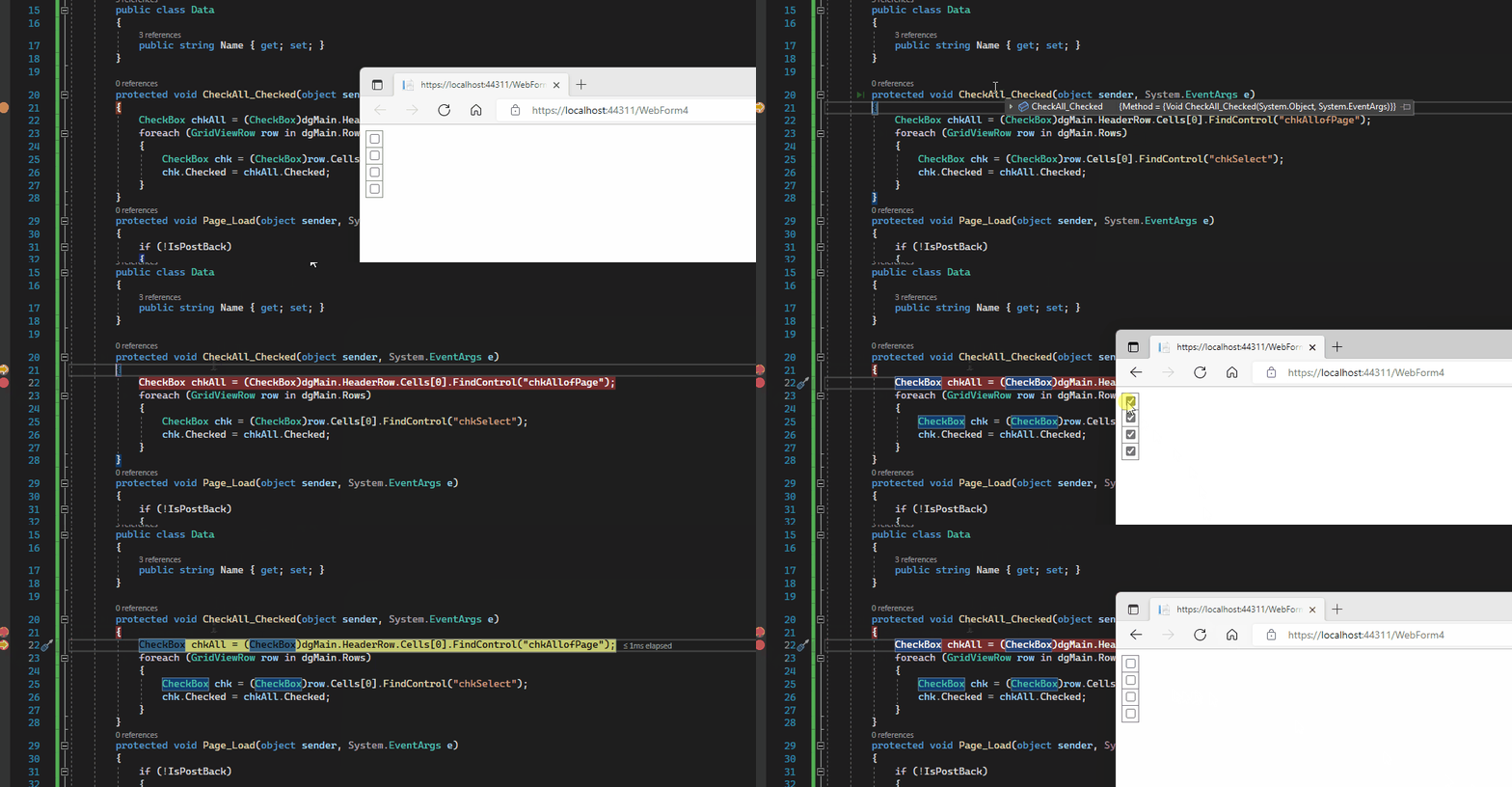
Best regards,
Lan Huang
If the answer is the right solution, please click "Accept Answer" and kindly upvote it. If you have extra questions about this answer, please click "Comment".
Note: Please follow the steps in our documentation to enable e-mail notifications if you want to receive the related email notification for this thread.
Hello Mr. Huang,
Thank you so much for your reply!
It doesn't work when the code is included in *.ascx, that is loaded into page.
I also notice that it can work for the normal page *.aspx with a gridview.
Hi @TracyLiang ,
I put the code in .ascx and it works fine, can you provide your code?
Best regards,
Lan Huang

I modified LanHuang-MSFT's code slightly and added the GridView to an acsx and the OnCheckedChanged handler fires on every change. Keep in mind, you can do the same.
As recommended, share your code if you want community debugging/code review support.