SQL Server Integration Services
A Microsoft platform for building enterprise-level data integration and data transformations solutions.
This browser is no longer supported.
Upgrade to Microsoft Edge to take advantage of the latest features, security updates, and technical support.
' cx='32' cy='32' r='32' /%3E%3Ctext x='50%25' y='55%25' dominant-baseline='middle' text-anchor='middle' fill='%23FFF' %3EVV%3C/text%3E%3C/svg%3E)
Hello:
I have a question related to data conversions in VS SSIS.
I have a string variable of length 500 but I needed the left 300.
I created a new derived column:
dosage_v = LEFT([dose], 300)
But the data type is set set Unicode String [DT_WSTR]
I wanted to convert the data type to STR using the cast function:
dosage_V = (DT_STR, 300, 1251)@[LEFT( [dose_vbm] , 300)]
But VS does not like the @.
What am I doing wrong?
Thanks.

Did you try removing the '@'?
Yes, with or without @, VS complains!

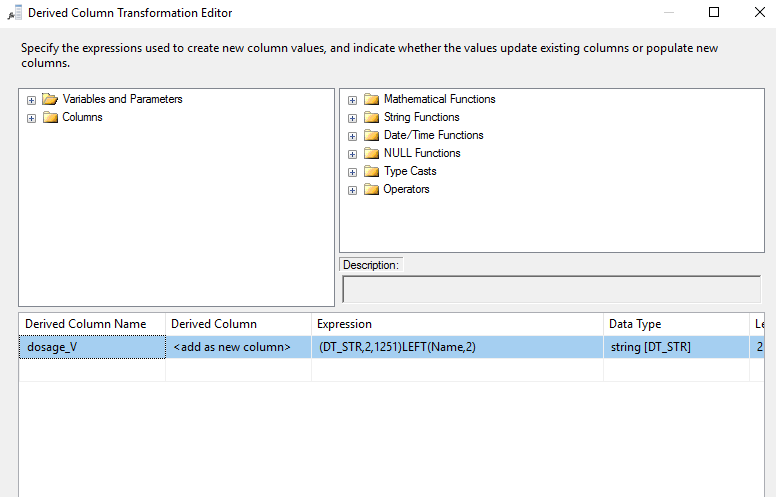
The expression in the derived column should be like below:
(DT_STR,300,1251)LEFT(dose_vbm,300)
Regards,
Zoe
If the answer is the right solution, please click "Accept Answer" and kindly upvote it. If you have extra questions about this answer, please click "Comment".
Note: Please follow the steps in our documentation to enable e-mail notifications if you want to receive the related email notification for this thread.
Do you have further question on this , could we offer more support?
If this helps on your issue, you could mark it as answer so other user with similar problem could see this easier. :)