Developer technologies | Visual Basic for Applications
An implementation of Visual Basic that is built into Microsoft products.
This browser is no longer supported.
Upgrade to Microsoft Edge to take advantage of the latest features, security updates, and technical support.
' cx='32' cy='32' r='32' /%3E%3Ctext x='50%25' y='55%25' dominant-baseline='middle' text-anchor='middle' fill='%23FFF' %3EBS%3C/text%3E%3C/svg%3E)
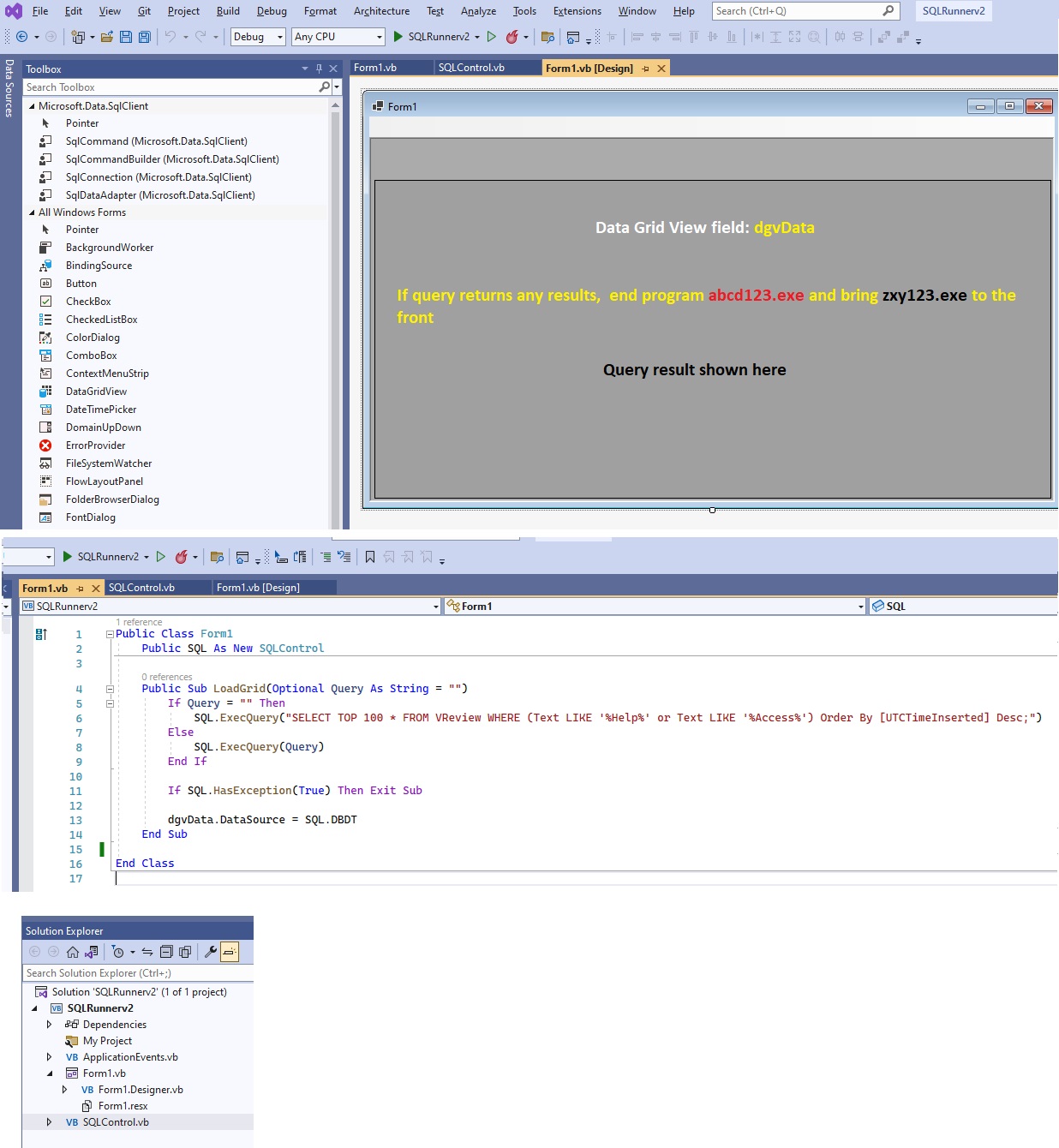
I have a live emergency map that runs all the time. However, the same computer also shows promotional presentations on the reception TV. In case of an alert (logs fetched by the SQL query, which is working fine), I want this VB program to run the query every 5 seconds, [U]if any result returns[/U], should close the abcd123.exe and bring the zxy.exe (emergency map window) to the front.
Public Class Form1
    Public SQL As New SQLControl

    Public Sub LoadGrid(Optional Query As String = "")
        If Query = "" Then
            SQL.ExecQuery("SELECT TOP 100 * FROM VReview WHERE (Text LIKE '%Help%' or Text LIKE '%Access%') Order By [UTCTimeInserted] Desc;")
        Else
            SQL.ExecQuery(Query)
        End If

        If SQL.HasException(True) Then Exit Sub

        dgvData.DataSource = SQL.DBDT
    End Sub

End Class
' cx='32' cy='32' r='32' /%3E%3Ctext x='50%25' y='55%25' dominant-baseline='middle' text-anchor='middle' fill='%23FFF' %3EJL%3C/text%3E%3C/svg%3E)
Hi @BNE Sys ,
You can refer to the following two pieces of code to close the process and bring the window to the front.
Public Class Inventory
    Public SQL As New SQLControl()
    Public Sub LoadGrid(Optional Query As String = "")
        If Query = "" Then
            SQL.ExecQuery("SELECT TOP 100 * FROM VReview WHERE (Text LIKE '%Help%' or Text LIKE '%Access%') Order By [UTCTimeInserted] Desc;")
        Else
            SQL.ExecQuery(Query)
        End If
        ' ERROR HANDLING
        If SQL.HasException(True) Then
            Timer1.Stop()
            KillHungProcess("abcd123.exe")
            StartOrShowProcess("zxy")
        End If

        dgvData.DataSource = SQL.DBDT
    End Sub

    Private Sub Inventory_Load(sender As Object, e As EventArgs) Handles MyBase.Load
        MdiParent = Form1
        LoadGrid()
    End Sub

    Private Sub Button1_Click(sender As Object, e As EventArgs) Handles Button1.Click
        Timer1.Interval = 500
        Timer1.Start()
    End Sub


    Private Sub Timer1_Tick(sender As Object, e As EventArgs) Handles Timer1.Tick
        LoadGrid()
    End Sub

    Public Sub KillHungProcess(processName As String)
        Dim psi As ProcessStartInfo = New ProcessStartInfo
        psi.Arguments = "/im " & processName & " /f"
        psi.FileName = "taskkill"
        psi.WindowStyle = ProcessWindowStyle.Hidden
        Dim p As Process = New Process()
        p.StartInfo = psi
        p.Start()
    End Sub
#Region "DLL Imports"
    <System.Runtime.InteropServices.DllImport("User32.dll")>
    Private Shared Function SetForegroundWindow(handle As IntPtr) As Boolean
    End Function

    <System.Runtime.InteropServices.DllImport("User32.dll")>
    Private Shared Function ShowWindow(handle As IntPtr, nCmdShow As Integer) As Boolean
    End Function
    <System.Runtime.InteropServices.DllImport("User32.dll")>
    Private Shared Function IsIconic(handle As IntPtr) As Boolean
    End Function
#End Region
    Private Sub StartOrShowProcess(ByVal strProcessName As String)
        Try
            Dim handle As IntPtr
            Dim proc As Process() = Process.GetProcessesByName(strProcessName)
            If proc.Count > 0 Then
                For Each procP As Process In proc
                    handle = procP.MainWindowHandle
                    If handle <> 0 AndAlso IsIconic(handle) Then 'Do we have a handle and is it minimized?
                        ShowWindow(handle, 9)
                        SetForegroundWindow(handle)
                    End If
                Next
            Else 'Not running or started...
                Process.Start(strProcessName)
            End If

        Catch ex As Exception
            'Handle your error...
        End Try
    End Sub
End Class
Best Regards.
Jiachen Li
----------
If the answer is helpful, please click "Accept Answer" and upvote it.
Note: Please follow the steps in our documentation to enable e-mail notifications if you want to receive the related email notification for this thread.
Thank you, Jiachen,
I am very new to programming. Where exactly I am gonna add this code? Do I also need to create buttons?
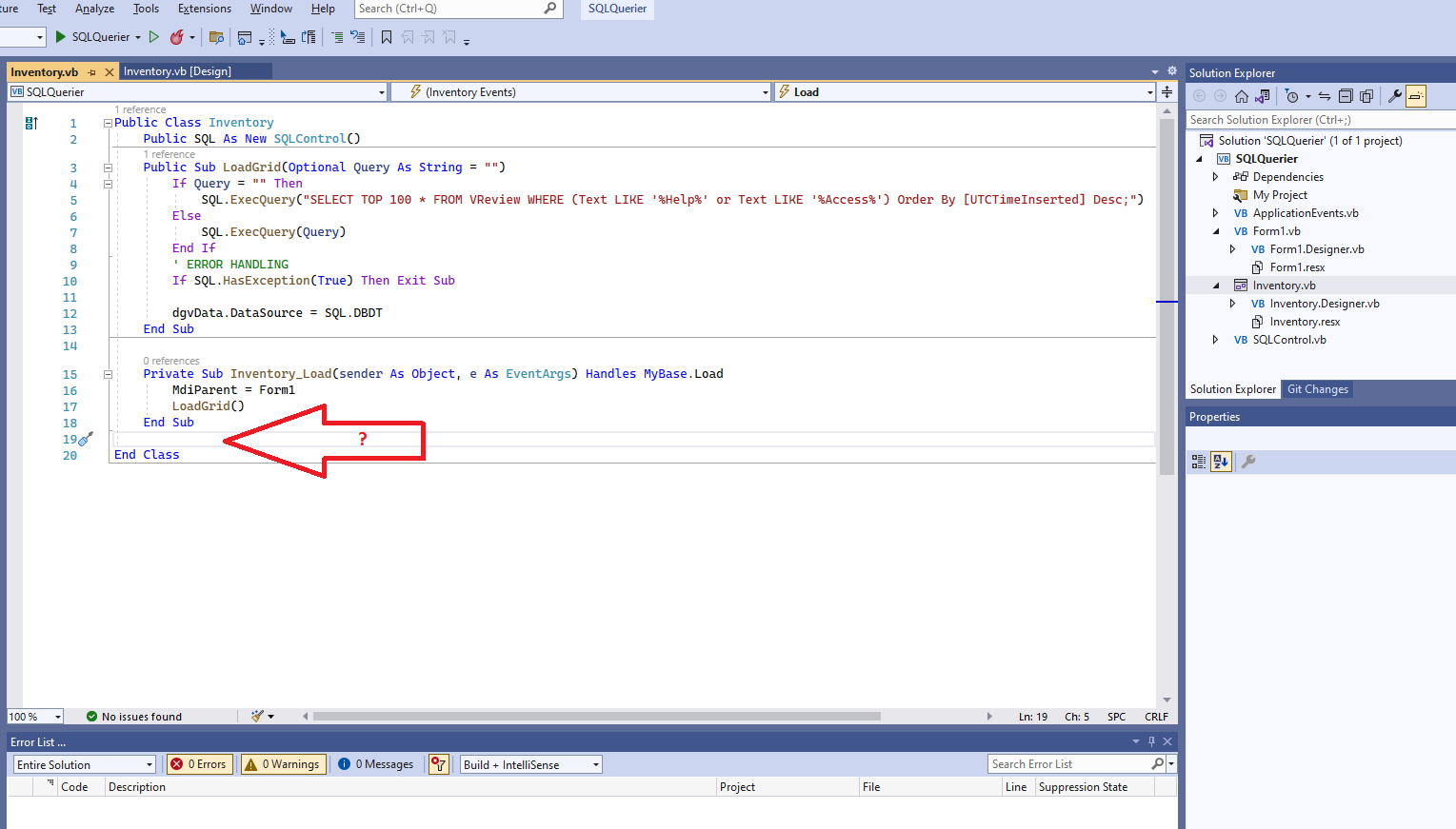
Hi @BNE Sys ,
I've edited my answer, you can check it out.
I tried to share the files via Git. Do you mind checking because I received too many errors?
teomcam/sqlquerier
Kind regards
Hi @BNE Sys ,
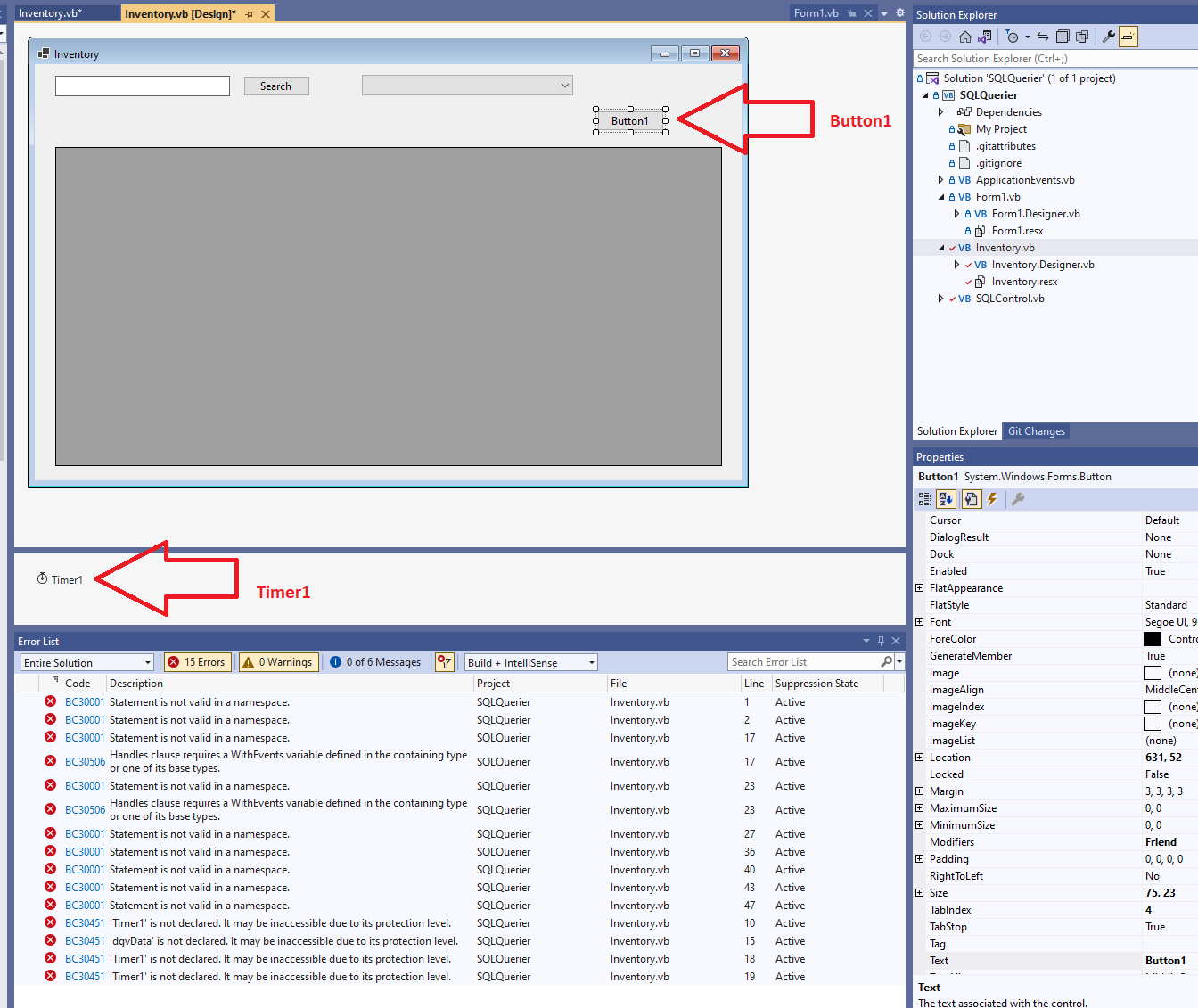
Add a Timer1 and a Button1 to your form on the design page.
Timer1 runs LoadGrid() every five seconds.
Button1 is used to start Timer1.
When I use Notepad as the action object, it gets closed/topped correctly.
The parameter of KillHungProcess needs to contain the extension, the parameter of StartOrShowProcess does not.
Sorry I need a hand little bit more. Thank you so much but could you please confirm if I am pasting your code to the correct place?
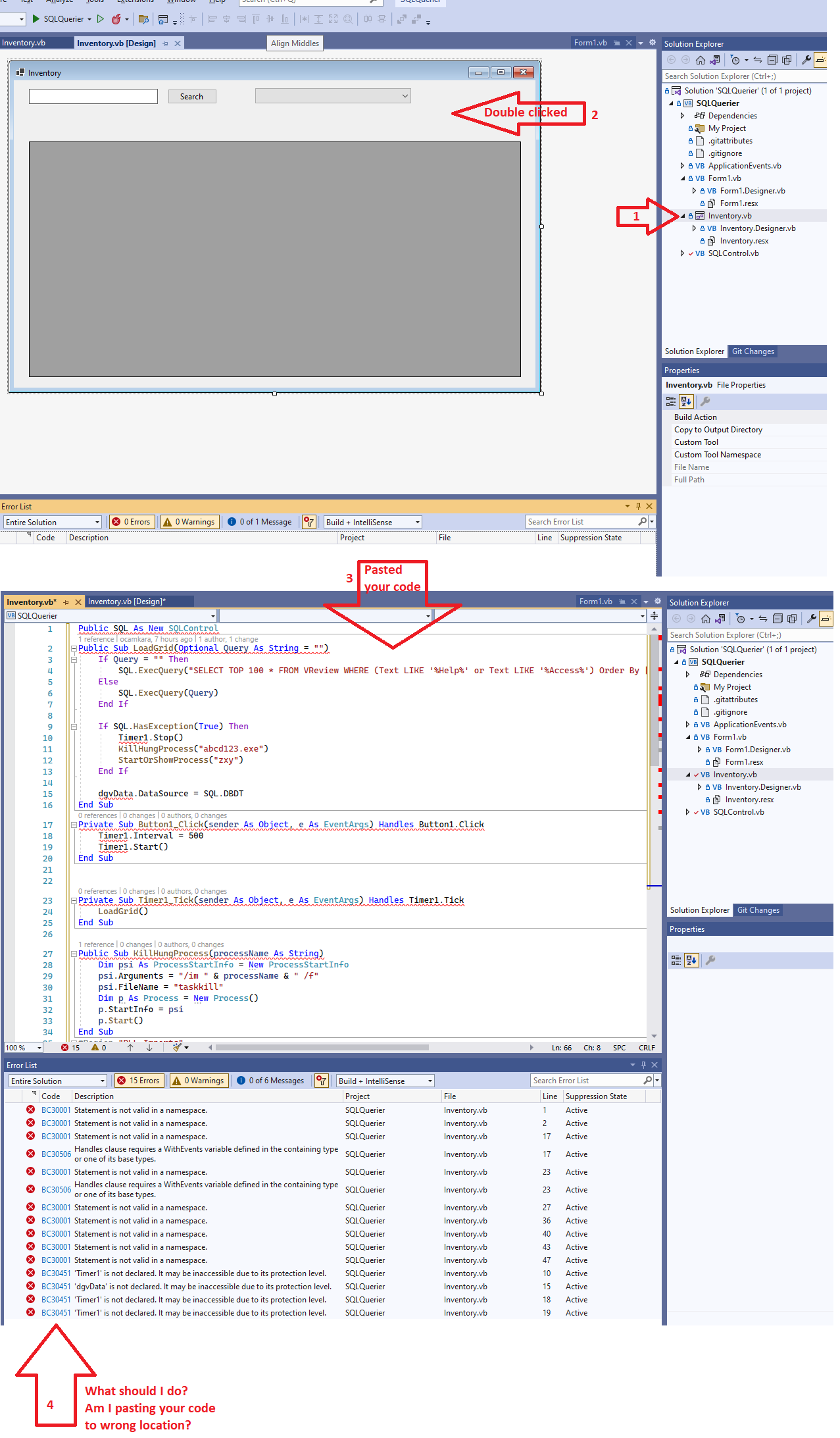
Hi @BNE Sys ,
I've updated my answer and now provide the full code you can use in your third step.
You are, sir, a legend; thank you so much for helping me with such a great effort. I appreciate your time. I can see the data successfully fetching live now. But could not make the process kill yet. As an example, I want to end Notepad.exe and Excel.exe to come in front. I have changed the app name part as seen below. Anywhere else to check?
    Public Sub LoadGrid(Optional Query As String = "")
        If Query = "" Then
            SQL.ExecQuery("SELECT TOP 100 * FROM VReview WHERE (Text LIKE '%Help%' or Text LIKE '%Access%') Order By [UTCTimeInserted] Desc;")
        Else
            SQL.ExecQuery(Query)
        End If
        ' ERROR HANDLING
        If SQL.HasException(True) Then
            Timer1.Stop()
            KillHungProcess("Notepad.exe")
            StartOrShowProcess("Excel.exe")
        End If

        dgvData.DataSource = SQL.DBDT
    End Sub
Hi @BNE Sys ,
         KillHungProcess("Notepad.exe")
         StartOrShowProcess("Excel")
You can add the following code after line 38 to keep the command line to close the window hidden when it is launched.
psi.WindowStyle = ProcessWindowStyle.Hidden
Sorry I receive this screen in return.
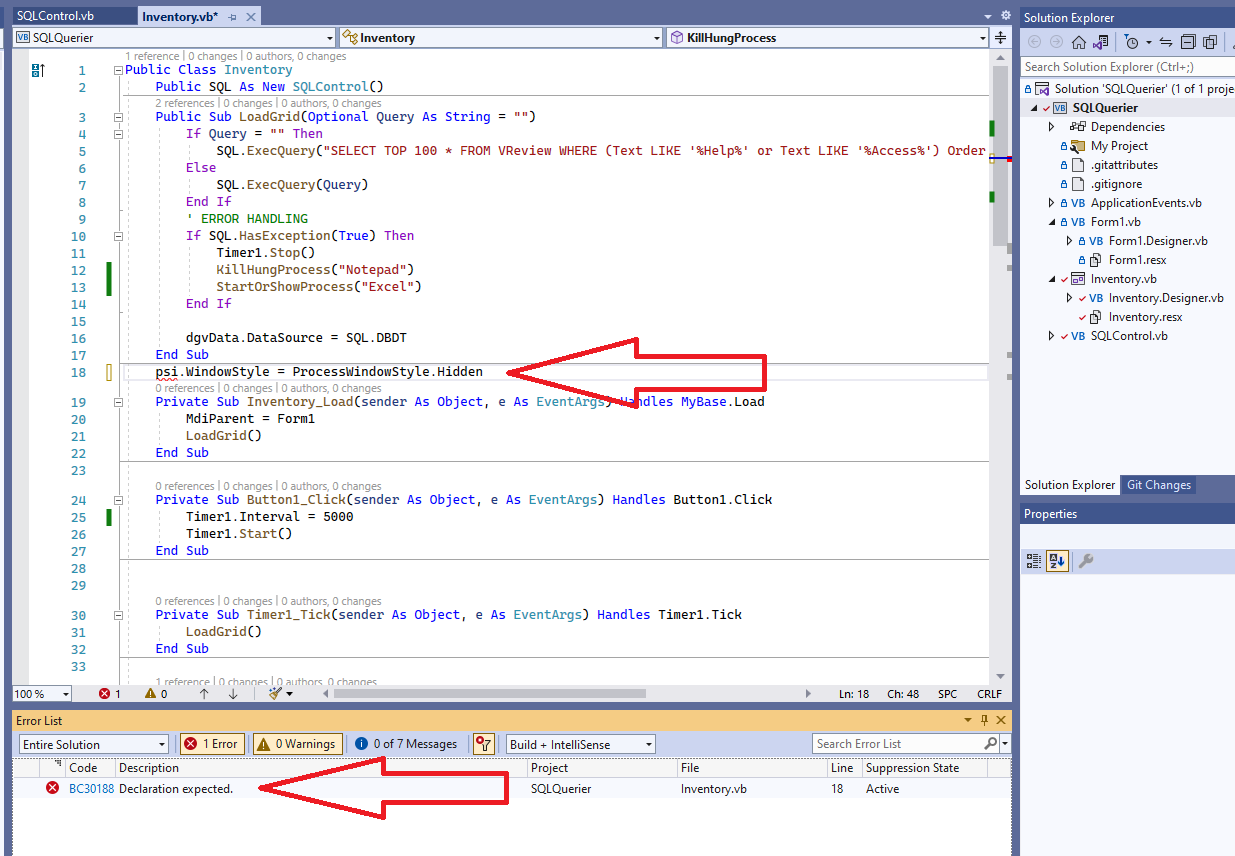
Hi @BNE Sys ,
Sorry for my mistake.
It should be Line 38, After 'psi.FileName = "taskkill"'.
Hi, Not sure, but still not closing the notepad and bringing the excel in front, despite the data correctly fetched and keyword present.
Public Class Inventory
    Public SQL As New SQLControl()
    Public Sub LoadGrid(Optional Query As String = "")
        If Query = "" Then
            SQL.ExecQuery("SELECT TOP 100 * FROM VReview WHERE Text LIKE '%Access%' Order By [UTCTimeInserted] Desc;")
        Else
            SQL.ExecQuery(Query)
        End If
        ' ERROR HANDLING
        If SQL.HasException(True) Then
            Timer1.Stop()
            KillHungProcess("Notepad.exe")
            StartOrShowProcess("Excel.exe")
        End If

        dgvData.DataSource = SQL.DBDT
    End Sub

    Private Sub Inventory_Load(sender As Object, e As EventArgs) Handles MyBase.Load
        MdiParent = Form1
        LoadGrid()
    End Sub

    Private Sub Button1_Click(sender As Object, e As EventArgs) Handles Button1.Click
        Timer1.Interval = 500
        Timer1.Start()
    End Sub


    Private Sub Timer1_Tick(sender As Object, e As EventArgs) Handles Timer1.Tick
        LoadGrid()
    End Sub

    Public Sub KillHungProcess(processName As String)
        Dim psi As ProcessStartInfo = New ProcessStartInfo
        psi.Arguments = "/im " & processName & " /f"
        psi.FileName = "taskkill"
        psi.WindowStyle = ProcessWindowStyle.Hidden
        Dim p As Process = New Process()
        p.StartInfo = psi
        p.Start()
    End Sub
#Region "DLL Imports"
    <System.Runtime.InteropServices.DllImport("User32.dll")>
    Private Shared Function SetForegroundWindow(handle As IntPtr) As Boolean
    End Function

    <System.Runtime.InteropServices.DllImport("User32.dll")>
    Private Shared Function ShowWindow(handle As IntPtr, nCmdShow As Integer) As Boolean
    End Function
    <System.Runtime.InteropServices.DllImport("User32.dll")>
    Private Shared Function IsIconic(handle As IntPtr) As Boolean
    End Function
#End Region
    Private Sub StartOrShowProcess(ByVal strProcessName As String)
        Try
            Dim handle As IntPtr
            Dim proc As Process() = Process.GetProcessesByName(strProcessName)
            If proc.Count > 0 Then
                For Each procP As Process In proc
                    handle = procP.MainWindowHandle
                    If handle <> 0 AndAlso IsIconic(handle) Then 'Do we have a handle and is it minimized?
                        ShowWindow(handle, 9)
                        SetForegroundWindow(handle)
                    End If
                Next
            Else 'Not running or started...
                Process.Start(strProcessName)
            End If

        Catch ex As Exception
            'Handle your error...
        End Try
    End Sub
End Class
Hi @BNE Sys ,
Try adding a button and test it by adding the following two lines of code to the button click event.
         KillHungProcess("Notepad.exe")
         StartOrShowProcess("Excel")
The code works well in my test.
Yes, with the button on click, It worked as expected.
But for some reason, not by the keyword from the logs. I see the program successfully filtering and bringing the keyword (Access) from the logs and listing.
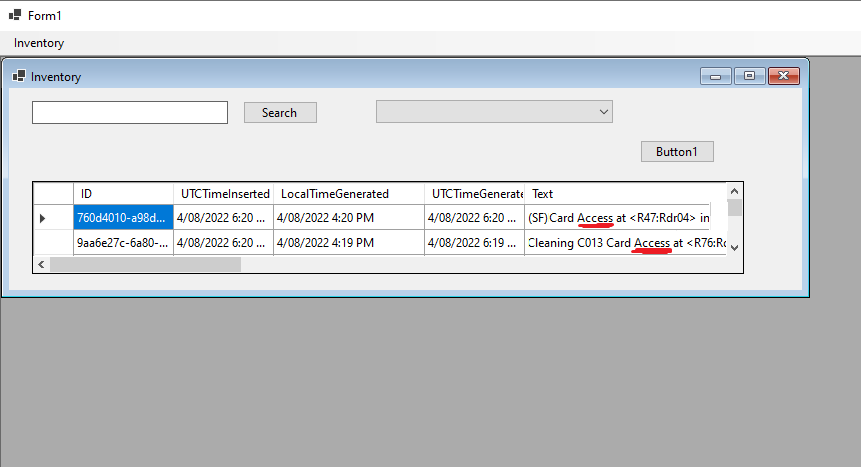
Hi @BNE Sys ,
Then you need to check every exception to see if they are null.
Console.WriteLine(SQL.Exception)
How do I do that? Where should paste the line? Thank you