' cx='32' cy='32' r='32' /%3E%3Ctext x='50%25' y='55%25' dominant-baseline='middle' text-anchor='middle' fill='%23FFF' %3EWS%3C/text%3E%3C/svg%3E)

' cx='32' cy='32' r='32' /%3E%3Ctext x='50%25' y='55%25' dominant-baseline='middle' text-anchor='middle' fill='%23FFF' %3ERD%3C/text%3E%3C/svg%3E)
' cx='32' cy='32' r='32' /%3E%3Ctext x='50%25' y='55%25' dominant-baseline='middle' text-anchor='middle' fill='%23FFF' %3EA%3C/text%3E%3C/svg%3E)
Hi,
According to your error message, the RDS CAL was not successfully issued to the remote user or client machine.
Since all cal licenses are activated, you should check if you have correctly configured the license server and the license type in your RDS environment.
If you only have one RD session host, you can use group policy to configure the licensing on this RDS server.
Computer Configuration\Administrative Templates\Windows Components\Remote Desktop Services\Licensing
Use the specified Remote Desktop license servers - input the license server IP or FQDN
Set the Remote Desktop licensing mode - Per user or Per device
If you have RD connection brokers in your RDS environment, you can configure the RD licensing on the broker server.
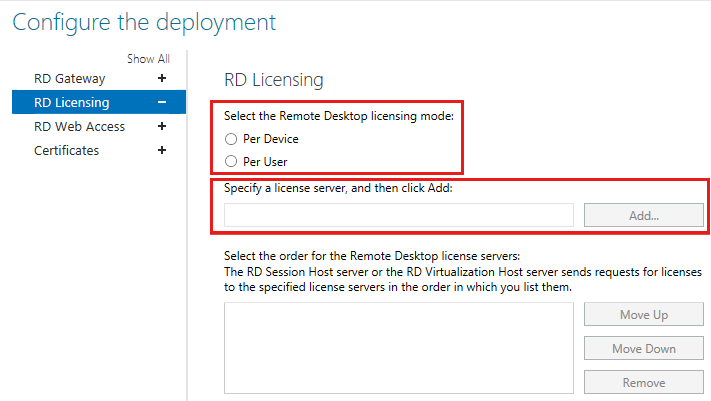
If the issue persists after license server and license type was configured, please follow the troubleshooting steps in below article:
https://learn.microsoft.com/en-us/troubleshoot/windows-server/remote/cannot-connect-rds-no-license-server
Hope above information could help you.
----------
If the Answer is helpful, please click "Accept Answer" and upvote it. Thanks.