Microsoft Teams | Microsoft Teams for business | Other
Additional features, settings, or issues not covered by specific Microsoft Teams categories

This browser is no longer supported.
Upgrade to Microsoft Edge to take advantage of the latest features, security updates, and technical support.
' cx='32' cy='32' r='32' /%3E%3Ctext x='50%25' y='55%25' dominant-baseline='middle' text-anchor='middle' fill='%23FFF' %3EA%3C/text%3E%3C/svg%3E)
i have created a teams named ProjectX. under that teams there is by default General Channel. i have created one more Channel under ProjectX name XYZ. i can add external users in teams projectX but cannot add external user in Channels.
ProjectX is a private and XYZ channel is shared.
can anyone assist me so i can add external user in shared channel.
note: i am not using azure. i have on-prem exchange and AD
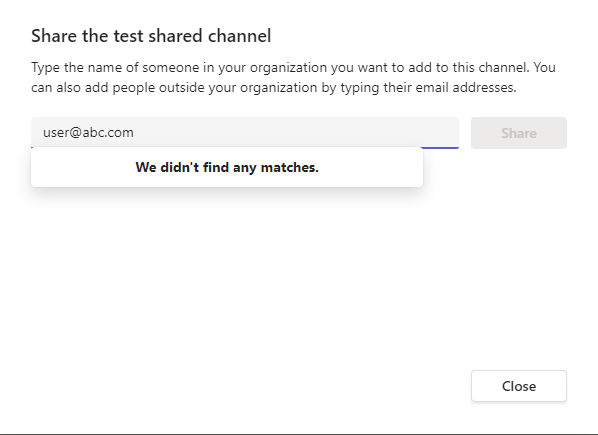
Allow guest access in teams is enabled by default but it did not search external users in channels.

here is the example
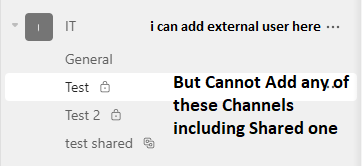
its show this error for example i am adding guest in test shared
' cx='32' cy='32' r='32' /%3E%3Ctext x='50%25' y='55%25' dominant-baseline='middle' text-anchor='middle' fill='%23FFF' %3EJM%3C/text%3E%3C/svg%3E)
Hi @akbarali-4925
i am not using azure. i have on-prem exchange and AD
Do you mean this external user is hosted on on-prem, right?
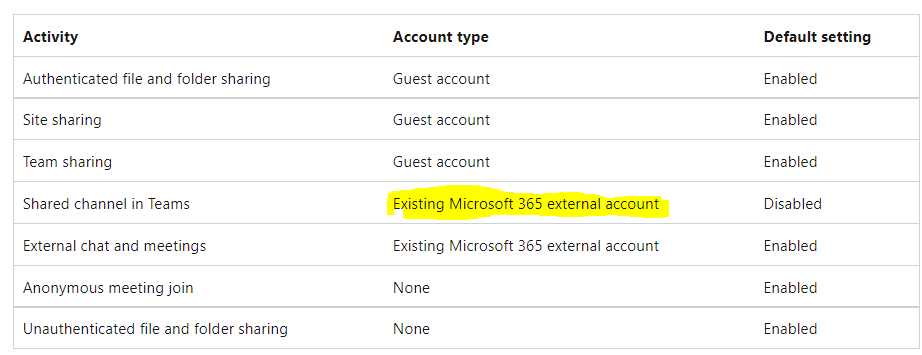
If the answer is yes, you could not find them directly in Teams client because shared channel access is mainly used for the Existing Microsoft 365 external account. You could see it from this picture:
@akbarali-4925
It has been a while, how is everything going?
If you have any update about this issue, please feel free to post back.

Access to shared channels is governed by the B2B Direct connect settings in the Cross-tenant access policy, as detailed here: https://learn.microsoft.com/en-us/azure/active-directory/external-identities/cross-tenant-access-settings-b2b-direct-connect
You need to have a policy created to allow sharing to the external tenant, as the default configuration is to block access.