3,726 questions
This browser is no longer supported.
Upgrade to Microsoft Edge to take advantage of the latest features, security updates, and technical support.
' cx='32' cy='32' r='32' /%3E%3Ctext x='50%25' y='55%25' dominant-baseline='middle' text-anchor='middle' fill='%23FFF' %3EQZ%3C/text%3E%3C/svg%3E)
Hi, I try to download file from my Sharepoint site in my iPad Sharepoint App, however, when I choose the download, I cannot see the content in for the downloaded file, is there anyway to download file to local machine from Sharepoint IOS App?

Hi @qinghao zhang ,
Thank you for your question. We will give you an update as soon as possible. Thank you for your understanding and support.
' cx='32' cy='32' r='32' /%3E%3Ctext x='50%25' y='55%25' dominant-baseline='middle' text-anchor='middle' fill='%23FFF' %3EST%3C/text%3E%3C/svg%3E)
Why can’t we download from SharePoint to iOS devices?
' cx='32' cy='32' r='32' /%3E%3Ctext x='50%25' y='55%25' dominant-baseline='middle' text-anchor='middle' fill='%23FFF' %3EOL%3C/text%3E%3C/svg%3E)
@Jinwei Li-MSFT Were you able to resolve this at all?
' cx='32' cy='32' r='32' /%3E%3Ctext x='50%25' y='55%25' dominant-baseline='middle' text-anchor='middle' fill='%23FFF' %3EJH%3C/text%3E%3C/svg%3E)
@Jinwei Li-MSFT don't use SharePoint I personally download all my files from OneDrive instead.
Hi @qinghao zhang ,
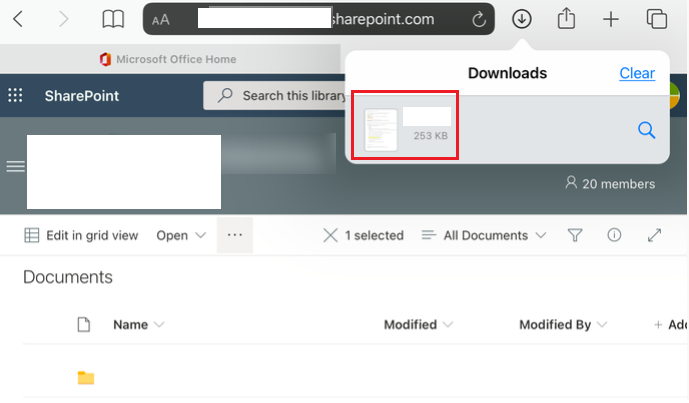
We tested at our end by downloading file in SharePoint from Safari on iPad, and we can download file without issue.
However, if we test in SharePoint application, we can’t save file in iPad.
Given this situation, we found that we can’t download files from SharePoint application and it seems like a default design.
If the answer is helpful, please click "Accept Answer" and kindly upvote it. If you have extra questions about this answer, please click "Comment".
Note: Please follow the steps in our documentation to enable e-mail notifications if you want to receive the related email notification for this thread.
Hi @qinghao zhang ,
I am checking to see if the problem has been resolved.
' cx='32' cy='32' r='32' /%3E%3Ctext x='50%25' y='55%25' dominant-baseline='middle' text-anchor='middle' fill='%23FFF' %3EXX%3C/text%3E%3C/svg%3E)
Hi @qinghao zhang ,
Is there any progress on this thread? Please feel free to let me know.
' cx='32' cy='32' r='32' /%3E%3Ctext x='50%25' y='55%25' dominant-baseline='middle' text-anchor='middle' fill='%23FFF' %3EVE%3C/text%3E%3C/svg%3E)
It's 2024 and they didn't fix this issue, yet...