Developer technologies | Visual Basic for Applications
An implementation of Visual Basic that is built into Microsoft products.
This browser is no longer supported.
Upgrade to Microsoft Edge to take advantage of the latest features, security updates, and technical support.
' cx='32' cy='32' r='32' /%3E%3Ctext x='50%25' y='55%25' dominant-baseline='middle' text-anchor='middle' fill='%23FFF' %3ESL%3C/text%3E%3C/svg%3E)
Hi,
I have an Excel file with VBA macro imbedded. It was working fine until I got new hp laptop.
Now I have this error:
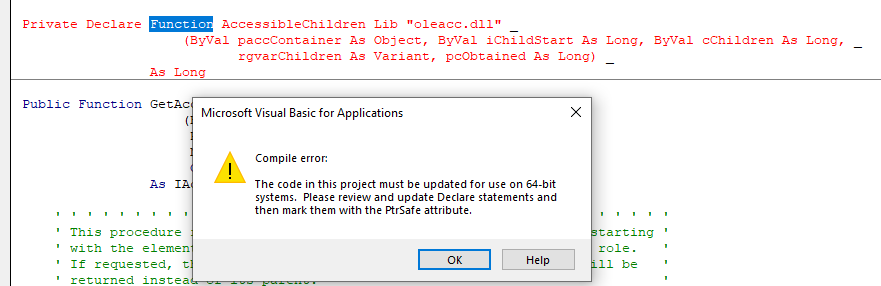
How do I fix this error?

Try adding PtrSafe:
Private Declare PtrSafe Function AccessibleChildren Lib "oleacc.dll" _
   (ByVal paccContainer As Office.IAccessible, ByVal iChildStart As Long, ByVal cChildren As Long, _
    rgvarChildren As Variant, pcObtained As Long) _
    As Long
Then check if it works.