Developer technologies | Windows Forms
A set of .NET Framework managed libraries for developing graphical user interfaces.
This browser is no longer supported.
Upgrade to Microsoft Edge to take advantage of the latest features, security updates, and technical support.
' cx='32' cy='32' r='32' /%3E%3Ctext x='50%25' y='55%25' dominant-baseline='middle' text-anchor='middle' fill='%23FFF' %3EJC%3C/text%3E%3C/svg%3E)
Greetings,
I was request to do a Windows Form project, where I should receive the data from COM Port and split it into variables. I know I have to split the data properly before I serialize it. But I'm quite new to C#/programming, and I don't have a clue how I can start that.
I have tried things like that:
    SerialPort sp = (SerialPort)sender;
    string indata = sp.ReadExisting();
    //sp.ReadLine();
    var noHyphen = indata.Replace("-", "");
    var lst = noHyphen.Split(' ').ToList();
But without success, the data I need to split, looks like this one below, I need to set each of those values into variables, I have create an object already for that, but I don't know how to apply it yet. This is my data from COM Port.
             Date :                   11:33  25/07/2022
             Machine SN :                  1234509385_9
             User ID :                           1-Emplo
             ------------------------------------------
             ------------ Value People Total -----------
             Type:                             Data
             ------------------------------------------
             This        That               Total
                7           25                  125
               53           32                  320
               87           25                  500
               95           20                 1000
              110           35                 3500
             ------------------------------------------
                                                 Total
                              137                 5445
             ------------------------------------------
                                           Total Amount
                                                  5445
             -------------------------------------------
Anyone can help me on this? My final goal is to convert these who;e data to JSON.
Thanks,

@Julio Caproni , Since your data is irregular, It is hard to convert your string to json by using common methods.
I make a code example to get you wanted and hope it helps you.

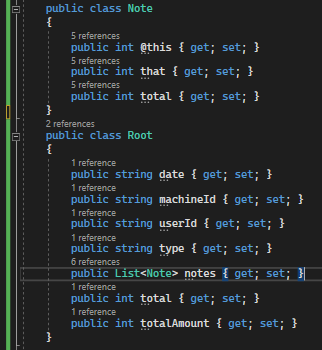
Update:

Result:
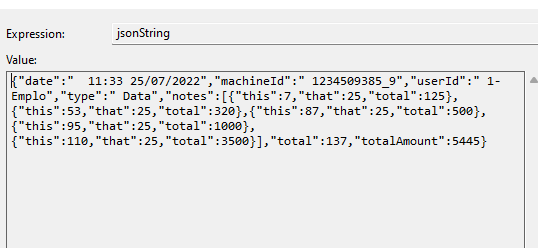
Best Regards,
Jack
If the answer is the right solution, please click "Accept Answer" and upvote it.If you have extra questions about this answer, please click "Comment".
Note: Please follow the steps in our documentation to enable e-mail notifications if you want to receive the related email notification for this thread.
Hi jack,
Thanks for replying, I replicate your logic on my code, and I'm getting the following error:
System.FormatException: 'Input string was not in a correct format.'
My object it is like yours. However, to test it, I changed all the variables to STRING and I executed again, it worked but on the final serialization, it didn't bring any value to the JSON fields. Just got the JSON structure.
Thanks
@Julio Caproni , the error means that you can not convert string type to the target type. Which lines throw the error?
I also attached my code file here.
I just copy the text from your question and copy it into the txt file.
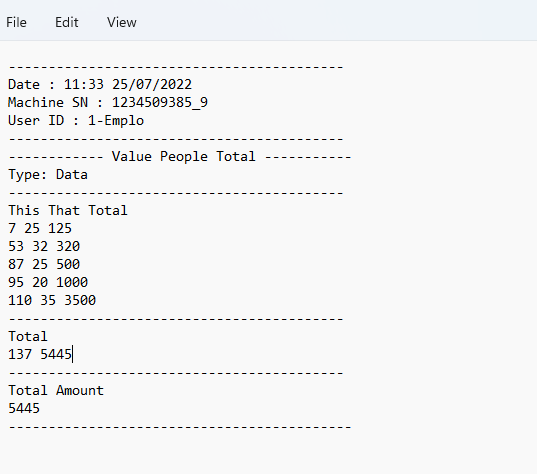
I'm having problem in this line while debuging
root.notes.Add(new Note() { @this = Convert.ToInt32(txt[5].Split(' ')[0]), that = Convert.ToInt32(txt[5].Split(' ')[1]), total = Convert.ToInt32(txt[5].Split(' ')[2]) });
I don't know what could be wrong since, I literally copied and pasted your code, and I'm getting the same error.
Thanks!
@Julio Caproni , If you used the same code with me, I think it may be that our txt file is different. Plase ensure that your txt file is the same with me.(refer to the picture in the last comment). If you still have the problem, you could provide your txt file or txt file picture.(I can not upload the txt file due to the forum problem).

Hi @Julio Caproni ,
Based on the content related to the problem description you provided and the following conditions:
I used a clumsy way to meet your requirement, please refer the below code:
using System.Text.Json;

namespace MSTestProject
{
    [TestClass]
    public class UnitTest2
    {
        [TestMethod]
        public void Test()
        {
            var result = Parse(indata);

            //Test output the total
            foreach (var item in result)
            {
                Console.WriteLine(item.Total);
            }

            //Test serialize the result to json
            string jsonString = JsonSerializer.Serialize(result);
            Console.WriteLine(jsonString);
        }

        private List<DataModel> Parse(string indata)
        {
            if (string.IsNullOrEmpty(indata))
            {
                throw new ArgumentNullException(nameof(indata));
            }
            var lines = indata.Split("\r\n").ToList();
            if (lines == null || lines.Count < 1)
            {
                throw new ArgumentNullException(nameof(indata));
            }

            var titleLineIndex = GetTitleLineIndex(lines);
            var closestDashLineIndex = GetClosestDashedLineNumber(lines, titleLineIndex);

            var result = new List<DataModel>();

            for (int i = titleLineIndex + 1; i < closestDashLineIndex; i++)
            {
                if (!string.IsNullOrEmpty(lines[i]))
                {
                    var dataItems = lines[i].Split(" ");
                    var dataModel = new DataModel();

                    dataModel.This = dataItems.Length > 0 ? ToInt32(dataItems[0]) : 0;
                    dataModel.That = dataItems.Length > 1 ? ToInt32(dataItems[1]) : 0;
                    dataModel.Total = dataItems.Length > 2 ? ToInt32(dataItems[2]) : 0;

                    result.Add(dataModel);
                }
            }
            return result;
        }

        private int GetTitleLineIndex(List<string> lines)
        {
            string titleLine = "This That Total";
            return lines.ToList().IndexOf(titleLine);
        }


        private int GetClosestDashedLineNumber(List<string> lines, int titleLineIndex)
        {
            string dashLine = "------------------------------------------";
            var closestDashLineIndex = lines.FindIndex(titleLineIndex, x => x == dashLine);
            return closestDashLineIndex;
        }

        private int ToInt32(string value)
        {
            try
            {
                return int.Parse(value);
            }
            catch (Exception ex)
            {
                return 0;
            }
        }

        const string indata = @"
------------------------------------------
Date : 11:33 25/07/2022
Machine SN : 1234509385_9
User ID : 1-Emplo
------------------------------------------
------------ Value People Total -----------
Type: Data
------------------------------------------
This That Total
7 25 125
53 32 320
87 25 500
95 20 1000
110 35 3500
------------------------------------------
Total
137 5445
------------------------------------------
Total Amount
5445
-------------------------------------------";
    }

    public class DataModel
    {
        public int This { get; set; }
        public int That { get; set; }
        public int Total { get; set; }
    }
}
If you have any questions, please comment.
If right, please Accept.
Enjoy programming!!!
Thanks mate for your help, I'll try to apply your logic on my program and see how it goes. However, this my final objective:
{
  "date": "11:3325072022",
  "machineId": "L17H01_00002",
  "userId": "User-1",
  "type": "HUE",
  "notes": [
{
   "this": 5,
   "that": 25,
   "total": 125
},
{
   "this": 10,
   "that": 32,
   "total": 320
},
{
   "this": 20,
   "that": 25,
   "total": 500
},
{
   "this": 50,
   "that": 20,
   "total": 1000
},
{
   "this": 100,
   "that": 35,
   "total": 3500
}

],
    "total": 137,
"totalAmount": 5445
}
Hi @Julio Caproni ,
I update my code as below:
using Newtonsoft.Json;
using System.Globalization;

namespace MSTestProject
{
    [TestClass]
    public class UnitTest2
    {
        //https://learn.microsoft.com/en-us/answers/questions/954604/spliting-data-from-com-port.html
        [TestMethod]
        public void Test()
        {
            var result = Parse(indata);
            Assert.IsNotNull(result);
            //Test serialize the result to json
            string jsonString = JsonConvert.SerializeObject(result);
            Console.WriteLine(jsonString);
        }


        private DataModel Parse(string indata)
        {

            if (string.IsNullOrEmpty(indata))
            {
                throw new ArgumentNullException(nameof(indata));
            }
            var lines = indata.Split("\r\n").ToList();
            if (lines == null || lines.Count < 1)
            {
                throw new ArgumentNullException(nameof(indata));
            }


            var result = new DataModel();

            result.Date = ParseDate(lines);
            result.MachineId = ParseMachineId(lines);
            result.UserId = ParseUserId(lines);
            result.Type = ParseType(lines);
            result.Notes = ParseNotes(lines);
            result.Total = ParseTotal(lines);
            result.TotalAmount = ParseTotalAmount(lines);

            return result;
        }


        private IList<Note> ParseNotes(List<string> lines)
        {
            var titleLineIndex = GetTitleLineIndex(lines);
            var closestDashLineIndex = GetClosestDashedLineNumber(lines, titleLineIndex);

            var result = new List<Note>();

            for (int i = titleLineIndex + 1; i < closestDashLineIndex; i++)
            {
                if (!string.IsNullOrEmpty(lines[i]))
                {
                    var dataItems = lines[i].Split(" ");
                    var dataModel = new Note();

                    dataModel.This = dataItems.Length > 0 ? ToInt32(dataItems[0]) : 0;
                    dataModel.That = dataItems.Length > 1 ? ToInt32(dataItems[1]) : 0;
                    dataModel.Total = dataItems.Length > 2 ? ToInt32(dataItems[2]) : 0;

                    result.Add(dataModel);
                }
            }
            return result;
        }
        private string ParseDate(List<string> lines)
        {
            var dateValue = GetLineValue(lines, "Date :");
            try
            {
                var date = DateTime.ParseExact(dateValue, "HH:mm dd/MM/yyyy", CultureInfo.InvariantCulture, DateTimeStyles.None);
                return date.ToString("HH:mmddMMyyyy");
            }
            catch
            {
                return string.Empty;
            }

        }
        private string ParseMachineId(List<string> lines)
        {
            var identifier = "Machine SN :";
            return GetLineValue(lines, identifier);
        }
        private string ParseUserId(List<string> lines)
        {
            var identifier = "User ID :";
            return GetLineValue(lines, identifier);
        }
        private string ParseType(List<string> lines)
        {
            var identifier = "Type:";
            return GetLineValue(lines, identifier);
        }
        private int ParseTotal(List<string> lines)
        {
            var total = lines[lines.Count - 5];
            if (!string.IsNullOrEmpty(total))
            {
                var values = total.Split(" ");
                return values.Length > 0 ? ToInt32(values[0]) : 0;
            }
            return 0;
        }
        private int ParseTotalAmount(List<string> lines)
        {
            var totalAmount = lines[lines.Count - 2];
            return ToInt32(totalAmount);
        }
        private string GetLineValue(List<string> lines, string identifier)
        {
            var line = lines.FirstOrDefault(x => x.StartsWith(identifier));
            if (string.IsNullOrEmpty(line))
            {
                return string.Empty;
            }
            else
            {
                return line.Replace(identifier, string.Empty).Trim();
            }
        }
        private int GetTitleLineIndex(List<string> lines)
        {
            string titleLine = "This That Total";
            return lines.ToList().IndexOf(titleLine);
        }
        private int GetClosestDashedLineNumber(List<string> lines, int titleLineIndex)
        {
            string dashLine = "------------------------------------------";
            var closestDashLineIndex = lines.FindIndex(titleLineIndex, x => x == dashLine);
            return closestDashLineIndex;
        }
        private int ToInt32(string value)
        {
            try
            {
                return int.Parse(value);
            }
            catch (Exception ex)
            {
                return 0;
            }
        }
        public class DataModel
        {
            [JsonProperty(PropertyName = "date")]
            public string Date { get; set; }
            [JsonProperty(PropertyName = "machineId")]
            public string MachineId { get; set; }

            [JsonProperty(PropertyName = "userId")]
            public string UserId { get; set; }
            [JsonProperty(PropertyName = "type")]
            public string Type { get; set; }
            [JsonProperty(PropertyName = "notes")]
            public IList<Note> Notes { get; set; }
            [JsonProperty(PropertyName = "total")]
            public int Total { get; set; }
            [JsonProperty(PropertyName = "totalAmount")]
            public int TotalAmount { get; set; }
        }
        public class Note
        {
            [JsonProperty(PropertyName = "this")]
            public int This { get; set; }
            [JsonProperty(PropertyName = "that")]
            public int That { get; set; }
            [JsonProperty(PropertyName = "total")]
            public int Total { get; set; }
        }

        const string indata = @"
------------------------------------------
Date : 11:33 25/07/2022
Machine SN : 1234509385_9
User ID : 1-Emplo
------------------------------------------
------------ Value People Total -----------
Type: Data
------------------------------------------
This That Total
7 25 125
53 32 320
87 25 500
95 20 1000
110 35 3500
------------------------------------------
Total
137 5445
------------------------------------------
Total Amount
5445
-------------------------------------------";
    }

}
Run the test, get result as below:
{
    "date": "11:3325072022",
    "machineId": "1234509385_9",
    "userId": "1-Emplo",
    "type": "Data",
    "notes": [
        {
            "this": 7,
            "that": 25,
            "total": 125
        },
        {
            "this": 53,
            "that": 32,
            "total": 320
        },
        {
            "this": 87,
            "that": 25,
            "total": 500
        },
        {
            "this": 95,
            "that": 20,
            "total": 1000
        },
        {
            "this": 110,
            "that": 35,
            "total": 3500
        }
    ],
    "total": 137,
    "totalAmount": 5445
}
If right, please Accept.
Enjoy programming!!!
I find what is happening. My text I pasted here, is different from the original one, for some reason, when I pasted here, it removed some of blank spaces, the original file, is like that:
This ........That...........Total
7.................25..............125
53..............32..............320
87..............25..............500
95..............20..............1000
110............35..............3500
Thoses dot ".", represents the blank space on my file. Once I paste here and click on post, it will replace multiple spaces just for one space.(Exactly what I need to do on my code)
It has more blank spaces between the values. When I text my own file with just one blank space, I could serialize without problems. I don't know how to handle that now, I tried replace multiple balnk characters by only one blank space but it didn't work.
@Julio Caproni ,thanks for the feedback, I understand your meaning and I reproduced your problem now. We need to remove empty string when we use string.split method.
Please try the following code:code.txt
@Julio Caproni , I also updated it in my answer and you could check if it works for you.
You are a legend, everything worked as I was expecting, thanks again for the assistance.
There was just one more thing I couldnt find a way to fix that, once I saved my JSON file, some of the properties has some extras space blank characters, like this one:
"receiptDate": " 11:29 25/07/2022",
Is there a way to remove that?
Thanks!
@Julio Caproni , thanks for your supporting, you could try the following code to remove the extra space:
root.Date=txt[0].Replace("Date","").Trim();