Microsoft Security | Intune | Configuration Manager | Updates
Managing and deploying updates via Configuration Manager

This browser is no longer supported.
Upgrade to Microsoft Edge to take advantage of the latest features, security updates, and technical support.
' cx='32' cy='32' r='32' /%3E%3Ctext x='50%25' y='55%25' dominant-baseline='middle' text-anchor='middle' fill='%23FFF' %3EMS%3C/text%3E%3C/svg%3E)
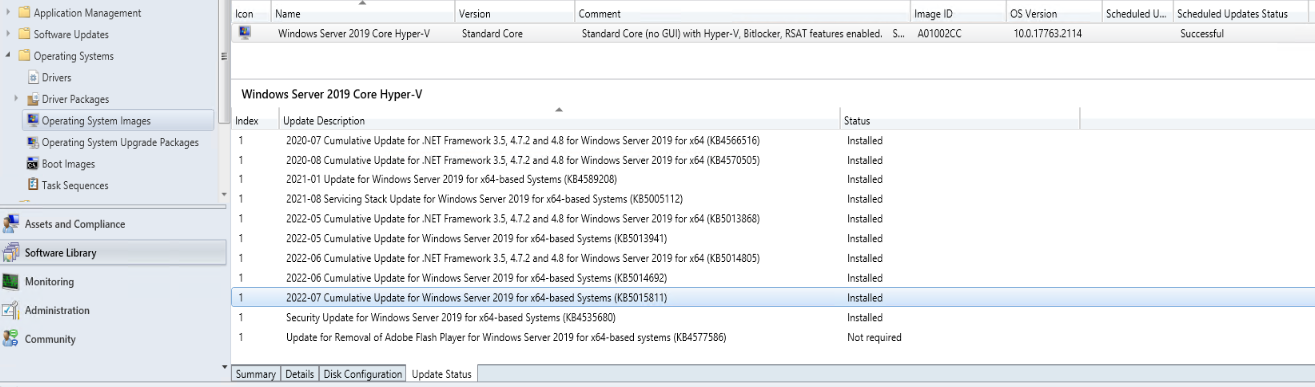
Yesterday I applied updates including July 2022 CU to a Server 2019 OS in CM we use for PXE builds.
The update says successful in the console and that it was successfully distributed to the DP we use for PXE.
However, I noticed the OS Version in CM did not update to the current build (should be 17763.3165 from the July CU).
I also ran a PXE build and when complete it showed being the 17763.2114 version the console shows.
Did I not do something correctly? This is my first time using the Schedule Updates feature.

Hi,
Per my experience, it may be due to the prerequisite:
We must install the August 10, 2021 SSU KB5005112 before installing the LCU KB5015811 (OS Build 17763.3165). We can add the prerequisite to have a try. Refer to:
July 12, 2022—KB5015811 (OS Build 17763.3165)
KB5005112: Servicing stack update for Windows 10, version 1809: August 10, 2021
August 10, 2021—KB5005030 (OS Build 17763.2114)
Hope it helps. Have a nice day!
Best regards,
Simon
If the response is helpful, please click "Accept Answer" and upvote it.
Note: Please follow the steps in our documentation to enable e-mail notifications if you want to receive the related email notification for this thread.
@Simon Ren-MSFT Thanks for the quick rely.
I tried this same process in June with applying updates and am revisiting it this month. In June I applied the available updates and KB5005112 was found and installed. It is the 4th one down in the screenshot.
Hi,
Thanks for your information. It's really strange now. If possible, we could capture a reference image from a workgroup computer that has already installed the LCU and shown OS Build 17763.3165 to have a try.
How to Capture an Image from a Reference Computer Manually
Thanks for your time. Have a nice day!
Best regards,
Simon