No. Do not remove built-in rights in the public role. There are many applications which depend on that functionality and they are all read-only functions.
There is no reason to revoke those permissions.
This browser is no longer supported.
Upgrade to Microsoft Edge to take advantage of the latest features, security updates, and technical support.
' cx='32' cy='32' r='32' /%3E%3Ctext x='50%25' y='55%25' dominant-baseline='middle' text-anchor='middle' fill='%23FFF' %3ER%3C/text%3E%3C/svg%3E)
Hi there,
This relates to SQL 2019 ENTERRPRISE edition.
My company had an security scan on SQL server and wanted to apply many restrictions on the PUBLIC role since public users had access to info schema, sys objects and other sql system related stuff.
I know I didnt want to play around with SQL server internals however to be compliant we need to lock down user access as much as possible so users dont query MASTER dbs, tempdbs, systemdbs, info schema, sys objects and other sql system related stuff.
Now after applying the below recommended scripts on a SQL master db, a team of 5-10 users wanted to be db owners for a particular db (1 of 10 dbs).
I created a test user,
assigned default db,
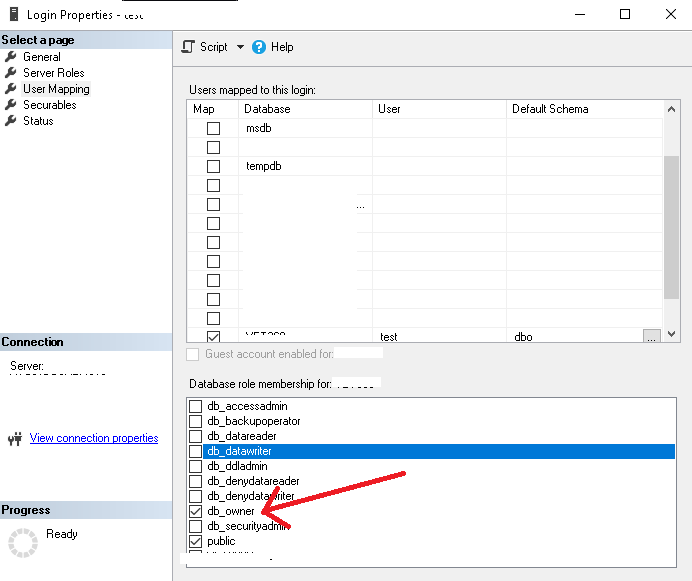
user mapping as db_owner (which helps them to do whatever they want with their db) screenshot attached
however while the user logs in via SSMS they have errors due to the below script restrictions on master.
Is there a way to create a server role or db role to bypass public or isolate them and give them full access to their db when the below scripts are applied in master? I tried all possible options but i think im missing something WHEN THE BELOW SCRIPT IS APPLIED.
You could give it a shot with the below.
Applied below scripts with sysadmin privileges
USE MASTER
go;
REVOKE EXECUTE ON [SYS].[xp_instance_regread] TO [PUBLIC]
REVOKE SELECT ON [SYS].[database_files] TO [PUBLIC]
REVOKE EXECUTE ON [SYS].[sp_getapplock] TO [PUBLIC]
REVOKE EXECUTE ON [SYS].[sp_MSdbuseraccess] TO [PUBLIC]
REVOKE EXECUTE ON [SYS].[sp_MSdbuserpriv] TO [PUBLIC]
REVOKE SELECT ON [SYS].[databases] TO [PUBLIC]
REVOKE EXECUTE ON [SYS].[sp_oledb_ro_usrname] TO [PUBLIC]
REVOKE EXECUTE ON [SYS].[sp_MSmerge_getgencur_public] TO [PUBLIC]
REVOKE EXECUTE ON [SYS].[sp_MSSQLDMO90_version] TO [PUBLIC]
REVOKE EXECUTE ON [SYS].[sp_tablecollations_100] TO [PUBLIC]
REVOKE EXECUTE ON [SYS].[sp_releaseapplock] TO [PUBLIC]
REVOKE EXECUTE ON [SYS].[xp_msver] TO [PUBLIC]
REVOKE SELECT ON [INFORMATION_SCHEMA].[TABLES] TO [PUBLIC]
REVOKE SELECT ON [SYS].[database_mirroring] TO [PUBLIC]
REVOKE SELECT ON [SYS].[database_query_store_options] TO [PUBLIC]
REVOKE SELECT ON [SYS].[sysdatabases] TO [PUBLIC]
REVOKE SELECT ON [SYS].[dm_os_host_info] TO [PUBLIC]
REVOKE SELECT ON [SYS].[configurations] TO [PUBLIC]
' cx='32' cy='32' r='32' /%3E%3Ctext x='50%25' y='55%25' dominant-baseline='middle' text-anchor='middle' fill='%23FFF' %3ETP%3C/text%3E%3C/svg%3E)
No. Do not remove built-in rights in the public role. There are many applications which depend on that functionality and they are all read-only functions.
There is no reason to revoke those permissions.
I agree Tom and as mentioned i too didnt want to play around with public permission. However if i dont act on revoking as much as possible per db scan recommendations on all functions related to public role and if some data breach happens or users could explore system items then i will be in cross hairs that such thing was already informed or notified in the audit scans and recommendations.
like public users have access to sys objects or information schema and so many other functions.
The entire scan and lock down is related ONLY to public roles.
Is there a way to revoke the above public permissions and create other roles which could allow the 5-10 users of 1 specific db owners to have full control on their own db.

There are two ways to fix that problem.
One is to add these people as users in master. Then you create a role in master and add this user to this role. Then you grant this role the rights you revoke from public above.
The other way is simply to restore the permissions you revoked.
I am in full agreement with Tom that the latter is the way to go. The REVOKE statements above essentially thrashed your server unusuable.
Thank you i'm with you and Tom on not to touch public roles. I have added my comments above under his reply.
I will try your recommendations as well but one thing is i dont want these users to have access to MASTER. These users are to have only access their own db nothing else. but i will try your recommendation.
Instead of creating a role under master, can i create a role under their own db and grant access all the rights to the new role that was revoked for public? (these users will be by default part of public but also have additional grants , will grants override the revokes?) let me try.
Thanks
' cx='32' cy='32' r='32' /%3E%3Ctext x='50%25' y='55%25' dominant-baseline='middle' text-anchor='middle' fill='%23FFF' %3ESX%3C/text%3E%3C/svg%3E)
Hi @RJ ,
I do not recommend that you remove these permissions, they can cause all sorts of problems with your server later on.
Alternatively, you can restore previously revoked permissions to resolve the issue.
For information on restoring permissions, see:
https://learn.microsoft.com/en-us/sql/t-sql/statements/grant-transact-sql?view=sql-server-ver16
Best regards,
Seeya
If the answer is the right solution, please click "Accept Answer" and kindly upvote it. If you have extra questions about this answer, please click "Comment".
Note: Please follow the steps in our documentation to enable e-mail notifications if you want to receive the related email notification for this thread.
I will try your recommendations as well but one thing is i dont want these users to have access to MASTER.
I've got some bad news for you: You can keep them out. The guest user is enabled for master, and cannot be disabled.
That said, creating explicit users in master is a different matter, and, no, I don't like to do that. It's an administrative burden, and it certainly gives me an uneasy feeling.
Instead of creating a role under master, can i create a role under their own db and grant access all the rights to the new role that was revoked for public? (these users will be by default part of public but also have additional grants , will grants override the revokes?) let me try.
You could create a local procedure that calls the real system procedure, and then you could sign the local procedure with a certificate, and from the certificate create a login that you grant permission.
While I am great fan of this technique to package permissions for specific action in stored procedure, what I said in the previous paragraph is only lunacy. A lot of work for little benefit.
However if i dont act on revoking as much as possible per db scan recommendations on all functions related to public role and if some data breach happens or users could explore system items then i will be in cross hairs that such thing was already informed or notified in the audit scans and recommendations.
That is what they call a professional problem. Well, you can document that you revoked the permissions and things stopped working. When investigating alternatives, you found that everything else was worse. You can also refer to the advice in this thread. Although, admittedly, it will be stronger if you open a support case and get the same advice from a support engineer.