Developer technologies | Transact-SQL
A Microsoft extension to the ANSI SQL language that includes procedural programming, local variables, and various support functions.
This browser is no longer supported.
Upgrade to Microsoft Edge to take advantage of the latest features, security updates, and technical support.
' cx='32' cy='32' r='32' /%3E%3Ctext x='50%25' y='55%25' dominant-baseline='middle' text-anchor='middle' fill='%23FFF' %3EF%3C/text%3E%3C/svg%3E)
Hy everyone,
i have an issue with a large query, when i execute it i have more line with same ItemBoxId repeating, how i can remove duplicated rows ?
my query return something like:
Id SecondIdentifier Year ItemBoxId BoxId
008 1029 2020 1C192F5D NULL
009 1129 2020 1C192F5D NULL
the problem is the ItemBoxId its the same and i would to have only first row.
Thanks for the help.
A Microsoft extension to the ANSI SQL language that includes procedural programming, local variables, and various support functions.
' cx='32' cy='32' r='32' /%3E%3Ctext x='50%25' y='55%25' dominant-baseline='middle' text-anchor='middle' fill='%23FFF' %3EEM%3C/text%3E%3C/svg%3E)
Do you have any updates?
Please remember to accept the answers if they helped. Your action would be helpful to other users who encounter the same issue and read this thread.
Echo
Do you have any updates?
Please remember to accept the answers if they helped. Your action would be helpful to other users who encounter the same issue and read this thread.
Echo
' cx='32' cy='32' r='32' /%3E%3Ctext x='50%25' y='55%25' dominant-baseline='middle' text-anchor='middle' fill='%23FFF' %3ERW%3C/text%3E%3C/svg%3E)
e.g.
DELETE a from tablename AS a WHERE EXISTS(SELECT 1 FROM tablename WHERE [ItemBoxId]=a.[ItemBoxId] AND [Id]<a.[Id] )
Hi @MassimoPallara,
In addition to row_number(), rank() can also be used.
Please refer to:
    declare @test table  (
         Id  varchar(3),SecondIdentifier  int,Year int, ItemBoxId varchar(30),BoxId int)
    insert into @test values('008',1029 ,2020 ,'1C192F5D', NULL),
         ('009', 1129, 2020 ,'1C192F5D', NULL)

    select * from @test

    ;with cte as (
     select *, rank() over(partition by  ItemBoxId order by SecondIdentifier ) rn
     from @test)

    delete  from cte
    where rn>1

    select * from @test
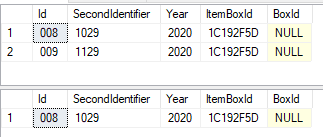
If you have any question, please feel free to let me know.
If the response is helpful, please click "Accept Answer" and upvote it.
Best Regards
Echo
If the answer is helpful, please click "Accept Answer" and upvote it.
Note: Please follow the steps in our documentation to enable e-mail notifications if you want to receive the related email notification for this thread.
' cx='32' cy='32' r='32' /%3E%3Ctext x='50%25' y='55%25' dominant-baseline='middle' text-anchor='middle' fill='%23FFF' %3EJL%3C/text%3E%3C/svg%3E)
create table test (
Id  varchar(3),SecondIdentifier  int,Year int, ItemBoxId varchar(30),BoxId int)
insert into test values('008',1029 ,2020 ,'1C192F5D', NULL),
('009', 1129, 2020 ,'1C192F5D', NULL)

Select * from test

;with mycte as (
select *, row_number() over(partition by  ItemBoxId order by SecondIdentifier ) rn
from test)

delete from mycte where rn>1

Select * from test

drop table test
' cx='32' cy='32' r='32' /%3E%3Ctext x='50%25' y='55%25' dominant-baseline='middle' text-anchor='middle' fill='%23FFF' %3EG%3C/text%3E%3C/svg%3E)
You can use ROW_NUMBER() OVER(PARTITION BY ItemBoxId ORDER BY Id, SecondIdentifier) to remove the duplicates of ItemBoxId:
;WITH CTE AS (
SELECT Id, SecondIdentifier, Year, ItemBoxId, BoxId, ROW_NUMBER() OVER(PARTITION BY ItemBoxId ORDER BY Id, SecondIdentifier) AS RN
FROM YourOutputSet
)
-- List rows without the duplicates
--SELECT Id, SecondIdentifier, Year, ItemBoxId, BoxId
--FROM CTE
--WHERE RN = 1;
-- Remove the duplicates:
DELETE FROM CTE WHERE RN > 1;