Azure SQL Database
An Azure relational database service.
This browser is no longer supported.
Upgrade to Microsoft Edge to take advantage of the latest features, security updates, and technical support.
' cx='32' cy='32' r='32' /%3E%3Ctext x='50%25' y='55%25' dominant-baseline='middle' text-anchor='middle' fill='%23FFF' %3ENA%3C/text%3E%3C/svg%3E)
Hi,
I am trying to insert records from excel to sql table, it is working as expected but having issue with data type for columns with date is getting inserted as number in sql table.
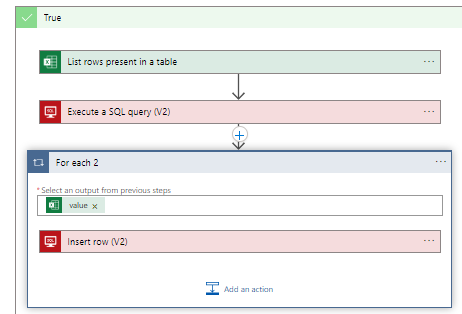
Example of a column with date

But when it is inserted into sql table it is getting inserted as number instead of the above format in excel. Excel has date format.
If I check expand the logic app flow for the insert sql the field appears as below which is not same as excel record (2022-08-01)

' cx='32' cy='32' r='32' /%3E%3Ctext x='50%25' y='55%25' dominant-baseline='middle' text-anchor='middle' fill='%23FFF' %3EBL%3C/text%3E%3C/svg%3E)
Did you try an expression like: https://learn.microsoft.com/en-us/azure/logic-apps/workflow-definition-language-functions-reference#formatdatetime
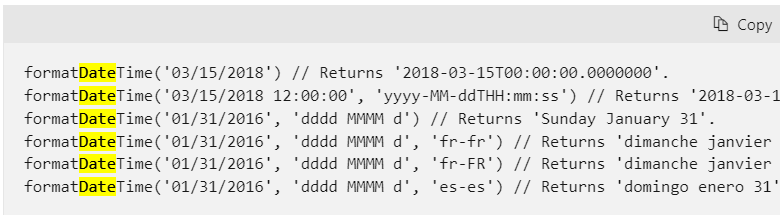
but I see you have yyyy-MM-dd, you may need to split by "-" and reorder to dd-MM-yyyy before using formatdatetime
a split would look like this:
formatDateTime(concat(split(outputs('Compose'),'-')[2],'-',split(outputs('Compose'),'-')1,'-',split(outputs('Compose'),'-')[0]))
on your case replace with the excel field
formatDateTime(concat(split(body('Get_a_row')?['Date_Delivered'])[2],'-',split(body('Get_a_row')?['Date_Delivered'])1,'-',split(body('Get_a_row')?['Date_Delivered'])[0]))
maybe a reorder without format may do it
concat(split(body('Get_a_row')?['Date_Delivered'])[2],'-',split(body('Get_a_row')?['Date_Delivered'])1,'-',split(body('Get_a_row')?['Date_Delivered'])[0])
Please don't forget to click on "Accept Answer" or the vote button whenever the information provided helps you. Original posters help the community find answers faster by identifying the correct answer.
@Bruno Lucas Hi , Sorry I haven't understood you response clearly.
Should I try something like in logic app ?
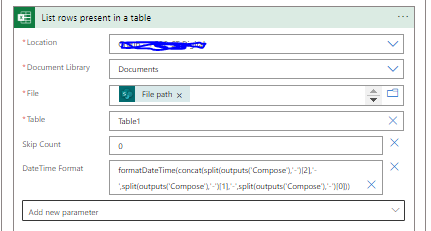
There are 4 columns with the following date format in Excel sheet which has issues.
Column1
Format : 2022-08-01
Column2
Format :Aug-22
Column3
Format: 26-Jul-22
Column4
Format :May-20
Hi @Niren Adhikary (NAD)
in the SQL control, where you insert a sql row, click on the datefield (like this one):
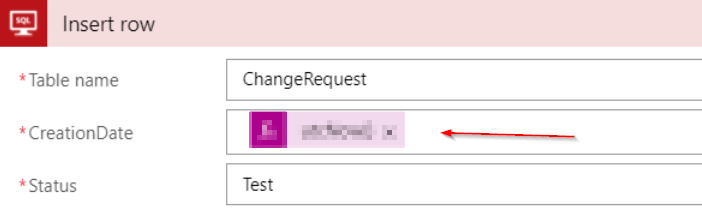
move to the expression tab:
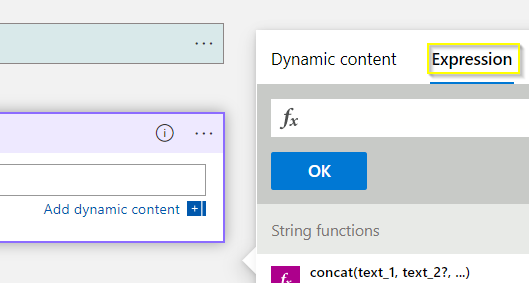
that will allow you to use expressions like data cast:
formatDateTime()
If you haven;t used that before you may want to check a video: https://www.youtube.com/watch?v=MM-IdK97KjY
you may endup with something like:
formatDateTime(concat(split(body('Get_a_row')?['Date_Delivered'])2,'-',split(body('Get_a_row')?['Date_Delivered'])1,'-',split(body('Get_a_row')?['Date_Delivered'])[0]))
or
concat(split(body('Get_a_row')?['Date_Delivered'])2,'-',split(body('Get_a_row')?['Date_Delivered'])1,'-',split(body('Get_a_row')?['Date_Delivered'])[0])
I should try something like this and remove the one in blue circle ?

Yes, but don't type the formula direct. check that video on how to use expressions. you will need to build the formula using the expressions tab
Hi @Niren Adhikary (NAD) ,
Just checking to see if you managed to use the expression
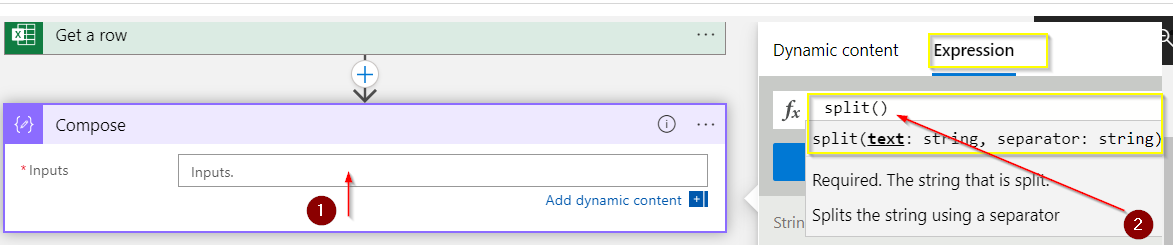
I'm using a compose here but you can do on your "insert sql"
to get started, click on the field (1) to open the context menu. Select the Expression tab and type "Split()" (2). the auto complete should pop and offer the auto-complete
with the cursor between the parentheses in split() (1) and move back to dynamic content (2) you should see the excel fields. drag date_delivered inside the parentheses
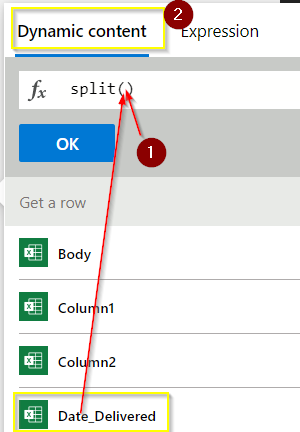
You should see this
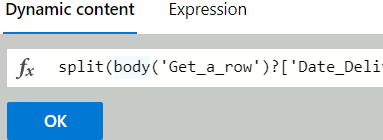
and than you can carry one to build the whole expression
if the expression code is correct you should see this "function" icon :
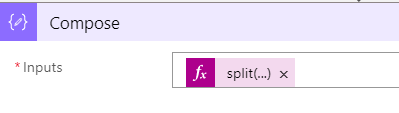
you can try to paste this in the expression tab but will only work if you didn't rename the actions:
formatDateTime(concat(split(body('Get_a_row')?['Date_Delivered'])2,'-',split(body('Get_a_row')?['Date_Delivered'])1,'-',split(body('Get_a_row')?['Date_Delivered'])[0]))
Unfortunately, the above solution didn't work.
I applied the function on the List of rows instead of Get rows as below :
formatDateTime(concat(split(body('List_rows_present_in_a_table')?['Date_Delivered'])2,'-',split(body('List_rows_present_in_a_table')?['Date_Delivered'])1,'-',split(body('List_rows_present_in_a_table')?['Date_Delivered'])[0]))
Because I am using List rows.
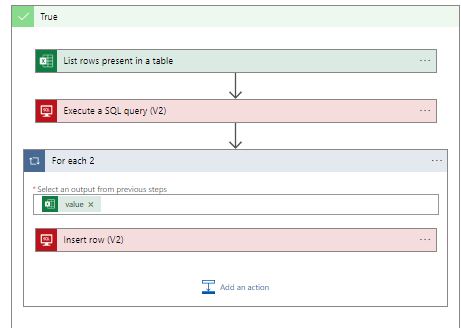
@Bruno Lucas Glad to inform you that I was able to fix the date columns by using below expression
if(empty(item()?['Date_Delivered']),null,addDays('1899-12-30',int(item()?['Date_Delivered'],'.')[0]),'yyyy-MM-dd'))
But then another column returned failure for decimal value. I think we can change the data type from integer to something which should fix it.
Conversion failed when converting the nvarchar value '9.86' to data type int.
Is there a way we can ensure the workflow does not fail when the values or data type changes something that it does not depend on data types just insert as is from the excel ?
Do you want the foreach loop to carry on when a bad field throw an error?
try using scope: https://blog.sandro-pereira.com/2022/06/30/how-to-get-the-error-message-with-logic-app-try-catch-part-i/
I believe that should allow it to carry on looping and you can also catch the errors and log it somewhere
@Bruno Lucas It currently does the same thing.
The logic app takes too long to execute records using the for each loop, is there a way to make the execution faster ?

@Niren Adhikary (NAD) It may take some time depending upon how many times the action is executed and what expression you are using. If in case if there is any complex formatting, then I will suggest you leverage this functionality to the inline code or azure function for faster processing.
