Security Permissions

Tom O'Brien 1 Reputation point
2022-08-10T08:43:22.7+00:00

Hi All,

I am having a strange issue with one of my file servers. One of the folders has full permissions for a specific user, they are able to access the folder via a mapped drive, access all documents in the folder and all sub folders however when they try to save a document in the folder or sub folder they get the error "You do not have permission to save in this location.

There are around 60 other users with access to this folder location and they are not experiencing the same issue. The folder is access via a mapped driver through terminal server. To make things even stranger this user is part of a Security Group which has full permission to the folder and all sub folders, everyone else in this group can access all of the folders, sub folders and are able to save documents in the location, apart from this one particular user.

I have also created a test user, added to the same security group and i am experiencing the same issue with this test user now. The user cannot even create a folder in the top level folder as it says he needs permission, even though he has full permission to the location.

Any help would be appreciated as I've tried the usual remove the user and permissions, re-add the user with full permissions and still no joy.

Windows for business | Windows Server | User experience | Other
Windows for business | Windows Server | Storage high availability | Other
{count} votes

2 answers

Sort by: Most helpful
  1. Limitless Technology 40,081 Reputation points
    2022-08-11T15:51:25.963+00:00

    Hi there,

    You can try giving Full control to Administrators over the problematic folder and see if that helps. If you’re getting the You don’t have permission to save in this location error message while trying to save files to a certain location, you might be able to fix the problem simply by giving Full control to the Administrators group on your PC.

    Disabling User Account Control might also help you with this issue.

    ----------------------------------------------------------------------------------------------------------------------------------------------

    --If the reply is helpful, please Upvote and Accept it as an answer–

    0 comments No comments

  2. Andreas Baumgarten 129.5K Reputation points MVP Volunteer Moderator
    2022-08-11T16:57:03.917+00:00

    Hi @Tom O'Brien ,

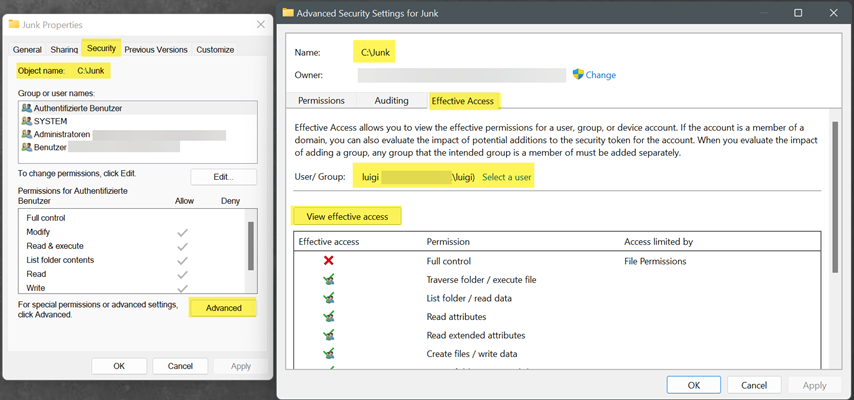
    have you checked the Effective Access permissions on the folder?

    230458-image.png

    ----------

    (If the reply was helpful please don't forget to upvote and/or accept as answer, thank you)

    Regards
    Andreas Baumgarten

    0 comments No comments

Your answer

Answers can be marked as 'Accepted' by the question author and 'Recommended' by moderators, which helps users know the answer solved the author's problem.