Azure Virtual Machines
An Azure service that is used to provision Windows and Linux virtual machines.
This browser is no longer supported.
Upgrade to Microsoft Edge to take advantage of the latest features, security updates, and technical support.
' cx='32' cy='32' r='32' /%3E%3Ctext x='50%25' y='55%25' dominant-baseline='middle' text-anchor='middle' fill='%23FFF' %3EWK%3C/text%3E%3C/svg%3E)
Hi,
I have an Azure VM (Linux, V1, agent version 2.7.3.0) running a Grafana Bitname Image.
The VM is running. I can access the Grafana page through its public IP address. Also, on the VM resource overview page it is showing 'running'.
However, I cannot connect to the VM. Not through Bastion, not through PuTTY and also not through the serial console.
I don't know whether I am using the right credentials, so I wanted to reset these through the 'Reset password' tab on the VM blade. However here it is giving the following notification:
"The virtual machine must be running before using VMAccess."
And I cannot reset anything.
Wanting to check if reapply/redeploy/restart would solve this issue. I get the following error:
restart:
Failed to restart the virtual machine 'vm-grafana-test'. Error: Cannot proceed with operation because resource rg-grafana-test/providers/Microsoft.Network/applicationGateways/ag-grafana-test/backendAddressPools/ag-grafana-test-pool'>ag-grafana-test/ag-grafana-test-pool used by resource /subscriptions/xxxxxxxxxxxxxxxxxxxx/resourceGroups/rg-grafana-test/providers/Microsoft.Network/networkInterfaces/vm-grafana-test24 is not in Succeeded state. Resource is in Failed state and the last operation that updated/is updating the resource is PutApplicationGatewayOperation.
Which means there is something wrong with the backend pool? But I have no clue how to fix this.

Hi @w Kon
I faced a similar problem with NIC, but in your case need to PutApplicationGatewayOperation on manually
To solve I used resource explorer.
Go to https://resources.azure.com/
Chante tab to read/write:

On the left size, go to -> Subscription/ you subscription -> /resourceGroups/rg-grafana-test/providers/Microsoft.Network/networkInterfaces/vm-grafana-test24
Click in edit button:
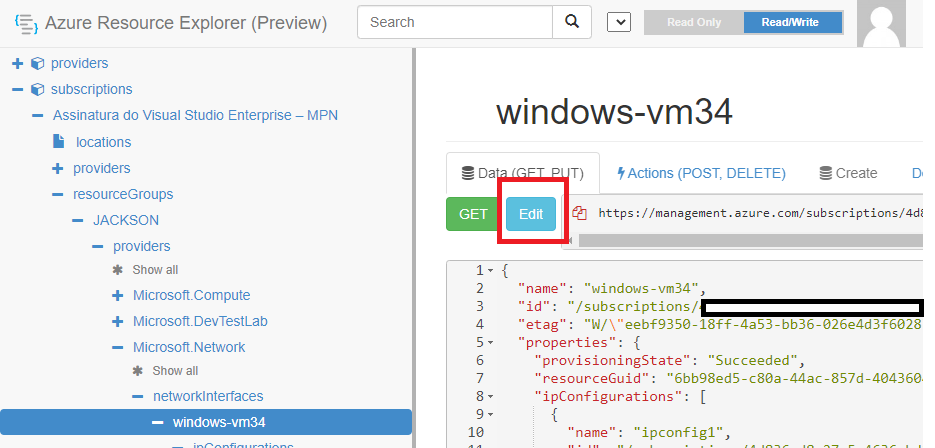
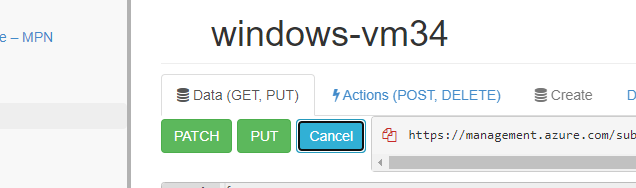
So, click on the PUT button:
Get in touch if you need more help with this issue.
--please don't forget to "[Accept the answer]" if the reply is helpful--
If it doesn't work, do the same with your application gateway
rg-grafana-test/providers/Microsoft.Network/applicationGateways/ag-grafana-test/backendAddressPools/ag-grafana-test-pool'>ag-grafana-test/ag-grafana-test-pool
@w Kon
Just checking if there's any progress or updates?
Please "[Accept the answer]" if the information helped you. This will help us and others in the community as well.
Hi @Jackson Martins ,
Thanks a lot for your reply.
I am a bit unsure what to change? Should I changed all the states from Failed to succeeded? I cannot find the /ag-grafana-test/backendAddressPools/ag-grafana-test-pool or the PutApplicationGatewayOperation.
Best,
Wout
did you run it on the network card (nic)?
Unfortunately, just pressing Edit and then Put shows a yellow triangle and the resource remains in Failed provisioningState
Can you post the screenshot from providers?
Do you mean if I did Edit>Put on Microsoft.Network/networkInterfaces/vm-grafana-test24. I did this and worked. But it still gives the yellow triangle for the applicationGatewat and the VM.
These are options I have:
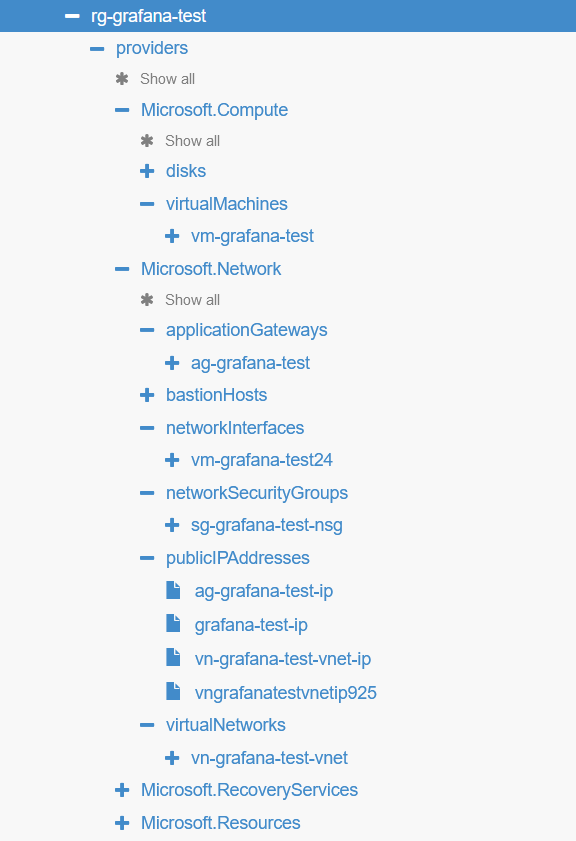
I now see it's giving this error for the provisioning of the NSG:
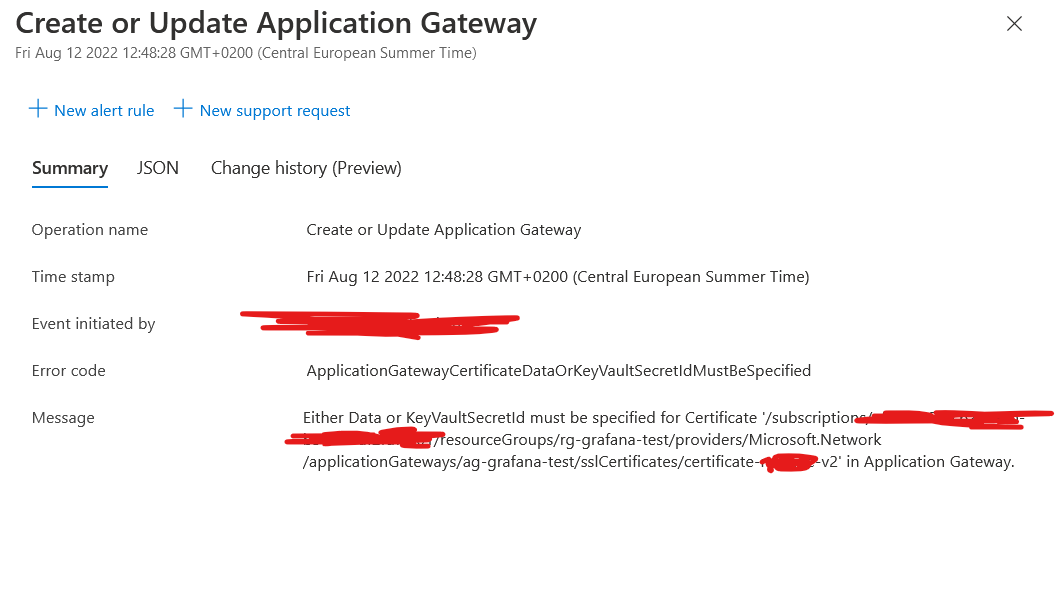
This error is different from the other one, this one is showing a certificate error in your app gateway, there is a thread here explaining about this error
You need to use a pfx certificate for appgw:
About the other error is a NIC related PUT error
Haha this quite funny. The person asking the question in that thread is the previous employee who has set this up...
I will look into it
@w Kon
what a coincidence!
But they are two different problems, I don't know if it's related, review the issue of the digital certificate and then we'll continue the PUT update
Best
To be frank, I am getting a bit lost here, and getting the feeling I am just running from error to error.
1.I cannot get to fix the SSL issue for the https-listener. I have made a new password enrypted .pfx file, and uploaded at

However this just gives the same error I get with any other SSL addition method (such as through the KeyVault PEM):
Failed to save configuration changes to application gateway 'ag-grafana-test'. Error: Either Data or KeyVaultSecretId must be specified for Certificate 'rg-grafana-test/providers/Microsoft.Network/applicationGateways/ag-grafana-test/sslCertificates/certificate-{company}-v2'>ag-grafana-test/certificate-{company}-v2' in Application Gateway.
where certificate-{company}-v2 is note even the certificate name of the one I am adding.
This causes me to believe that the Application Gateway is just stuck in a failed state.
When I am trying to just redeploy the Application Gateway I get error:
...
All right, nevermind, I have completely broken everything.
Hi @w Kon
Sorry for the delay, try to allow keyvault access from "all networks" and try to remove and recreate de rule.
Best