


Copying Multiple files and directory creation using a batch file

ClaudioADiaz 1 Reputation point
2022-08-11T13:23:29.12+00:00

Amigos,

I need your expert help please on this simple project. I am not a programmer so this is why I am here.

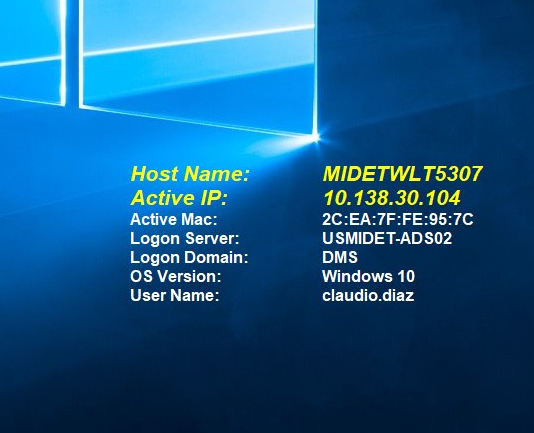
  • I have a BG Info folder saved with all most custom settings to be shown on a Desktop.230485-screenshot-2022-08-11-090235.png
  • As seen in the image, this looks real nice on a Desktop!
  • I have a folder called "Bginfo" saved on shared drive. This contains all necessary files to use on a single desktop
  • Process is, copy all contents of "Bginfo" onto a target desktop on path "C:\bginfo" If bginfo is not present, it needs to be created.
  • Once copied, inside this folder, we need to copy a single file to the startup folder of that target machine. This file launches the app BgInfo with special commands
  • I need to deploy this to over 200 machines (Windows 10) I need to do this using a batch file which once ran from a shared drive, it can do all this from a single batch file.
  • In other image I loaded, it shows the contents of BGinfo folder and highlighted in yellow is the file to be copied to that target machine's startup folder.

@gastonecanali-5513 Could you also assist me please on this?

Grazie!

Tony

230419-screenshot-2022-08-11-091846.png

Windows for business | Windows Client for IT Pros | User experience | Other
0 comments No comments
{count} votes

1 answer

Sort by: Most helpful
  1. Limitless Technology 40,081 Reputation points
    2022-08-12T07:26:40.317+00:00

    Hello

    Thank you for your question and reaching out. I can understand you are having query related to Push .bat file to 200 Machines.

    You can create .bat file and configure to run them using Start-Up script or using Logon Script using GPO.

    Below are steps which should be helpful in your case.

    https://social.technet.microsoft.com/wiki/contents/articles/20262.group-policy-apply-bginfo-using-a-logon-script.aspx

    ------------------------------------------------------------------------------------------------------------------------------------------------

    --If the reply is helpful, please Upvote and Accept as answer--

    0 comments No comments

Your answer

Answers can be marked as 'Accepted' by the question author and 'Recommended' by moderators, which helps users know the answer solved the author's problem.