Microsoft Teams | Development
Building, integrating, or customizing apps and workflows within Microsoft Teams using developer tools and APIs

This browser is no longer supported.
Upgrade to Microsoft Edge to take advantage of the latest features, security updates, and technical support.
' cx='32' cy='32' r='32' /%3E%3Ctext x='50%25' y='55%25' dominant-baseline='middle' text-anchor='middle' fill='%23FFF' %3EGN%3C/text%3E%3C/svg%3E)
Hi,
I am working on teams app with create tab functionality. While debugging and running the app locally, the app is loading but I am unable to interact with any of the user editable fields like input box, dropdown etc.
On inspecting I can see an error that the clientId is invalid when Graph api trying to login and get content. Below is the error
Uncaught ErrorWithCode.InvalidConfiguration: clientId in configuration is invalid: undefined. at TeamsUserCredential.loadAndValidateConfig (https://localhost:53000/static/js/vendors~main.chunk.js:113083:11)
We have clientId mentioned in the .fx/states/state.dev.json file under
"fx-resource-aad-app-for-teams": {
"clientId": "XXXX",
It tries to get data from Graph API using below code.
credentials = new TeamsUserCredential();
if (!_graph) _graph = createMicrosoftGraphClient(credentials, SCOPE);
return _graph.api(url);
ClientId that we have provided is a valid one and has not reached its expiry yet.
Even we created new key but issue is same.
Note : Fields are editable when I launch the app using Remote option.
Any ideas on how can I resolve this?
Building, integrating, or customizing apps and workflows within Microsoft Teams using developer tools and APIs
An API that connects multiple Microsoft services, enabling data access and automation across platforms

Additional features, settings, or issues not covered by specific Microsoft Teams categories
' cx='32' cy='32' r='32' /%3E%3Ctext x='50%25' y='55%25' dominant-baseline='middle' text-anchor='middle' fill='%23FFF' %3ESM%3C/text%3E%3C/svg%3E)
@Godhwani, Naina - We are looking into this we will get back to you soon.
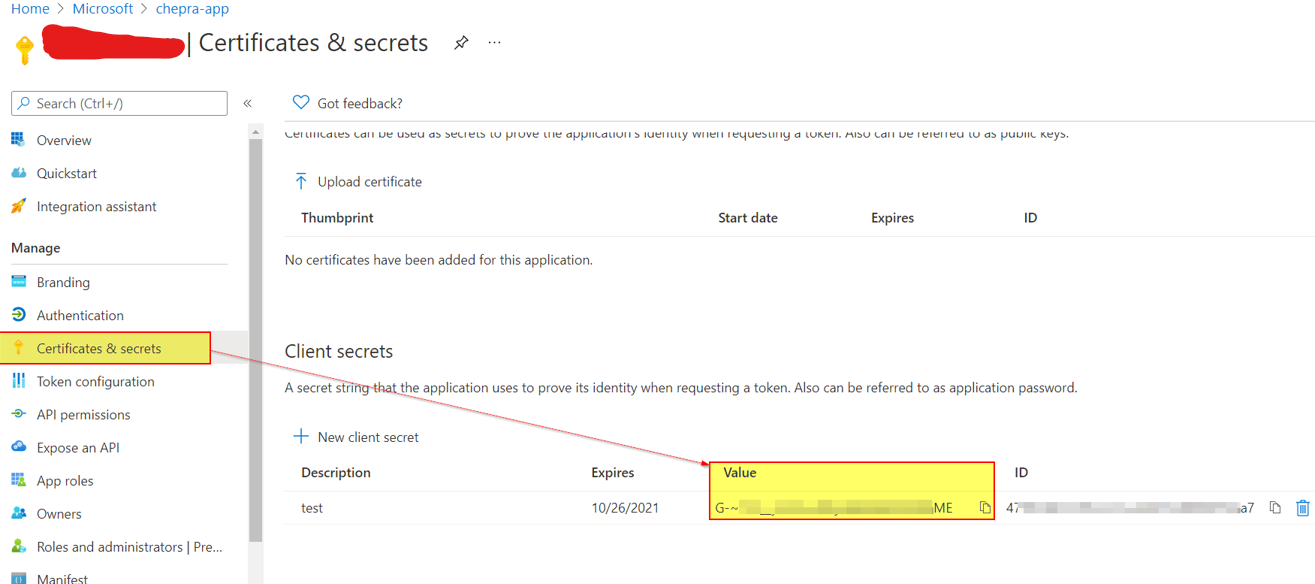
@Godhwani, Naina - Make sure you have copied client secret value and not the client secret ID. This Value is visible only when it is generated. So you can copy/paste it, in this moment.
' cx='32' cy='32' r='32' /%3E%3Ctext x='50%25' y='55%25' dominant-baseline='middle' text-anchor='middle' fill='%23FFF' %3ESE%3C/text%3E%3C/svg%3E)
@Sayali-MSFT We have app which auto generate local.userdata with clientSecret in decrypt format.
So what I tried is removing old secret from portal and added new secret that auto updated in app when I am running. But the issue is same and we still getting same error. Can you check and let us know as its blocker for the development.
@Godhwani, Naina - Could you please share the Document or sample which you refer, so that we can investigate it from our end.
@Sayali-MSFT - I tried debugging the issue locally and it looks like this error is because process.env is coming as an empty object and env variables are not available while running the teams app. As client id and some other variables are accessed via process.env those are coming as undefined in useteamsFx file.
Below error is seen in console logs,
VM117:2 Uncaught ReferenceError: process is not defined
These are the scripts in package.json
"start": "env-cmd --silent -f .env.teamsfx.local react-scripts start",
"build": "GENERATE_SOURCEMAP=false env-cmd --silent -f .env.teamsfx.local react-scripts build",
@Godhwani, Naina - Got the related thread-https://stackoverflow.com/questions/57057155/why-is-process-env-returning-an-empty-object-while-process-env-prop-returns-the#:~:text=The%20issue%20with%20process.env%20variable%20being%20empty%20in,the%20node.js.%20It%27s%20run%20inside%20the%20browser%20though.
Hope it's helpful.
@Sayali-MSFT , This issue was because new scripts were added in package json for dev:teamsfx and tasks json had an update.
After taking those latest changes, the issue got resolved.
Thanks for your support !!