Azure Data Factory
An Azure service for ingesting, preparing, and transforming data at scale.
This browser is no longer supported.
Upgrade to Microsoft Edge to take advantage of the latest features, security updates, and technical support.
' cx='32' cy='32' r='32' /%3E%3Ctext x='50%25' y='55%25' dominant-baseline='middle' text-anchor='middle' fill='%23FFF' %3EPD%3C/text%3E%3C/svg%3E)
Hi,
I'm facing Azure Data Factory Script activity input parameter issue. - design - ADF_ScriptActivity.jpg

When I triggered this activity, I got input as
===============================
{
"scripts": [
{
"parameters": [
{
"name": "tableName",
"type": "String",
"value": "Testtable",
"direction": "Input"
},
{
"name": "result",
"type": "String",
"value": null,
"direction": "Output",
"size": "300"
}
],
"type": "Query",
"text": "set @result = (SELECT * FROM @tableName FOR XML AUTO, ELEMENTS);"
}
]
}
===============================
But it failed with below error - ADF_Error.jpg

Early response is highly appreciated.
Regards,
Partha

Hey
It should be @{Pipeline().parameters.tableName} in your query
Hi Nandan,
Thanks for quick response but when I modified the script as
set @result = (SELECT * FROM @{Pipeline().parameters.tableName} FOR XML AUTO, ELEMENTS);
I was unable to publish the pipeline with below error

I believe since tableName is a script parameter and not a pipeline parameter, we can't access it that way.
Please suggest.
' cx='32' cy='32' r='32' /%3E%3Ctext x='50%25' y='55%25' dominant-baseline='middle' text-anchor='middle' fill='%23FFF' %3ESV%3C/text%3E%3C/svg%3E)
Exactly.
Script parameters need to be accessed using @. But table name can't be derived from script parameters as they are meant to be used as filters.
Then how can I parameterize the table name in query of a Script Activity so that I can use that within FOREACH activity.
If your foreach loop is not a parallel one you can use a set variable activity to frame the query or store table name and use it in the script activity. Like below where the table name comes from a variable
@markus.bohland@hotmail.de ('select * from ' , variables('tablenamevariable'), ' where addressed=10')
Thank you @Subashri Vasudevan for the explanation.
@Partha Das :Sorry for the confusion. It seems my entire answer was not published .
As stated , @tablename is also a syntax for SQL for table variable thereby creating that error.
SO my suggestion was to create a pipeline parameter and leverage it.
But your use case is for loop, so you can directly call @{item()} as the tablename for every iteration in your code if need be assuming your iteration is on the basis of tablenames only
Hi @Nandan Hegde ,
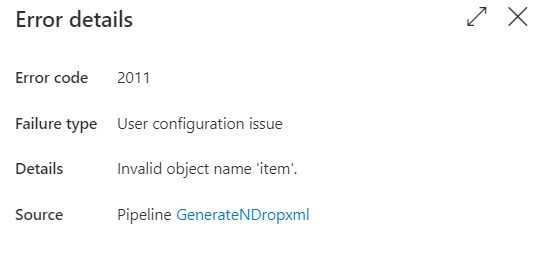
When I tried to directly use item() instead of tableName parameter, its input was showing
======================================
{
"scripts": [
{
"parameters": [
{
"name": "tableName",
"type": "String",
"value": {
"table_name": "Testtable"
},
"direction": "Input"
}
],
"type": "Query",
"text": "DECLARE @tempTable TABLE\n (\n ResultXML VARCHAR(max)\n )\n\nDECLARE @RS NVARCHAR(max);\nset @RS = (SELECT * FROM item() FOR XML AUTO, ELEMENTS);\n\n\nINSERT INTO @tempTable values (@RS )\nselect * from @tempTable"
}
]
}
======================================
But now getting the error below
Hi,
Could you please post your pipeline design and the activity output that is used by foreach?
Thanks
Hi @Subashri Vasudevan ,
The pipeline is attached.230753-pipeline.pdf
Hey,
use @{item()}
Glad we could be of help :)
And thank you @Subashri Vasudevan
@Partha Das Can you please accept the above solution as answer as it might help other community members as well.
Thank you for using MSFT Q&A
Could you please elaborate a bit on how you made it work. Could be helpful for the community. Thanks in advance
Ether way it is working in FOREACH use case -
@markus.bohland@hotmail.de ('set @resultXML = (SELECT * FROM ', item().table_name, ' FOR XML AUTO, ELEMENTS);')
set @resultXML = (SELECT * FROM @{item().table_name} FOR XML AUTO, ELEMENTS);