Microsoft 365 and Office | Development | Other
Building custom solutions that extend, automate, and integrate Microsoft 365 apps.

This browser is no longer supported.
Upgrade to Microsoft Edge to take advantage of the latest features, security updates, and technical support.
' cx='32' cy='32' r='32' /%3E%3Ctext x='50%25' y='55%25' dominant-baseline='middle' text-anchor='middle' fill='%23FFF' %3ESS%3C/text%3E%3C/svg%3E)
I have a folder having multiple excel files each having one single worksheet which contains exact data with same columns. i want a macro to help append all the excel files data one below the other into one new excel file .
I tried using vba code from "Append data from multiple excel files RRS feed
Archived Forums 421-440 > Visual Basic for Applications (VBA )". But it is not working
kindly help

You can do it easy using Power Query. That for a start:
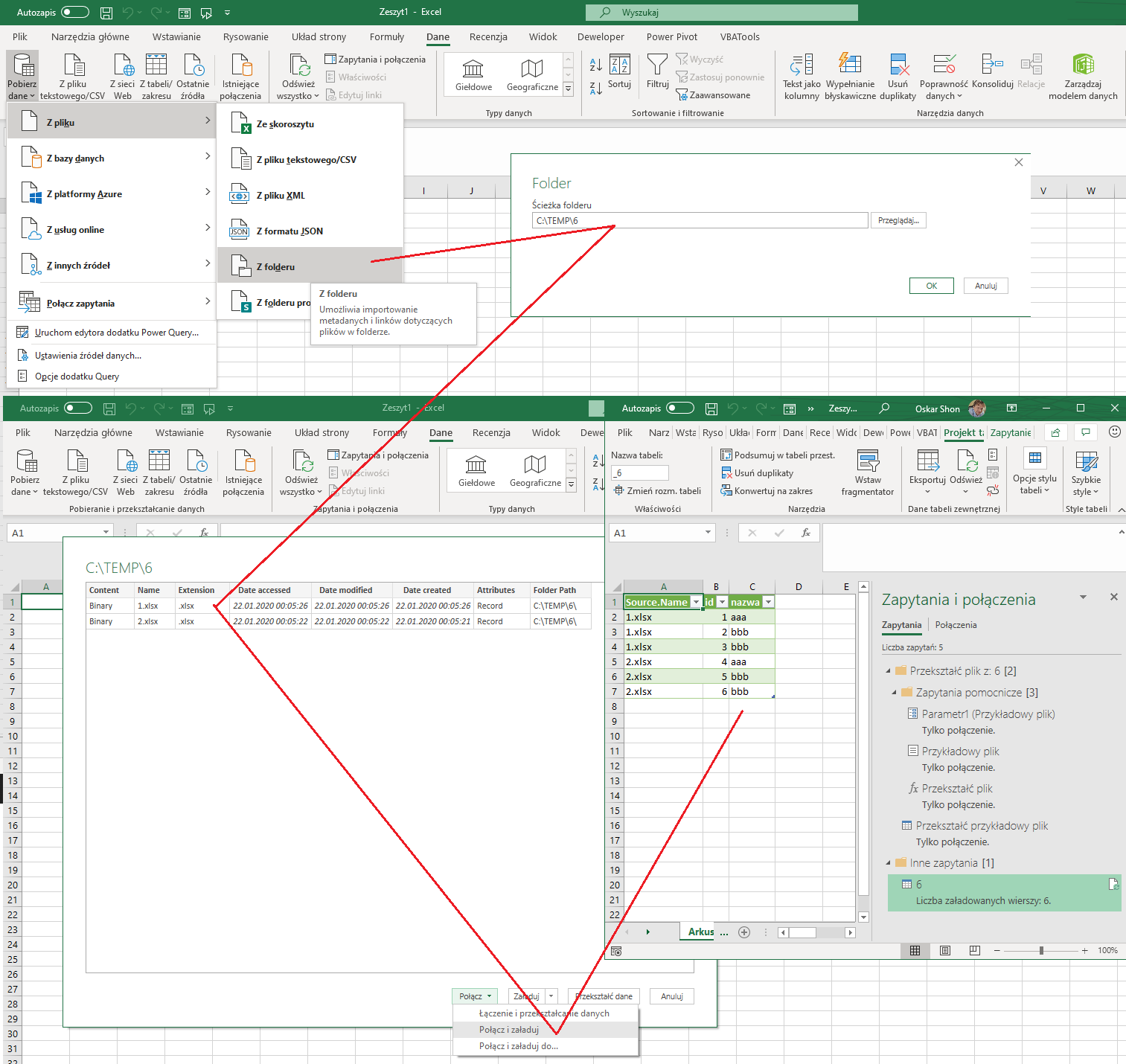
If you must do it in code then loop, open files, find data on tabs and copy to single one. That is not easy way.
I create tool for it before PQ exist: hQlGjMo8fws
Regards