I am in the process of upgrading our SQL 2017 servers to the current CU. I have ran across two systems that won't allow me to apply the update. In the SQL installer, I see below text when I click on the SQL Instance name.
"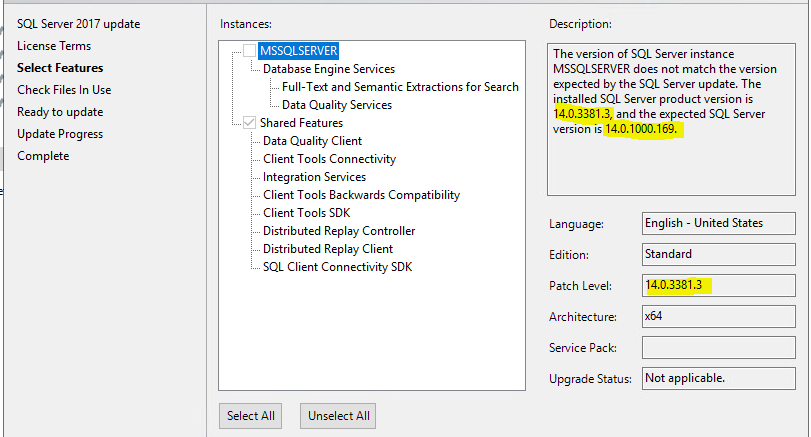 The version of SQL Server instance MSSQLSERVER does not match the version expected by the SQL Server update. The installed SQL Server product version is 14.0.3381.3, and the expected SQL Server version is 14.0.1000.169."
I am unsure where the installer pulls the version info from. I have compared the registry against a couple of other systems and nothing is standing out as being incorrect, so not sure where it is pulling the 14.0.1000.169 value for the "expected sql version". I tried removing the previous CU so I could reapply it, but it didn't appear that it removed fully as it was still in the add/remove programs screen. Everything I have found online points to older versions where people were trying to install CUs on top of the wrong Service Packs, which doesn't apply in this case since SQL 2017 doesn't have service packs.
Any ideas would be greatly appreciated.
' cx='32' cy='32' r='32' /%3E%3Ctext x='50%25' y='55%25' dominant-baseline='middle' text-anchor='middle' fill='%23FFF' %3EP%3C/text%3E%3C/svg%3E)
' cx='32' cy='32' r='32' /%3E%3Ctext x='50%25' y='55%25' dominant-baseline='middle' text-anchor='middle' fill='%23FFF' %3EB%3C/text%3E%3C/svg%3E)




' cx='32' cy='32' r='32' /%3E%3Ctext x='50%25' y='55%25' dominant-baseline='middle' text-anchor='middle' fill='%23FFF' %3ETF%3C/text%3E%3C/svg%3E)
' cx='32' cy='32' r='32' /%3E%3Ctext x='50%25' y='55%25' dominant-baseline='middle' text-anchor='middle' fill='%23FFF' %3ETP%3C/text%3E%3C/svg%3E)