Hyper-V VMs failing to start

Cory Lineberger 1 Reputation point
2020-09-16T08:47:21.27+00:00

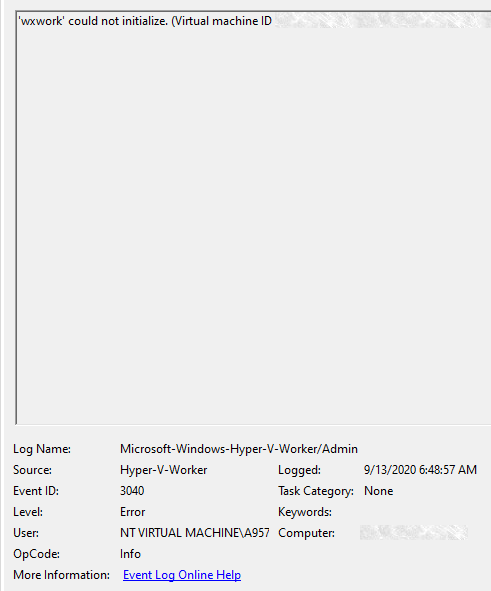
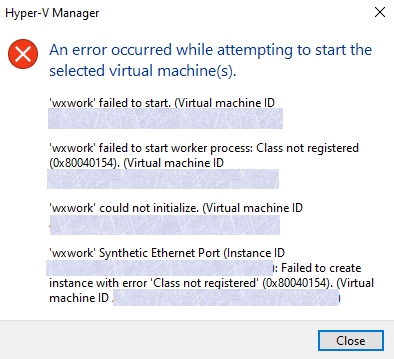
I am having some issues with Hyper-V after a windows update. not really sure what is needed to help me, but here is all that I could find regarding whatever is going on. Also steps I have tried:

Rebooting  

Disabling/re-enabling Hyper-V and other Virtualization services  

Creating a brand new VM after the update, still broken  

SFC /scannow (it did find and fix corrupt files apparently, but no change)  

I wanted to try to restore, but apparently Windows says it's been longer than 10 days when in fact it has only been 3, so I could not do that. Any help is appreciated, as I use VMs for a lot of things, including work, but luckily I have a workaround for that at least.

25123-ev-log.png
25119-ev-log-2.png
25120-hyper-v-error.png 2: /api/attachments/25119-ev-log-2.png?platform=QnA

Windows for business | Windows Client for IT Pros | Storage high availability | Virtualization and Hyper-V
0 comments No comments
{count} votes

1 answer

Sort by: Most helpful
  1. Xiaowei He 9,936 Reputation points
    2020-09-17T06:00:50.87+00:00

    Hi,

    What is the window update do you install before the issue occurs? Could it work if we uninstall the Windows Update?/

    What is the workaround you mentioned?

    Please check if the issue talked about hotly in the following link is the same as yours:

    https://learn.microsoft.com/en-us/answers/questions/90025/kb4571756-breaks-hyper-v-synthetic-ethernet-port.html

    Thanks for your time!
    Best Regards,
    Anne

    -----------------------------

    If the Answer is helpful, please click "Accept Answer" and upvote it.

    Note: Please follow the steps in our documentation to enable e-mail notifications if you want to receive the related email notification for this thread.

    0 comments No comments

Your answer

Answers can be marked as 'Accepted' by the question author and 'Recommended' by moderators, which helps users know the answer solved the author's problem.