Azure Databricks
An Apache Spark-based analytics platform optimized for Azure.
This browser is no longer supported.
Upgrade to Microsoft Edge to take advantage of the latest features, security updates, and technical support.

Why doesnt the following code work in my databricks notebook? I am getting error.
<console>:7: error: '(' expected but identifier found.
for db in dbs:
^
<console>:10: error: '(' expected but identifier found.
for t in tables:
^
<console>:12: error: identifier expected but integer literal found.
f.write(DDL.first()[0])
^
****Code is below****
dbs = spark.catalog.listDatabases()
for db in dbs:
f = open("testfile{}.ddl".format(db.name), "w")
tables = spark.catalog.listTables(db.name)
for t in tables:
DDL = spark.sql("SHOW CREATE TABLE {}.{}".format(db.name, t.name))
f.write(DDL.first()[0])
f.write("\n")
f.close()
https://learn.microsoft.com/en-us/azure/databricks/kb/metastore/create-table-ddl-for-metastore

Hi @Vinodh247 ,
Thank you for posting query in Microsoft Q&A Platform.
I tried same code, its working perfectly fine for me. Please check below screenshot.
I suspect you might have missed to have proper indentation, that means spaces before lines to differentiate code which is inside
forloops. Kindly check below screenshot and use similar code and see if that helps.
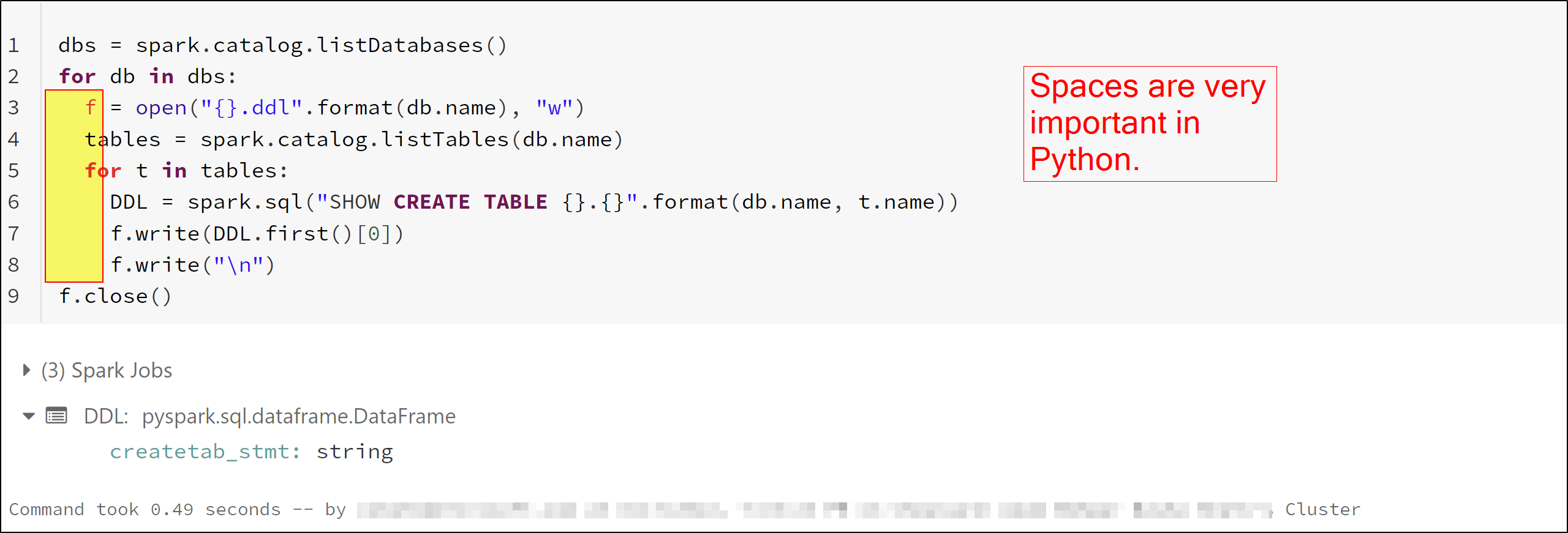
Code used:
dbs = spark.catalog.listDatabases()
for db in dbs:
  f = open("{}.ddl".format(db.name), "w")
  tables = spark.catalog.listTables(db.name)
  for t in tables:
    DDL = spark.sql("SHOW CREATE TABLE {}.{}".format(db.name, t.name))
    f.write(DDL.first()[0])
    f.write("\n")
f.close()
Please check below video to understand about indentation in Python.
Indentation in Python
Hope this helps. Please let us know if any further queries.
------------
Please consider hitting Accept Answer button. Accepted answers help community as well.
The copy pasting of code came without indentation, the issue was something else.. I have figured it out, thnx!