Windows RE Status - reagentc

VinodProsk 26 Reputation points
2022-08-18T20:09:14.397+00:00

is there a way we can find out across all devices (1000+) to see if the windows recovery is enabled? Currently i need to go to each device and run reagentc /info to check the status. But these is time consuming and not possible. So is there any SCCM report or some sort of registry key that i can query remotely to check the status ?

Windows for business | Windows Client for IT Pros | Devices and deployment | Configure application groups
Microsoft Security | Intune | Configuration Manager | Other
Windows for business | Windows Client for IT Pros | User experience | Other
0 comments No comments
{count} votes

5 answers

Sort by: Most helpful
  1. Sherry Kissinger 5,546 Reputation points
    2023-06-02T16:43:46.9033333+00:00

    Possible suggestion... As a Configuration Item:

    Discovery Script:

    ==================

    $Test = reagentc /info | findstr "status"

    if ($Test.Replace("Windows RE status: ", "").TRIM() - eq 'Enabled')

    { write-Host "Enabled"}

    Else

    { write-host "WinRe is not Enabled"}

    ===================

    Remediation Script (if you choose to remediate...):

    ===================

    $Test = reagentc /info | findstr "status"

    if ($Test.Replace("Windows RE status: ", "").TRIM() - eq 'Enabled')

    { write-Host "Enabled"}

    Else

    { $EnableIt = Reagentc /Enable }

    ===========

    "What Means Compliant" string of == Enabled

    =======Optionally==========

    Make the CI an "Application type" CI, and for Detection Method, make it script based, and use a script that will only write-host something if the target fits your criteria, like perhaps you don't want to enable WinRe if the device is VMWare.


    1 person found this answer helpful.
    0 comments No comments

  2. Limitless Technology 40,081 Reputation points
    2022-08-19T15:13:09.487+00:00

    Hello there,

    The Get-ComputerRestorePoint cmdlet gets the local computer's system restore points. And, it can display the status of the most recent attempt to restore the computer.

    System restore points and the Get-ComputerRestorePoint cmdlet are supported only on client operating systems such as Windows 10.

    ------------------------------------------------------------------------------------------------------------------------------

    --If the reply is helpful, please Upvote and Accept it as an answer--

    0 comments No comments

  3. VinodProsk 26 Reputation points
    2022-08-19T16:12:39.287+00:00

    Its not about computer restore. I am looking for Windows recovery status on the device

    0 comments No comments

  4. AllenLiu-MSFT 49,436 Reputation points Microsoft External Staff
    2022-08-22T07:15:27.727+00:00

    Hi, @vinodprosk

    Thank you for posting in Microsoft Q&A forum.

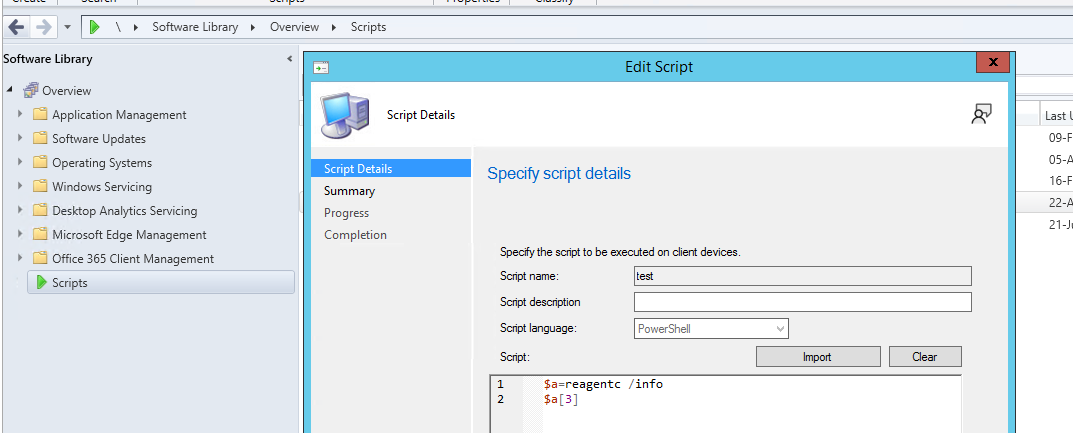
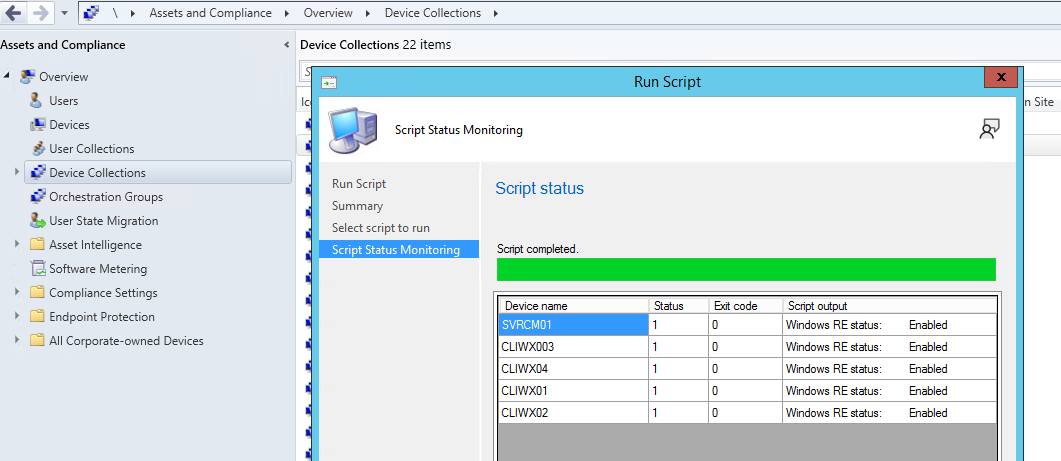
    I tried the below script, and run the script for a device with all clients and get the results:

    $a=reagentc /info  
    $a[3]  
    

    233402-1.png

    233434-2.png


    If the answer is the right solution, please click "Accept Answer" and kindly upvote it. If you have extra questions about this answer, please click "Comment".
    Note: Please follow the steps in our documentation to enable e-mail notifications if you want to receive the related email notification for this thread.


  5. Darrell Gorter 2,906 Reputation points
    2023-06-12T21:00:06.88+00:00

    Hello,

    If you are running Windows 11, there are new commands for Powershell for BCD-Entry which would capture this information.

    The information is stored in the BCD file.

    0 comments No comments

Your answer

Answers can be marked as 'Accepted' by the question author and 'Recommended' by moderators, which helps users know the answer solved the author's problem.