Account unknown on Security tab created after synchronizing files/folders from a MacOS system to Windows Server 2016

RRphotography 21 Reputation points
2022-08-19T09:56:29.24+00:00

Hello everyone,
I have a MacBook Pro (MBP) which I wanna get in sync with the file/folders stored centrally on my home file server (running Windows Server 2016). For an intelligent storage management on the MBP, I don't have a replica of the entire file server obviously, so when I am on the road I have the following needs:

a. some files/folders have to be synced on the MBP prior leaving home;
b. MBP could have new files/folder which have to be synced to the file server when backed home;
c. files/folders previously synced (see a.) could be edited, so when backed home, they should be synced back to the file server.

For managing those above tasks, I tried some applications for MacOS systems: Chronosync and FreeFileSync.
They do what they are intended for, but during the test phase I have noted that the synced files/folders (from MBP to WS2016) show in the Security tab an "Account unknown", with the security rule DENY applied to "This folder" only, as in the following screenshot.
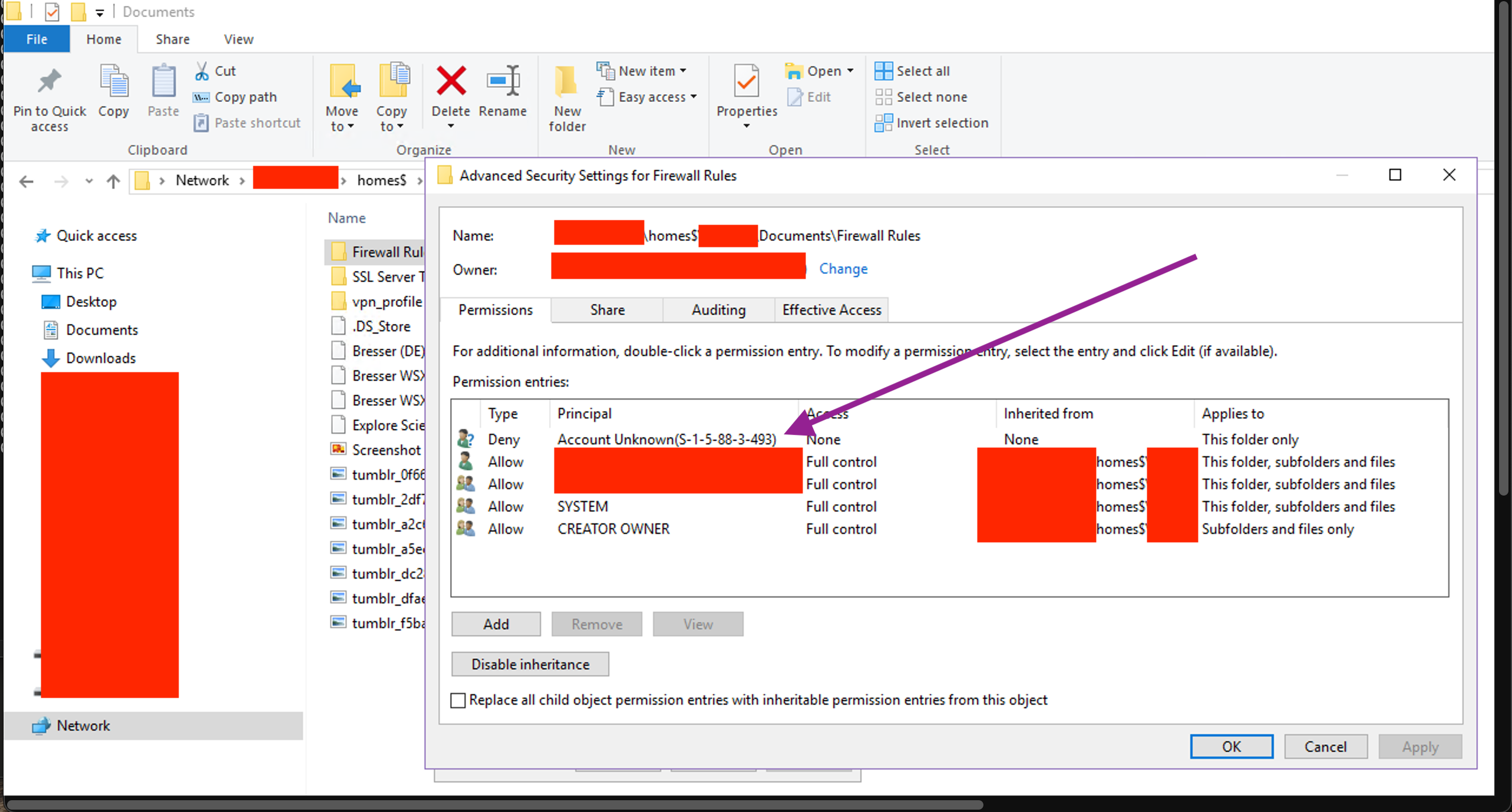
232799-synchro-test-21-server-side-folder.png

This happens any time I perform a synchronization from the MBP to the file server, for any file/folder synced and for both applications, so I guess it is not a matter of the application used.
The security rules applied to the \\server_ip\homes$\username\Documents is the following:
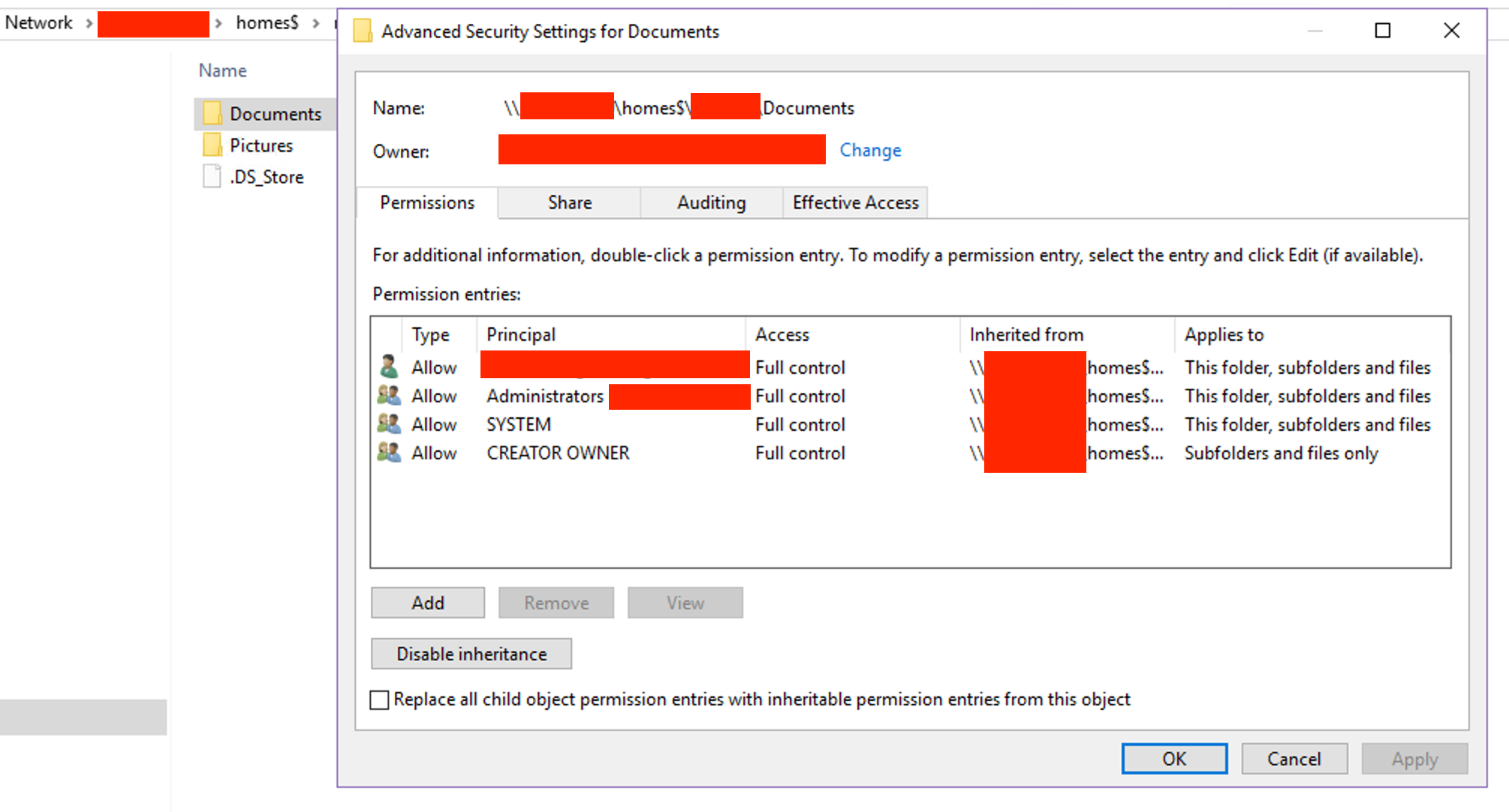
232848-fileserver-homes-documents-security-rules.png

Do you have any clue why this unknown account is being created and how to avoid it?

Final Notes:

  • MBP has joined my AD domain and I login to MBP with my AD account;
  • files and folders synchronised from MBP to WS2016 report my_domain\my_ad_account as owner, so they are recognised as created by that specific AD account.

Thanks.
Regards.

Richard

Windows for business | Windows Client for IT Pros | Directory services | Active Directory
Windows for business | Windows Server | User experience | Other
0 comments No comments
{count} votes

3 answers

Sort by: Most helpful
  1. MotoX80 37,161 Reputation points
    2022-08-19T11:57:12.057+00:00

    It appears that SID's that begin with S-1-5-88 are related to NFS. (I'm not a Unix guy.)

    https://serverfault.com/questions/567387/how-to-recognize-windows-permissions-on-a-osx-server-share

    https://social.technet.microsoft.com/Forums/lync/en-US/7881ffbf-51e9-4b36-823d-11201ca799a4/how-to-map-unix-scope-quotothersquot-to-quoteveryonequot-instead-of-quots15884quot

    Since the other permissions look to be inherited from a parent folder, do those 2 applications have an option to NOT copy security permissions?

    If that doesn't work, you could look into using robocopy.exe or some other tool from the Windows machine.

    0 comments No comments

  2. Gary Reynolds 9,626 Reputation points
    2022-08-19T12:08:45.047+00:00

    Hi @RRphotography

    The S-1-5-88 SID are coming from the NFS permissions on the source file system, these are the details from the MS-FSSO File Access Services System Overview, Appendix A- http://download.microsoft.com/download/A/C/C/ACC0C33D-4480-4370-97D2-5B6C06BB9C29/MS-FSSO_M7.pdf

    To construct a complete security descriptor, the NFS server generates a set of NFS-specific SIDs based on the UID, GID, and mode bits to be represented:

    • Owner SID based on the UID (for example, "S-1-5-88-1-<uid>")
    • Group SID based on the GID (for example, "S-1-5-88-2-<gid>")
    • Mode SID based on the UNIX mode bits (for example, "S-1-5-88-3-<mode>")
    • Other SID, a constant value (for example, "S-1-5-88-4")

    Gary.

    0 comments No comments

  3. RRphotography 21 Reputation points
    2022-08-19T13:47:12.19+00:00

    Hello everyone,
    thanks to both for your quick replies, but in particular to @MotoX80 who gave me the starting (useful) hint.
    Despite I cannot understand the connection with NFS, because the shared folder is not an NFS shared but a standard SMB one, I have started to look around on the net and found this topic on the Edugeek forum:

    http://www.edugeek.net/forums/mac/226838-mac-files-windows-server-not-inheriting-permissions-correctly.html

    In the thread, at post no. 2, is described a potential solution to the matter: change the Share permission for Everyone from Full Control to Modify.

    After reading that, I then modified the permission as stated and BOOOM: I got perfectly clean NTFS security permissions, without that weird Account unknown. This was tested only through FreeFileSync (for now) both sides: from L to R and viceversa, either with new files as well as simply modifying the file name.

    Later this day, I am gonna try with the other MacOS app and more in-depth testing.

    Stay tuned for the confirmation of the solution proposed.

    Thanks a lot for now.

    Richard

    0 comments No comments

Your answer

Answers can be marked as 'Accepted' by the question author and 'Recommended' by moderators, which helps users know the answer solved the author's problem.