Azure Synapse Analytics
An Azure analytics service that brings together data integration, enterprise data warehousing, and big data analytics. Previously known as Azure SQL Data Warehouse.
This browser is no longer supported.
Upgrade to Microsoft Edge to take advantage of the latest features, security updates, and technical support.
' cx='32' cy='32' r='32' /%3E%3Ctext x='50%25' y='55%25' dominant-baseline='middle' text-anchor='middle' fill='%23FFF' %3ESV%3C/text%3E%3C/svg%3E)
Hi,
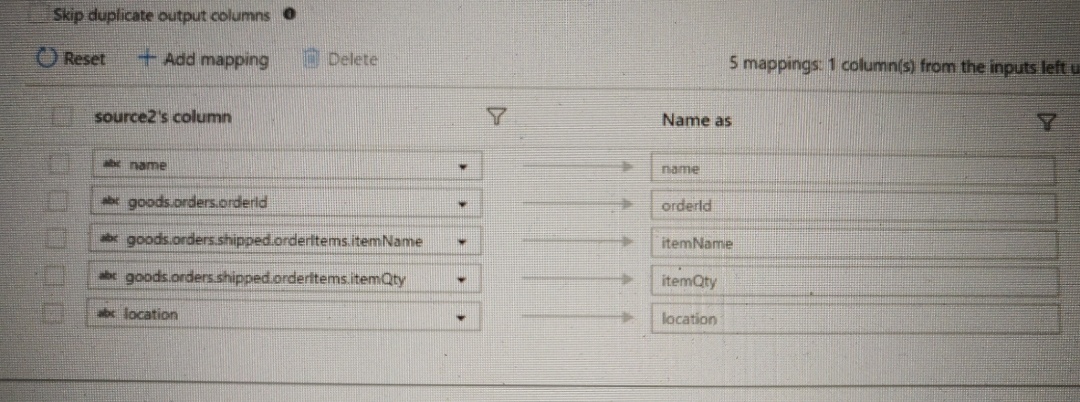
Is there a way I can simplify renaming columns in flatten settings without adding each column manually? Like column patterns.
For example, in the below example, I want to write expression to rename columns by ignoring all hierarchical info (ex: goods.orders.shipped.orderitems) and just keep the last portion as column name. Can we write expressions to achieve this? Basically, a generic expression that would just get me the last part of hierarchical shape for all the available columns.
Please advise. TIA

Hello @Subashri Vasudevan ,
Just checking in to see if the below answer provided by @MarkKromer-MSFT helped. If this answers your query, do click Accept Answer and Up-Vote for the same. And, if you have any further query do let us know.

You will have to add a Select transformation after the Flatten and use patterns there to rename the columns
Hi @MarkKromer-MSFT ,
Thanks for your reply. So, I can leave the mapping in flatten but do it on a select transformation right?
Thanks
correct