Microsoft Security | Intune | Configuration
Setting up and managing device configurations using Intune

This browser is no longer supported.
Upgrade to Microsoft Edge to take advantage of the latest features, security updates, and technical support.
' cx='32' cy='32' r='32' /%3E%3Ctext x='50%25' y='55%25' dominant-baseline='middle' text-anchor='middle' fill='%23FFF' %3ESK%3C/text%3E%3C/svg%3E)
Hello team,
I want to create (Android Restriction) profiles in Intune same as Workspace One (UEM) , but I am not getting these parameters under profile settings on Intune side. Can anyone please suggest how can we create these settings under (Android Restriction) profiles in Intune :
<parm name="allowBluetoothAndroidO" value="True"/>
<parm name="allowOutgoingBluetoothConnections" value="True"/>
<parm name="allowedAccounts" value="AllAccounts"/>
<parm name="allowChrome" value="True"/>
<parm name="allowOutgoingPhoneCalls" value="True"/>
<parm name="allowSMS" value="True"/>
<parm name="allowKeyguardFeatures" value="True"/>
<parm name="allowKeyguardUnredacted" value="True"/>
<parm name="allowModifyingAppsSettings" value="True"/>
<parm name="allowInstallingApps" value="True"/>
<parm name="allowUninstallingApps" value="True"/>
<parm name="allowVPNChanges" value="True"/>
<parm name="allowMobileChanges" value="True"/>
<parm name="allowKeyguard" value="True"/>
<parm name="allowSafeBoot" value="True"/>
<parm name="allowSetUserIcon" value="True"/>
<parm name="AllowSystemWindows" value="True"/>
<parm name="AllowSystemErrorDialogs" value="True"/>
<parm name="whitelistWidgetProviders" value="True"/>
<parm name="allowWorkContactsInPhone" value="True"/>
<parm name="allowContacts" value="True"/>
<parm name="allowWorkToAccessPersonal" value="True"/>
Thanks!
' cx='32' cy='32' r='32' /%3E%3Ctext x='50%25' y='55%25' dominant-baseline='middle' text-anchor='middle' fill='%23FFF' %3ECM%3C/text%3E%3C/svg%3E)
@Siya Kumari , I have list the similar settings in Intune for your reference:
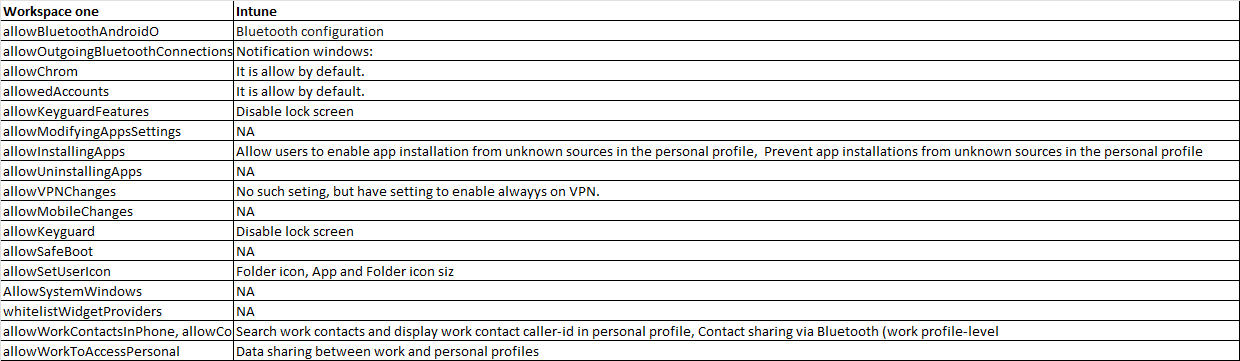
But as different product have different design thoughts, not all the settings are in Intune. If you still want them, you can feedback to Intune uservoice to see if we can have them added in the future:
https://feedbackportal.microsoft.com/feedback
Thanks for the understanding and have a nice day!
If the answer is helpful, please click "Accept Answer" and kindly upvote it. If you have extra questions about this answer, please click "Comment".
Note: Please follow the steps in our documentation to enable e-mail notifications if you want to receive the related email notification for this thread.