Microsoft Security | Microsoft Entra | Microsoft Entra ID
A cloud-based identity and access management service for securing user authentication and resource access

This browser is no longer supported.
Upgrade to Microsoft Edge to take advantage of the latest features, security updates, and technical support.
' cx='32' cy='32' r='32' /%3E%3Ctext x='50%25' y='55%25' dominant-baseline='middle' text-anchor='middle' fill='%23FFF' %3EDD%3C/text%3E%3C/svg%3E)
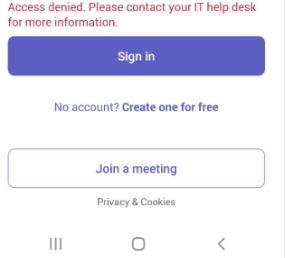
One of our customers has an Android phone running version 12 and Intune refuses to allow it access. The user received an access denied message when attempting to sign in.
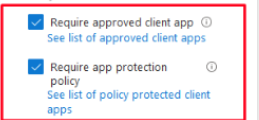
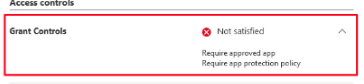
Checking CA I can see that these are the two triggering policies when sign-in fails.
He’s installing Intune through the link provided by Outlook when signing into the app.
He’s able to sign into Intune and I can verify this in Azure. It’s Teams, Outlook, and OneDrive that are blocked by CA. There are 13 other Android users, but no one else is having this issue. It was working 10 days ago, and the user didn’t update the OS to his knowledge.
The authenticator seemed to be the issue for Teams and OneDrive. Outlook is still looping the login. Their most recent email “I just tried to login to outlook on my phone again. It take me to the password and authenticator process, then just loops back to that. No success. Please advise.”
Please see the below image-
Can anyone help me on this?
' cx='32' cy='32' r='32' /%3E%3Ctext x='50%25' y='55%25' dominant-baseline='middle' text-anchor='middle' fill='%23FFF' %3EAB%3C/text%3E%3C/svg%3E)
We are experiencing the exact same issue on all newly enrolled Android devices. It seems like we only encounter the problem when users try to install Teams via work version of the Play Store. We haven´t experienced the same issue with users that enrolled earlier this summer.
' cx='32' cy='32' r='32' /%3E%3Ctext x='50%25' y='55%25' dominant-baseline='middle' text-anchor='middle' fill='%23FFF' %3ECM%3C/text%3E%3C/svg%3E)
@DheemanDas-0192, From your description, it seems you set a Conditional Access policy which block the Teams, outlook, OneDrive access.
In your configuration, I find we have set "Require approved client app" and "Require app protection policy". I notice Microsoft Teams, Outlook, OneDrive are in the approved client app list.
https://learn.microsoft.com/en-us/azure/active-directory/conditional-access/concept-conditional-access-grant#require-approved-client-app
So it can be that there's no app protection policy present on Microsoft Teams app. Please create an Android app protection policy for these users with these apps to see if the result will be different.
https://learn.microsoft.com/en-us/mem/intune/apps/app-protection-policy-settings-android
Hope it can help.
If the answer is helpful, please click "Accept Answer" and kindly upvote it. If you have extra questions about this answer, please click "Comment".
Note: Please follow the steps in our documentation to enable e-mail notifications if you want to receive the related email notification for this thread.
@DheemanDas-0192, How's everything going? I am writing to see if there's any update on our issue. If yes, feel free to let us know.