Azure Files
An Azure service that offers file shares in the cloud.
This browser is no longer supported.
Upgrade to Microsoft Edge to take advantage of the latest features, security updates, and technical support.
' cx='32' cy='32' r='32' /%3E%3Ctext x='50%25' y='55%25' dominant-baseline='middle' text-anchor='middle' fill='%23FFF' %3EA%3C/text%3E%3C/svg%3E)
I am trying to come up with either a script or other process in Azure to move some files into a designated folder (for archiving).
I have been manually moving csv files using Azure Storage Explorer, but it has been time consuming process daily.
How do I go about doing it?
I am willing to script in Powershell or Python, not using other tool such as Power Automate, since it appears that I need to subscribe to it.
What is best practice to do this mundane task in Azure Portal /Azure environment?
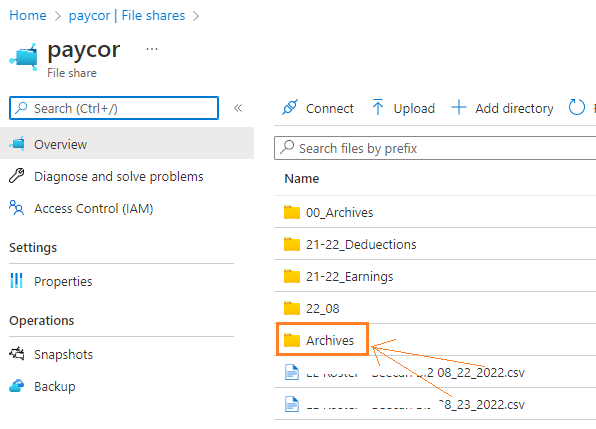
Thanks.

There are different ways available to schedule a task in Azure. One of the method is based on Azure Function App. Create a Function App based on Runtime Stack as PowerShell Core with the following PowerShell code.
I have also detailed the procedure to show how to create a function app for this purpose in one of the 'comment' in the following question asked by a different customer
function app
$srcRGName = "name here"
$srcStgAccount = "qrfree"
$srcContainer = "source"
$blobName = "source1/test.txt"
$srcRGName = "name here"
$destStgAccount = "qrfree"
$destContainer = "archive"
$srcStorageKey = Get-AzStorageAccountKey -Name $srcStgAccount -ResourceGroupName $srcRGName
$destStorageKey = Get-AzStorageAccountKey -Name $destStgAccount -ResourceGroupName $srcRGName
$srcContext = New-AzStorageContext -StorageAccountName $srcStgAccount -StorageAccountKey $srcStorageKey.Value[0]
$destContext = New-AzStorageContext -StorageAccountName $destStgAccount -StorageAccountKey $destStorageKey.Value[0]
$copyOperation = Start-AzStorageBlobCopy -SrcBlob $blobName -SrcContainer $srcContainer -Context $srcContext -DestBlob $blobName -DestContainer $destContainer -DestContext $destContext -Force
----------
--please don't forget to upvote and Accept as answer if the reply is helpful--
@Manu Philip
Thank you for your help and feedback.
Before getting into using Azure Function, can I also use Azure Logic App?
I am thinking Logic App might be easier because it requires very minimal coding, no?
' cx='32' cy='32' r='32' /%3E%3Ctext x='50%25' y='55%25' dominant-baseline='middle' text-anchor='middle' fill='%23FFF' %3EHM%3C/text%3E%3C/svg%3E)
I have same problem. And new to Azure. I need a step by step on how to do it.