Microsoft 365 and Office | SharePoint Server | Development
The process of building custom solutions for SharePoint Server.

This browser is no longer supported.
Upgrade to Microsoft Edge to take advantage of the latest features, security updates, and technical support.
' cx='32' cy='32' r='32' /%3E%3Ctext x='50%25' y='55%25' dominant-baseline='middle' text-anchor='middle' fill='%23FFF' %3EPA%3C/text%3E%3C/svg%3E)
Hello,
I have some old solution which has been created using node 0.10.0. now I am trying to add node modules using npm install. It gives following error:
CERT UNIDENTIFIED
OR if I use latest version like 14.20.0 then I am getting typescript error.
How can I proceed? Please help.
Thanks,
Amar

Please ensure your SPFx solution complies with the SPFx development environment compatibility table. Node.js 0.10.0 is not listed as a compatible version. Additionally, please ensure the version of TypeScript you are using is compatible.
Ok. Thanks for your answer.
But what to do with already built solution with node 0.10.0. how can I build solution and package solution withe the node versions listed in the table given.
Please help.
Is it an SPFx solution? I'm not sure how that would be because the earliest version of SPFx used Node.js v6.
If it's not an SPFx solution e.g. a package you have created, you will need to make the appropriate changes to the package so that it works with whichever Node.js version you are using for your SPFx solution.

This is the error I am getting
SPFx doesn't work with Node.js v0.10.0
You can only use packages which work with SPFx compatible versions of Node.js
Ok, tried node module installation with node 10&14 but there I am getting typescript error and even react router Dom and react paginate module incomparability
' cx='32' cy='32' r='32' /%3E%3Ctext x='50%25' y='55%25' dominant-baseline='middle' text-anchor='middle' fill='%23FFF' %3ETZ%3C/text%3E%3C/svg%3E)
Hi @Anonymous ,
According to my research and testing, SPFx development environment is not compatible with Node.js v0.10.0 .If you install Node.js v14, you should install the SharePoint Framework v1.12.1 / v1.13.0 / v1.13.1 / v1.14.0 / v1.15.0 / v1.15.2 . Please check if your SPFx version and Node.js version are compatible.
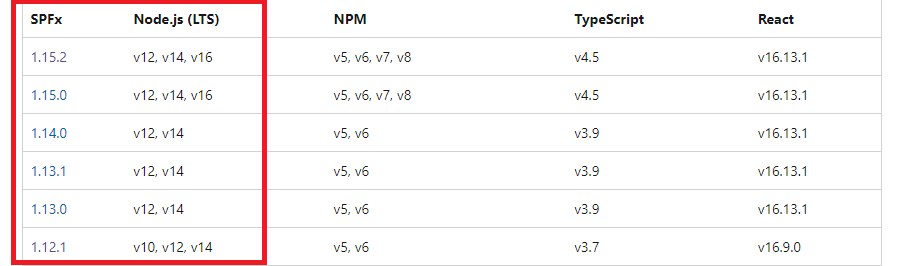
More information for reference:
SPFx development environment compatibility
Set up your SharePoint Framework development environment
If the answer is helpful, please click "Accept Answer" and kindly upvote it. If you have extra questions about this answer, please click "Comment".
Note: Please follow the steps in our documentation to enable e-mail notifications if you want to receive the related email notification for this thread.
Hi @Anonymous ,
Do you have any further questions about this thread? If you have any questions or progress, you can contact me in time.