Microsoft SQL Server 2017 (RTM) - 14.0.1000.169 (X64)
I suggest applying the latest CU (CU 30) as a first step. You are running the RTM version and several years behind in patching.
This browser is no longer supported.
Upgrade to Microsoft Edge to take advantage of the latest features, security updates, and technical support.
' cx='32' cy='32' r='32' /%3E%3Ctext x='50%25' y='55%25' dominant-baseline='middle' text-anchor='middle' fill='%23FFF' %3EMY%3C/text%3E%3C/svg%3E)
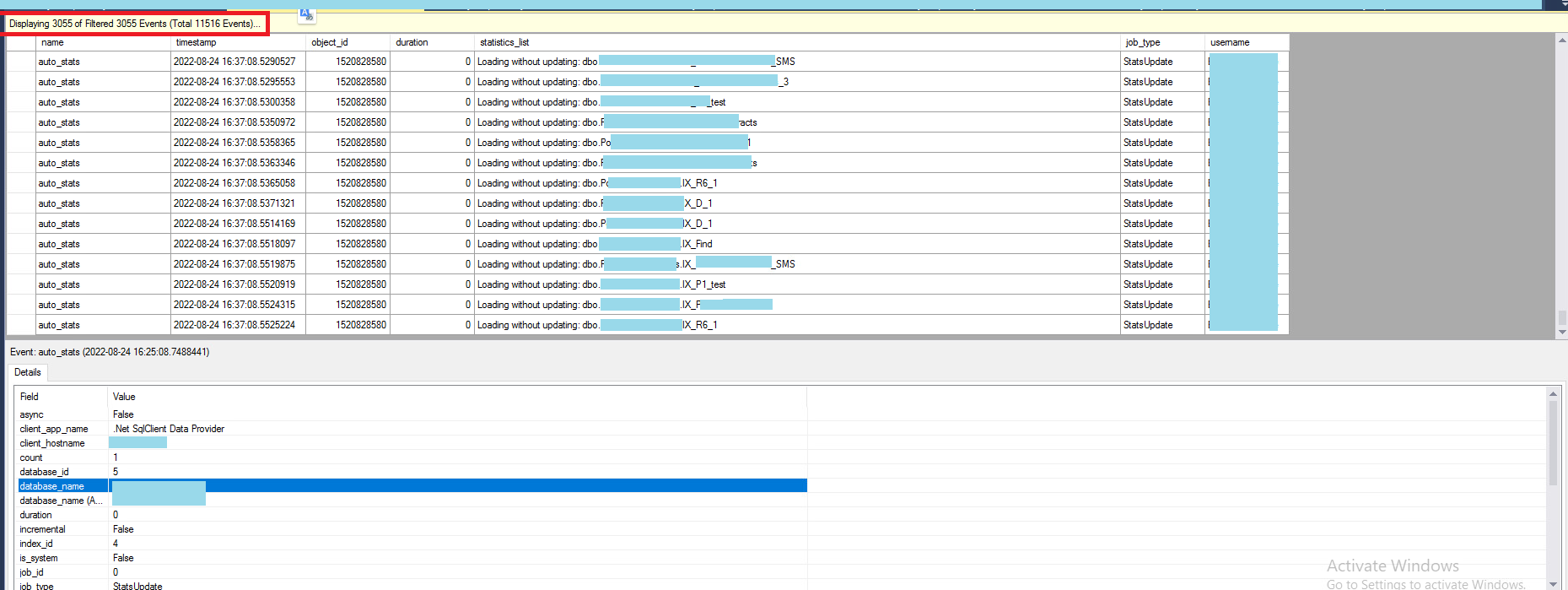
I am using the 2017 version of SQL Server. The auto update statistics setting is enabled
As follows :
Microsoft SQL Server 2017 (RTM) - 14.0.1000.169 (X64)
I have a procedure whose statements are always recompiling. With Extended event, when I check, the reason for recompilation is Statistics changed.
This causes the stored plans to change constantly and increases the CPU consumption during recompilation.

Hi,
Any update for this thread? Did your issue resolve?

Microsoft SQL Server 2017 (RTM) - 14.0.1000.169 (X64)
I suggest applying the latest CU (CU 30) as a first step. You are running the RTM version and several years behind in patching.

I agree with Dan. Apply CU30 before any discussion. There are means to turn off autostats, but we need to know more so we can give accurate advice. But first CU30, to make sure that you are not victim to something that has been fixed.
Hi @mohamadreza YY ,
Agree with Dan and Erland, please apply the latest CU30 for SQL 2017 at first, you can get it from below link. If it is not work, then we can continue to discuss this issue.
SQL Server® 2017 for Microsoft® Windows Latest Cumulative Update
If the answer is helpful, please click "Accept Answer" and kindly upvote it. If you have extra questions about this answer, please click "Comment".