scheduling powershell tasks with sql agent
' cx='32' cy='32' r='32' /%3E%3Ctext x='50%25' y='55%25' dominant-baseline='middle' text-anchor='middle' fill='%23FFF' %3ES%3C/text%3E%3C/svg%3E)
SVA
121
Reputation points
Hi
How to run a powershell script through SQL Server agent.
SQL Server | Other
{count} votes
-
' cx='32' cy='32' r='32' /%3E%3Ctext x='50%25' y='55%25' dominant-baseline='middle' text-anchor='middle' fill='%23FFF' %3ESH%3C/text%3E%3C/svg%3E) Scott Head 5 Reputation points
Scott Head 5 Reputation points2023-08-01T03:51:55.36+00:00 Not sure what you are attempting to perfrom but I personally would install the PowerShell SQL Module that allows you access to SQL commands in PowerShell and to connect to servers \ databases.
https://learn.microsoft.com/en-us/sql/powershell/download-sql-server-ps-module?view=sql-server-ver16
Scott Head
-
' cx='32' cy='32' r='32' /%3E%3Ctext x='50%25' y='55%25' dominant-baseline='middle' text-anchor='middle' fill='%23FFF' %3EBE%3C/text%3E%3C/svg%3E) Bruce-EX 0 Reputation points
Bruce-EX 0 Reputation points2023-08-01T06:29:36.2733333+00:00 Not sure what you are attempting to perfrom but I personally would install the PowerShell SQL Module that allows you access to SQL commands in PowerShell and to connect to servers \ databases. https://learn.microsoft.com/en-us/sql/powershell/download-sql-server-ps-module?view=sql-server-ver16 Scott Head https://www.scriptsbyscott.com/
Its is very helpful for me. Thanks for this.
Sign in to comment
2 answers
Sort by: Most helpful
-
-
 PandaPan-MSFT 1,931 Reputation points
2022-08-25T01:54:28.857+00:00 Hi,@SVA
I’m agree with what @Tom Phillips has already put before. His answer was perfect seems to me.
You just need to follow the steps below:
1.Expand SQL Server Agent, create a new job or right-click an existing job, and then select Properties.
2.In the Job Properties dialog, select the Steps page, and then select New.
3.In the New Job Step dialog, type a job Step name.
4.In the Type list, select PowerShell.
5.In the Run as list, select the proxy account with the credentials that the job will use.
6.In the Command box, enter the PowerShell script syntax that will be executed for the job step. Alternately, select Open and select a file containing the script syntax.
7.Select the Advanced page to set the following job step options: what action to take if the job step succeeds or fails, how many times SQL Server Agent should try to execute the job step,
and how often retry attempts should be madeBest regards
-
SVA 121 Reputation points
2022-08-25T05:10:40.46+00:00 I Am getting below error in SQL agent job
Message
Unable to start execution of step 1 (reason: Error authenticating proxy LAPTOP-UN8Q241G\kiran, system error: The user name or password is incorrect.). The step failed.I passed the script in Command box as
powershell.exe -file c:\test\extract.ps1
-
PandaPan-MSFT 1,931 Reputation points
2022-08-25T05:59:41.67+00:00 Hi@SVA , my understanding is that you can’t start the SQL Server and the error is “The user name or password is incorrect”. I suggest that you can make sure if the account exists and whether the account and password are both correct. If everything is right then I recommend that you may try to change the Authentication mode into Windows Authentication. You can follow the steps:
In SQL Server Management Studio Object Explorer, right-click the server, and then click Properties.
On the Security page, under Server authentication, select a new server authentication mode, and then click OK.
In the SQL Server Management Studio "dialog box, click OK to accept the request to restart SQL Server.
In Object Explorer, right-click the server, and click Restart. If you are running SQL Server Agent, you must also restart the agent.
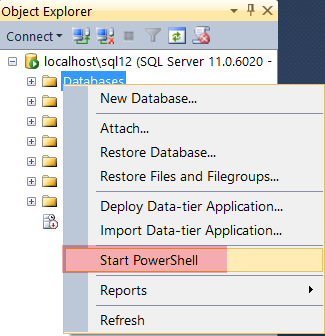
After your starting your SQL ,you may just do the picture shows then you can connect the Powershell.
-
PandaPan-MSFT 1,931 Reputation points
2022-08-29T05:58:53.94+00:00 Hi @SVA ,have you solved your problem? I hope my answer can be a little help to you if so pls mark the answer, or you still have some problems pls feel free to let me know.
Sign in to comment -
' cx='32' cy='32' r='32' /%3E%3Ctext x='50%25' y='55%25' dominant-baseline='middle' text-anchor='middle' fill='%23FFF' %3ETP%3C/text%3E%3C/svg%3E)