Developer technologies | ASP.NET | Other
A set of technologies in .NET for building web applications and web services. Miscellaneous topics that do not fit into specific categories.
This browser is no longer supported.
Upgrade to Microsoft Edge to take advantage of the latest features, security updates, and technical support.
' cx='32' cy='32' r='32' /%3E%3Ctext x='50%25' y='55%25' dominant-baseline='middle' text-anchor='middle' fill='%23FFF' %3EMJ%3C/text%3E%3C/svg%3E)
I am being asked to change the validation message that is displayed to the user during registration.
The site uses the Individual User Accounts
I have modified to add FirstName, LastName, get the phone number at registration and use Captcha
This is what the registration model looks like now
public class RegisterViewModel
{
    [Required]
    [EmailAddress]
    [Display(Name = "Email")]
    public string Email { get; set; }

    [Required]
    [StringLength(100, ErrorMessage = "The {0} must be at least {2} characters long.", MinimumLength = 6)]
    [DataType(DataType.Password)]
    [Display(Name = "Password")]
    public string Password { get; set; }

    [DataType(DataType.Password)]
    [Display(Name = "Confirm password")]
    [Compare("Password", ErrorMessage = "The password and confirmation password do not match.")]
    public string ConfirmPassword { get; set; }

    [Required]
    [StringLength(50, ErrorMessage = "The {0} can not exceed {1} characters.")]
    [Display(Name = "First Name")]
    public string FirstName { get; set; }

    [Required]
    [StringLength(50, ErrorMessage = "The {0} can not exceed {1} characters.")]
    [Display(Name = "Last Name")]
    public string LastName { get; set; }

    [Required]
    [Display(Name = "Telephone"), Phone]
    [DataType(DataType.PhoneNumber)]
    public string PhoneNumber { get; set; }

    public string CaptchaCode { get; set; }
}
and this is what the controller code looks like
[HttpPost]
[AllowAnonymous]
[ValidateAntiForgeryToken]
public async Task<ActionResult> Register(RegisterViewModel model)
{
    try
    {
        if (ModelState.IsValid)
        {
            var user = new ApplicationUser { UserName = model.Email, Email = model.Email, FirstName = model.FirstName, LastName = model.LastName, PhoneNumber = model.PhoneNumber };
            var result = await UserManager.CreateAsync(user, model.Password);
            if (result.Succeeded)
            {
                await SignInManager.SignInAsync(user, isPersistent:false, rememberBrowser:false);

                // For more information on how to enable account confirmation and password reset please visit https://go.microsoft.com/fwlink/?LinkID=320771
                // Send an email with this link
                string code = await UserManager.GenerateEmailConfirmationTokenAsync(user.Id);
                var callbackUrl = Url.Action("ConfirmEmail", "Account", new { userId = user.Id, code = code }, protocol: Request.Url.Scheme);
                // await UserManager.SendEmailAsync(user.Id, "Confirm your account", "Please confirm your account by clicking <a href=\"" + callbackUrl + "\">here</a>");

                return RedirectToAction("Index", "Home");
            }
            AddErrors(result);
        }

        // If we got this far, something failed, redisplay form
        return View(model);
    }
    catch (Exception ex)
    {
        Errors.ErrorOccured(ex);
    }
    return View(model);
}
now one of the testers for the company office that sold the product tried to use an email address that they had already used for registration and this image is what they got back for the message on the screen
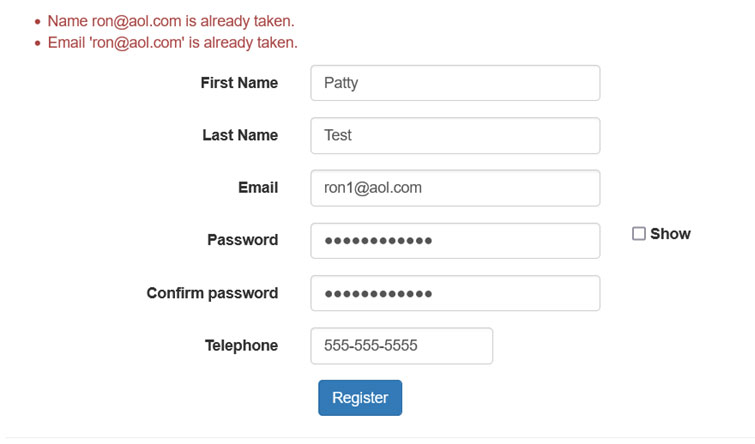
How do I remove the 1st message that says
Name ******@aol.com is already taken ?

I'm guessing the login uses remote validation to check the email address but you did not share the relevant code.
Please use the debuggers, Visual Studio and the browser's dev tools, to find where the error message is generated.
I am trying to learn here, so when you say that I did not provide the relavant code, what code should I have displayed ? the model and the controller and displayed an image of the view, so what is missing?
As to the debugger, it does not throw an error. I am assuming it is in this code if (result.Succeeded) which is part of the code that is autogenerated by Visual Studio when individual user account validation is selected.
' cx='32' cy='32' r='32' /%3E%3Ctext x='50%25' y='55%25' dominant-baseline='middle' text-anchor='middle' fill='%23FFF' %3EA%3C/text%3E%3C/svg%3E)
Hi @M J ,
According to your requirement, if you just want to remove the first line of error messages, you could modify some code of AddErrors() function in AccountController, something like this:
   private void AddErrors(IdentityResult result)
           {
               foreach (var error in result.Errors)
               {
                   if (error ==result.Errors.First())
                    continue;
                   else ModelState.AddModelError("", error);
               }
           }
Result:

Best regards,
Xudong Peng
If the answer is the right solution, please click "Accept Answer" and kindly upvote. If you have extra questions about this answer, please click "Comment".
Note: Please follow the steps in our documentation to enable e-mail notifications if you want to receive the related email notification for this thread.