Outlook | Windows | Classic Outlook for Windows | For business
Using classic Outlook for Windows in business environments

This browser is no longer supported.
Upgrade to Microsoft Edge to take advantage of the latest features, security updates, and technical support.
' cx='32' cy='32' r='32' /%3E%3Ctext x='50%25' y='55%25' dominant-baseline='middle' text-anchor='middle' fill='%23FFF' %3EA%3C/text%3E%3C/svg%3E)
I cannot send messages
When sending messages, I have this phrase
Your message couldn't be delivered because you weren't recognized as a valid sender. The most common reason for this is that your email address is suspected of sending spam and it's no longer allowed to send email. Contact your email admin for assistance.
ما الحل؟
Using classic Outlook for Windows in business environments

Hi @عبد الله بن الشقيفي ,
Are you sending emails from your Outlook desktop client? If so, to further confirm if your issue, please try to log in to your web mail and send the same emails again and see if this issue will still be reproduced.
Besides, does this issue only occur when you send emails to some specific users(such as users in one specific domain)? It is suggested to send emails to other users and see if the issue has any difference.
I did some research about the error message you offered, and found most similar cases told that your email address might has been blocked by the recipient's domain. So, in order to solve this issue, you may need to contact the recipient and let them remove your email address from the Restricted Users(or the Blocked list). If you are using O365 email account, this official document could be useful to you: Remove blocked users from the Restricted Users portal in Office 365.
In addition, from the perspective of the Outlook client, you could also try to make the recipient remove your email address from the Outlook Blocked Sender List and add your email address to the Safe Sender List to see if it could helps.
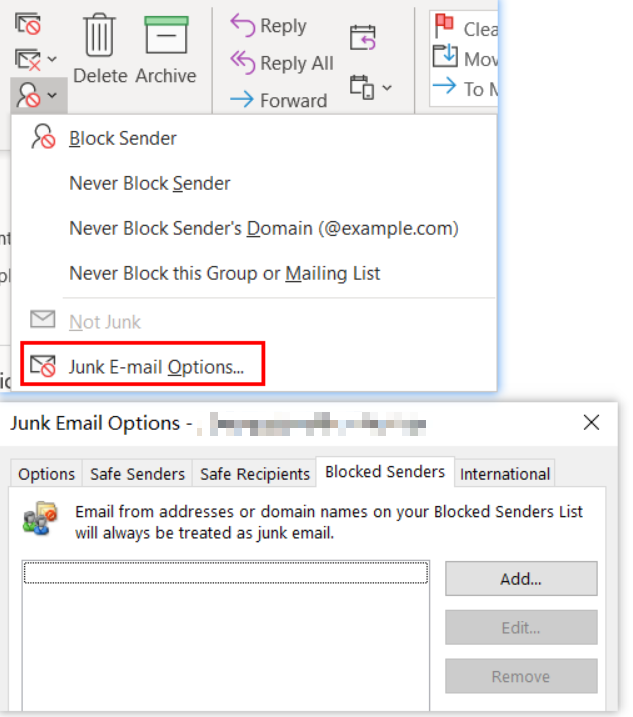
Any update, please feel free to post back.
If an Answer is helpful, please click "Accept Answer" and upvote it.
Note: Please follow the steps in our documentation to enable e-mail notifications if you want to receive the related email notification for this thread.
Hi @عبد الله بن الشقيفي ,
It has been a while, how is everything going?
If you have any update about this issue, please feel free to post back.
Hi @عبد الله بن الشقيفي ,
Have you got your issue fixed?
I'm writing to see if these replies above are helpful to you.
If you think my reply is helpful to you, please remember to mark it as an answer.
Thanks for your understanding and support.