Microsoft 365 and Office | SharePoint Server | For business
A family of Microsoft on-premises document management and storage systems.

This browser is no longer supported.
Upgrade to Microsoft Edge to take advantage of the latest features, security updates, and technical support.
' cx='32' cy='32' r='32' /%3E%3Ctext x='50%25' y='55%25' dominant-baseline='middle' text-anchor='middle' fill='%23FFF' %3EMA%3C/text%3E%3C/svg%3E)
Hello Everyone. We are facing an issue with a managed metadata field pointing to a term set. (site column field used in a site content type)
Error: microsoft.sharepoint.spduplicatevaluesfoundexception the list item could not be added or updated because duplicate values were found in the following filed(s) in the list : [Title]
at Microsoft.SharePoint.SPListItem.AddOrUpdateItem.
Any idea how to solve this bug? the metadata field was working properly.
COnfiguration DB Version: 16.0.10389.20000
' cx='32' cy='32' r='32' /%3E%3Ctext x='50%25' y='55%25' dominant-baseline='middle' text-anchor='middle' fill='%23FFF' %3ER%3C/text%3E%3C/svg%3E)
Hi @Michel AL HAYEK
I am currently doing some research on this issue, will let you know as soon as possible
Hi @Michel AL HAYEK
The cause of the error is that you set the column as unique, so the user cannot select the same value of this column twice. Please try to change the column setting like following pic
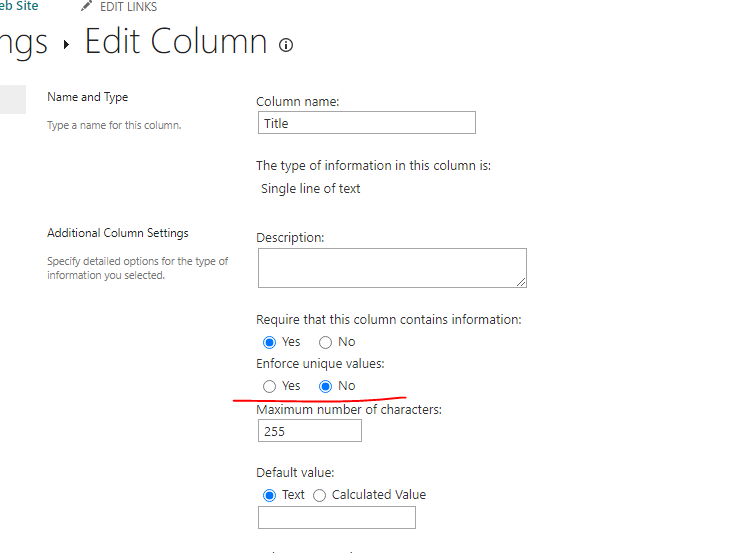
If the answer is helpful, please click "Accept Answer" and kindly upvote it. If you have extra questions about this answer, please click "Comment".
Note: Please follow the steps in our documentation to enable e-mail notifications if you want to receive the related email notification for this thread.
Hi @Michel AL HAYEK
Have you tried the solution I proposed?
If you have any questions or progress, you can contact me in time.
Looking forward to your reply
Have a lucky day!
Thanks,
Raytheon Xie
Hi, sorry for the late reply. I will check again if the field unique values option was set to true. But, as i remember the field was set to required only.
@RaytheonXie_MSFT , the field type is managed metadata and the unique value option is set to false.
