Logon script pop a survey

Jazib Khan 1 Reputation point
2022-08-31T17:32:25.897+00:00

Our HR department is looking for a way to force people to respond to a wellness survey every day at logon. They would like for it to be easy to track and not be avoidable.

We have built a simple survey in Microsoft Forms, but haven't found a way to make people have to respond. HR is worried that the voluntary method is going to have a lot of non-participants and they don't want to spend all their time chasing after people.

Has anyone ever used a logon script (Windows network, Windows 10 clients) to pop some sort of survey / questionnaire for each user?

It seems that Visual Basic might work for this but we don't have staff knowledgeable enough to create one of these.

I appreciate any thoughts or suggestions.

Windows for business | Windows Client for IT Pros | Directory services | Active Directory
Windows for business | Windows Client for IT Pros | User experience | Other
0 comments No comments
{count} votes

2 answers

Sort by: Most helpful
  1. Dillon Silzer 60,726 Reputation points Volunteer Moderator
    2022-08-31T17:39:16.687+00:00

    Hi @Jazib Khan

    You could suggest using the "IT Acceptance Policy" function that could be used to say "If you are logging in you accept that you are healthy to work".

    You could add a GPO by configuring Security Options in the group policy:

    Computer Configuration > Windows Settings > Security Settings > Local Policies > Security Options

    Interactive Logon: Message text for users attempting to log on
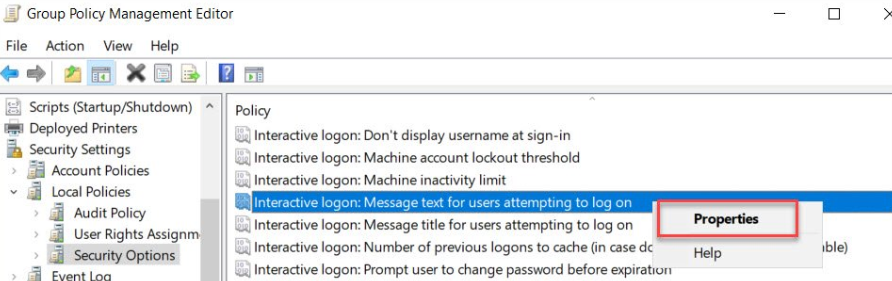
    236672-image.png

    -----------------------------------------------------

    If this is helpful please accept answer.


  2. JimmySalian-2011 44,721 Reputation points
    2022-08-31T19:57:47.04+00:00

    Hi,

    Here is a detailed thread about similar requirement and it should provide some links and process around this, GPO will be a good start but you need some app or script to do the job for pop up.

    2285353-logon-script-pop-a-survey

    =
    Please "Accept the answer" if the information helped you. This will help us and others in the community as well.

    0 comments No comments

Your answer

Answers can be marked as 'Accepted' by the question author and 'Recommended' by moderators, which helps users know the answer solved the author's problem.
