Cannot log in to domain after Windows Update

oskpo 1 Reputation point
2022-08-31T18:15:16.153+00:00

Hello all,

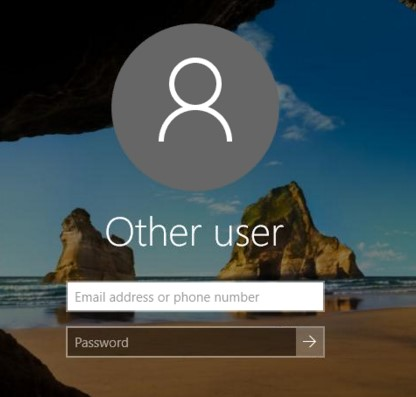
After a Windows Update, logging screen in Windows 10 changed from domain/local to live account.

A computer I'm using is company provided, domain joined. It worked for more than a year without any problems.

The screen looks like attached below:
236664-image.png
I do own two types of account in my corporate domain: an user account and a domain administrator account.
Both of those account are not linked with live account. I do have access to local admin set by domain.

I can't log in as:

  • myAccount
  • myAdminAccount
  • administrator
  • .\administrator
  • .\myAccount
  • domain\myAdminAccount
  • domain\myAccount
  • hostname\administrator
  • hostname\myAccount
  • hostname\myAdminAccount
  • corporate email address
    In every attempt I have the message in return:
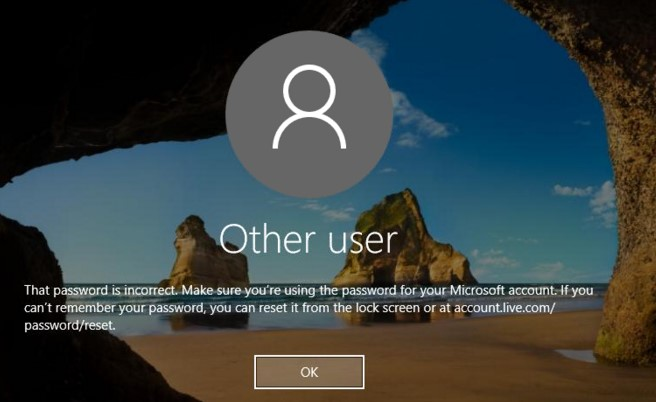
236557-image.png
In Safe Mode I'm able to login to corporate domain as any of both domain accounts. Login as local administrator also works well.

The question is:
How can I change normal login screen to log in to domain/local account instead of log in to Microsoft Account?

Another question is:
Am I able to change the login screen to local/domain sign in without accessing Safe Mode?

Windows for business | Windows Client for IT Pros | User experience | Other
{count} votes

4 answers

Sort by: Most helpful
  1. Anonymous
    2022-08-31T19:16:44.067+00:00

    Am I able to change the login screen to local/domain sign in without accessing Safe Mode?

    Use
    either a dot backslash as in .\username or computername\username for local logon

    then use domainname\username for domain logon

    --please don't forget to upvote and Accept as answer if the reply is helpful--


  2. Anonymous
    2022-09-02T04:38:15.81+00:00

    Hello oskpo-6596,

    Thank you for posting in our Q&A forum.

    You may need to create a Microsoft account to login.

    And then sign out and try to login using any of both domain accounts to see if it helpful.

    Reference
    https://www.microsoft.com/en-us/windows/windows-11-specifications?r=1

    Best Regards,
    Daisy Zhou

    ============================================

    If the Answer is helpful, please click "Accept Answer" and upvote it.

    0 comments No comments

  3. Limitless Technology 40,076 Reputation points
    2022-09-02T07:44:30.793+00:00

    Hello

    Thank you for your question and reaching out. I can understand you are having issues related to logging after Windows update.

    Please try to Un-Plug LAN or Disable WIFI on your Windows 10 PC.

    Then try to Login with your Domain account -> Enable or connect to Network -> Try to remove last update from Control Panel then reboot your PC

    After reboot please check if issue resolved or persists.

    ------------------------------------------------------------------------------------------------------------------------------------------

    --If the reply is helpful, please Upvote and Accept as answer--

    0 comments No comments

  4. JimmySalian-2011 44,721 Reputation points
    2022-09-02T08:24:27.87+00:00

    Hi,

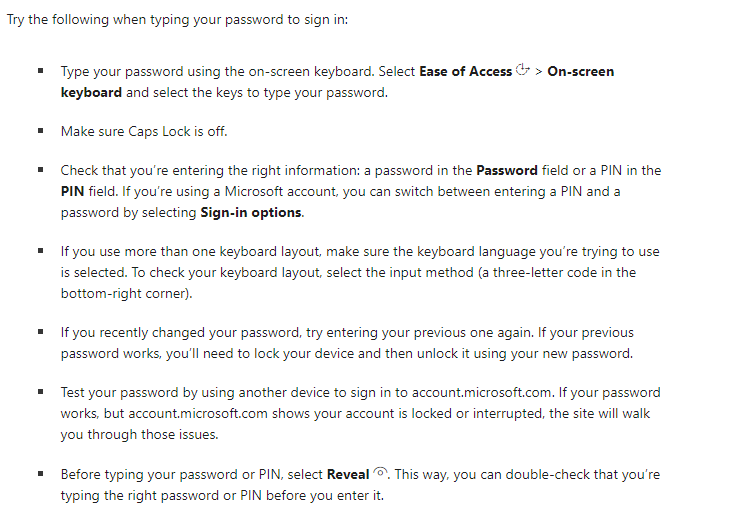
    It seems like a password issue or keypad, can you please follow the listed steps for making sure that password is correct for that account? And that account is definely Microsoft Account so try the URL account.microsoft.com

    237233-image.png

    ==
    Please "Accept the answer" if the information helped you. This will help us and others in the community as well.

    0 comments No comments

Your answer

Answers can be marked as 'Accepted' by the question author and 'Recommended' by moderators, which helps users know the answer solved the author's problem.