Developer technologies | .NET | Blazor
A free and open-source web framework that enables developers to create web apps using C# and HTML, developed by Microsoft.
This browser is no longer supported.
Upgrade to Microsoft Edge to take advantage of the latest features, security updates, and technical support.

Hello,
In my application, I want to change the layout of the login page like this one here: sign-in So I created LoginLayout.
@inherits LayoutComponentBase

<div class="main">
    @Body
</div>
And added @layout to the login page as follows:
@page
@layout LoginLayout
@using Microsoft.AspNetCore.Authorization
@using Microsoft.AspNetCore.Mvc.TagHelpers
@using IMS.WebApp.Shared
@model LoginModel
@attribute [AllowAnonymous]

@{
    ViewData["Title"] = "Log in";
}

<h1>@ViewData["Title"]</h1>
<div class="row">
    <div class="col-md-4">
        <section>
            <form id="account" method="post">
                @*<h2>Use a local account to log in.</h2>*@
                <hr />
                <div asp-validation-summary="ModelOnly" class="text-danger"></div>
                <div class="form-floating m-lg-3">
                    <input asp-for="Input.Email" class="form-control" autocomplete="username" aria-required="true" />
                    <label asp-for="Input.Email" class="form-label"></label>
                    <span asp-validation-for="Input.Email" class="text-danger"></span>
...
But it gives this error:
The name 'layout' does not exist in the current context
How can I change the layout of the login page?
A free and open-source web framework that enables developers to create web apps using C# and HTML, developed by Microsoft.
' cx='32' cy='32' r='32' /%3E%3Ctext x='50%25' y='55%25' dominant-baseline='middle' text-anchor='middle' fill='%23FFF' %3EA%3C/text%3E%3C/svg%3E)
Hi,@Cenk ,the codes you suppiled won't cause the error,could you supply the most simple and clear codes that could repeate your error?
Just add the @layout LoginLayout to Login.cshtml and you will see the error I mentioned.
Any update @Anonymous ? I don't understand why I can not add layout to login page?
i've already explained the reason in the last comment,please check it
sorry, I didn't see your comment. So you are saying create a Blazor Component login page and add what layout you want. I will try and let you know. Thank you.
the project seems a little bit confused, with a couple of the same files. I don't understand which is used. There is a shared folder inside of Pages and outside there is one more shared. :(
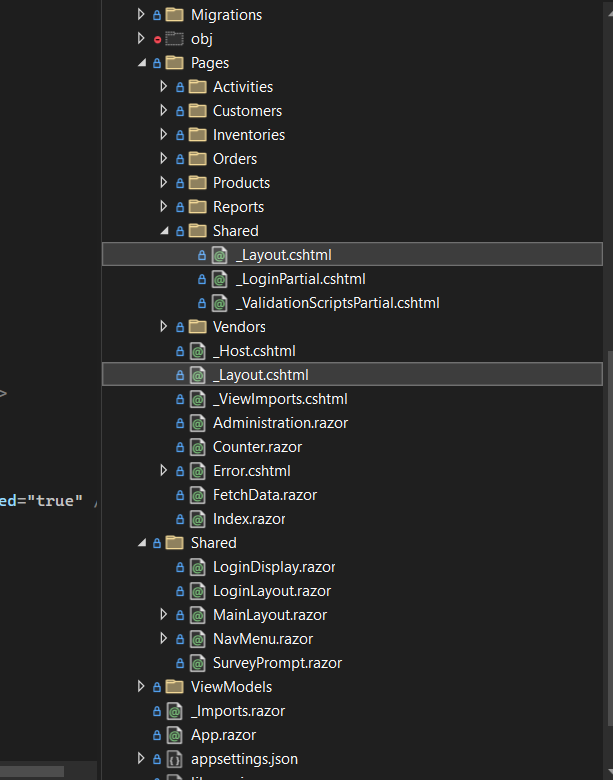
Here is the Login.cshtml just in case;
@page
@layout LoginLayout
@using Microsoft.AspNetCore.Authorization
@using Microsoft.AspNetCore.Mvc.TagHelpers
@using IMS.WebApp.Shared
@model LoginModel
@attribute [AllowAnonymous]

@{
    ViewData["Title"] = "Log in";
}

<h1>@ViewData["Title"]</h1>
<div class="row">
    <div class="col-md-4">
        <section>
            <form id="account" method="post">
                @*<h2>Use a local account to log in.</h2>*@
                <hr />
                <div asp-validation-summary="ModelOnly" class="text-danger"></div>
                <div class="form-floating m-lg-3">
                    <input asp-for="Input.Email" class="form-control" autocomplete="username" aria-required="true" />
                    <label asp-for="Input.Email" class="form-label"></label>
                    <span asp-validation-for="Input.Email" class="text-danger"></span>
                </div>
                <div class="form-floating m-lg-3">
                    <input asp-for="Input.Password" class="form-control" autocomplete="current-password" aria-required="true" />
                    <label asp-for="Input.Password" class="form-label"></label>
                    <span asp-validation-for="Input.Password" class="text-danger"></span>
                </div>
                @*<div clas="m-lg-3">
                    <div class="checkbox">
                        <label asp-for="Input.RememberMe" class="form-label">
                            <input class="form-check-input" asp-for="Input.RememberMe" />
                            @Html.DisplayNameFor(m => m.Input.RememberMe)
                        </label>
                    </div>
                </div>*@
                <div>
                    <button id="login-submit" type="submit" class="w-100 btn btn-lg btn-primary">Log in</button>
                </div>
               @* <div>
                    <p>
                        <a id="forgot-password" asp-page="./ForgotPassword">Forgot your password?</a>
                    </p>
                    <p>
                        <a asp-page="./Register" asp-route-returnUrl="@Model.ReturnUrl">Register as a new user</a>
                    </p>
                    <p>
                        <a id="resend-confirmation" asp-page="./ResendEmailConfirmation">Resend email confirmation</a>
                    </p>
                </div>*@
            </form>
        </section>
    </div>
    @*<div class="col-md-6 col-md-offset-2">
        <section>
            <h3>Use another service to log in.</h3>
            <hr />
            @{
                if ((Model.ExternalLogins?.Count ?? 0) == 0)
                {
                    <div>
                        <p>
                            There are no external authentication services configured. See this <a href="https://go.microsoft.com/fwlink/?LinkID=532715">article
                            about setting up this ASP.NET application to support logging in via external services</a>.
                        </p>
                    </div>
                }
                else
                {
                    <form id="external-account" asp-page="./ExternalLogin" asp-route-returnUrl="@Model.ReturnUrl" method="post" class="form-horizontal">
                        <div>
                            <p>
                                @foreach (var provider in Model.ExternalLogins)
                                {
                                    <button type="submit" class="btn btn-primary" name="provider" value="@provider.Name" title="Log in using your @provider.DisplayName account">@provider.DisplayName</button>
                                }
                            </p>
                        </div>
                    </form>
                }
            }
        </section>
    </div>*@
</div>

@section Scripts {
    <partial name="_ValidationScriptsPartial" />
}