Microsoft 365 and Office | SharePoint | For business | Windows
A group of Microsoft Products and technologies used for sharing and managing content, knowledge, and applications.

This browser is no longer supported.
Upgrade to Microsoft Edge to take advantage of the latest features, security updates, and technical support.
' cx='32' cy='32' r='32' /%3E%3Ctext x='50%25' y='55%25' dominant-baseline='middle' text-anchor='middle' fill='%23FFF' %3EJ%3C/text%3E%3C/svg%3E)
Hi, I'm after some assistance in formatting with JSON Code on lists.
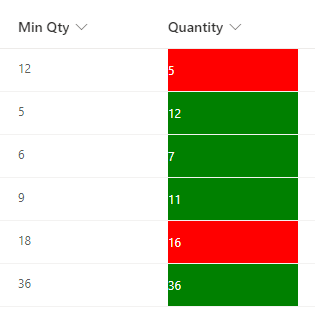
I would like to have the colors change according to the value of the column. So the Quantity column changes color based on 2 rules - Rule 1 Red if quantity is less than to the min qty column
rule 2 the quantity column is green if the number is greater than or equal to the number in the min qty column.
Can anyone assist?

' cx='32' cy='32' r='32' /%3E%3Ctext x='50%25' y='55%25' dominant-baseline='middle' text-anchor='middle' fill='%23FFF' %3EZY%3C/text%3E%3C/svg%3E)
Hi @Jarryd ,
Your problem is more related to the SharePoint, I will remove microsoft-graph-sites-lists tag. The reason why we recommend posting appropriately is you will get the most qualified pool of respondents, and other partners who read the forums regularly can either share their knowledge or learn from your interaction with us. Thank you for your understanding.

Try adding below JSON on Quantity column:
{
    "$schema": "https://developer.microsoft.com/json-schemas/sp/v2/column-formatting.schema.json",
    "elmType": "div",
    "txtContent": "@currentField",
    "style": {
        "color": "white",
        "background-color": "=if(@currentField < [$MinQty], 'red', if(@currentField >= [$MinQty], 'green', ''))"
    }
}
Use correct internal name of Min Qty field in place of [$MinQty].
Documentation: SharePoint column formatting

Hi @Jarryd ,
Does ganesh-sanap's answer help you? Below is the output of my attempt:
If the answer is helpful, please click "Accept Answer" and kindly upvote it. If you have extra questions about this answer, please click "Comment".
Note: Please follow the steps in our documentation to enable e-mail notifications if you want to receive the related email notification for this thread.
Hi @Jarryd ,
I’m checking how the things are going on about this issue. Whether the answer helps you?
Is there any progress on this thread? Please feel free to let me know.
Hi @Jarryd ,
I just wanted to check in and see if you had any other questions or if you were able to resolve this issue?