Developer technologies | C#
An object-oriented and type-safe programming language that has its roots in the C family of languages and includes support for component-oriented programming.
This browser is no longer supported.
Upgrade to Microsoft Edge to take advantage of the latest features, security updates, and technical support.
' cx='32' cy='32' r='32' /%3E%3Ctext x='50%25' y='55%25' dominant-baseline='middle' text-anchor='middle' fill='%23FFF' %3ETD%3C/text%3E%3C/svg%3E)
Hi All
I faced an error while reading the XPS file that was created from the Excel from Office 365 build 2208.
Excel worksheet contains one function HYPERLINK and with next parameters
With this function, I have a link on the worksheet to create an e-mail to two recipients.
I exported this file into XPS and trying to read it with C# code (XPS format is needed to generate a preview in my program). But I'm getting the error while I call the method GetFixedDocumentSequence(): "'Failed to create a 'NavigateUri' from the text 'mailto:asd@John Wallace .com;qwe@Anonymous .com'.' Line number '22' and line position '3'.". Example of the code that causing error:
            try
            {
                string filePath = Path.Combine(AppDomain.CurrentDomain.BaseDirectory, "Test.xps");
                XpsDocument xpsDocument = new XpsDocument(filePath, FileAccess.Read);
                FixedDocumentSequence fixedDocumentSequence = xpsDocument.GetFixedDocumentSequence();  //<-- error here
            }
            catch (Exception ex)
            {
                Console.WriteLine("Error: " + ex.Message);
                Console.ReadKey();
            }
I have not any errors if HYPERLINK parameter contains only one recipient.
Also, issue with more than one recipient is not reproducible with the XPS, created with Office version before build 2201
Do you have any ideas how to resolve this issue?

@Tsvetkov, Daniil , Welcome to Microsoft Q&A, Could you provide the related code about your function like the following?
Function DISCOUNT(quantity, price)
   If quantity >= 100 Then
     DISCOUNT = quantity * price * 0.1
   Else
     DISCOUNT = 0
   End If

 DISCOUNT = Application.Round(DISCOUNT, 2)
End Function
Which reference or nuget-package you used about the XpsDocument class?
Hello, @Jack J Jun
Thank you for your response
The function is a standard EXCEL function:
=HYPERLINK("first@Anonymous .com;second@Anonymous .com","Send e-mail")
This function entered into cell A1 and workbook saved as XPS
References are next:
<Reference Include="System" />
<Reference Include="System.Core" />
<Reference Include="System.Xml.Linq" />
<Reference Include="System.Data.DataSetExtensions" />
<Reference Include="Microsoft.CSharp" />
<Reference Include="System.Data" />
<Reference Include="System.Net.Http" />
<Reference Include="System.Xml" />
<Reference Include="WindowsBase" />
<Reference Include="PresentationFramework" />
<Reference Include="ReachFramework" />
@Tsvetkov, Daniil , thanks for the feedback, based on my test, I also get the almost same error with you. Then I want to know what do you want to get by using the above code, just click the hyperlink in the xps?
@Jack J Jun , then this XPS using to show the preview with a DocumentViewer control. This should be prevoew only, without any functionality.
So, I just need generating XPS from the source Excel file dynamically and then get a FixedDocumentSequence object to assign it to the Document property of the DocumentViewer control:
documentViewer.Document = fixedDocumentSequence as IDocumentPaginatorSource;
Problem that the FixedDocumentSequence object could not be generated for this file with the mentioned error.
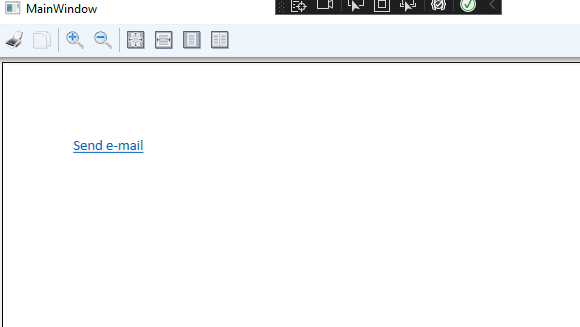
@Tsvetkov, Daniil , is your app a wpf app? Based on my test, I could use the following code to show the preview of xps file.
Xaml:
<Grid>
<DocumentViewer Width="800" Height="440" Name="xpsdoc"></DocumentViewer>
</Grid>
code:
 public MainWindow()
        {
            InitializeComponent();
            XpsDocument doc = new XpsDocument("t.xps", FileAccess.Read);
            xpsdoc.Document = doc.GetFixedDocumentSequence();
        }
Tested result:
@Jack J Jun , no, the error is there:
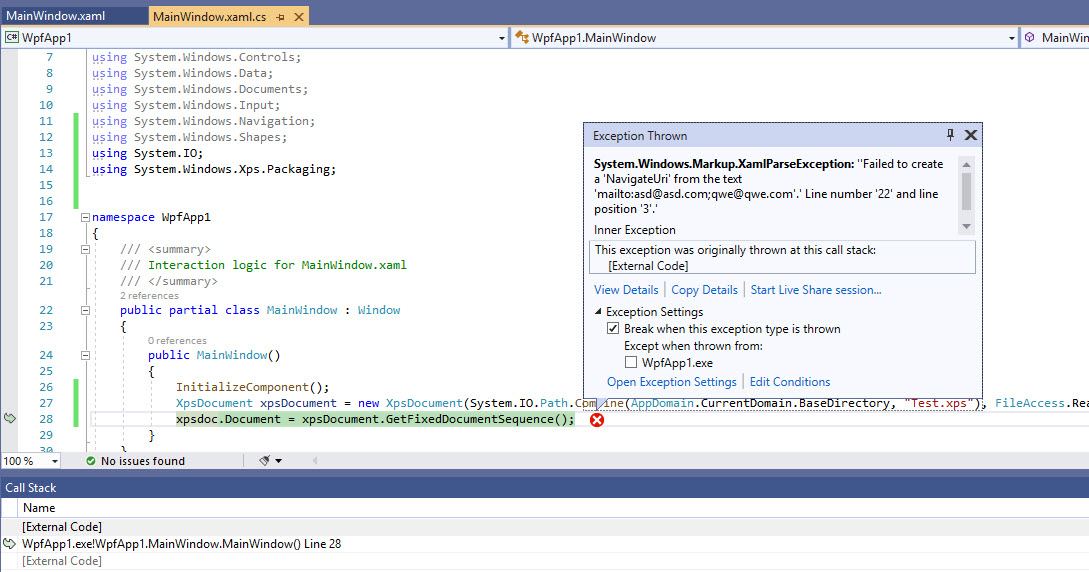
XPS was created with Office 365, Excel version 2208 Build 16.0.15601.20072
Just for your information, XPS created with Excel version prior 2202 worked fine. But customer already updated to 2208.
@Tsvetkov, Daniil , thanks for the feedback, based on my test, I also reproduced the same error with you when I used the XPS file created with Office 365, Excel version 2208. BTW, I could run the code without a problem when I used the XPS file created with office 2016. Therefore, I think it is the office version problem instead of the code problem.
I recommend that you could do the version rollback by using the following command in the Run:
"C:\Program Files\Common Files\microsoft shared\ClickToRun\officec2rclient.exe" /update user updatetoversion=16.0.14931.20132 ->this is version 2202
Hope this could help you.
Best Regards,
Jack
If the answer is the right solution, please click "Accept Answer" and upvote it.If you have extra questions about this answer, please click "Comment".
Note: Please follow the steps in our documentation to enable e-mail notifications if you want to receive the related email notification for this thread.
Hi @Jack J Jun
Thank you for your feedback
I'll suggest customer to downgrade the Office version with the provided steps. But not sure that this will be acceptable
Also, I changed the extension of the XPS file from .xps to .zip and opened it as achieve. Then I looked into file \Documents\1\Pages\1.fpage:
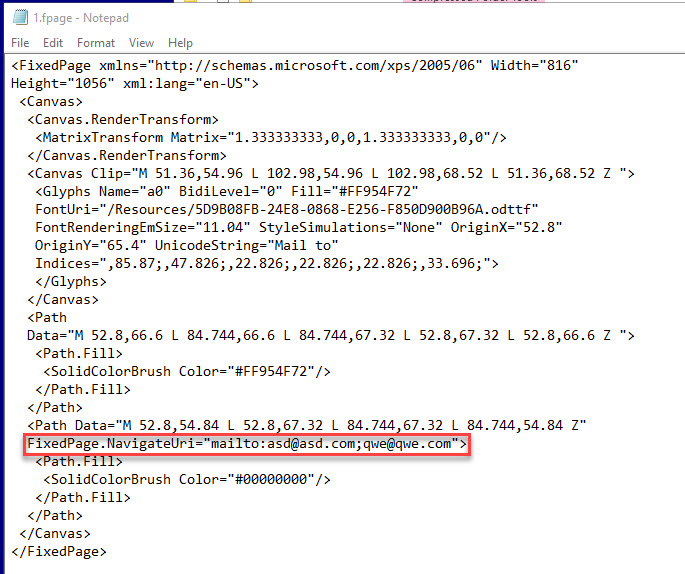
This file contains tag Path with attribute, that contains string 'FixedPage.NavigateUri="mailto:asd@John Wallace .com;qwe@Anonymous .com"'
If I totally remove this string - issue disappears
If I updated this string by removing the second email (like this 'FixedPage.NavigateUri="mailto:asd@John Wallace .com"') - issue disappears
I checked the XPS files, created with older Office version - there is no this string inside.
So, I think, problem not only with Office, but with the Xaml Parser, that can't correct parse this string
@Tsvetkov, Daniil , thanks for the reply, based on my your description, I make a test. I find that the issue disappears when I remove the string or the email you mentioned. However, it also could not show the link in wpf app.
but with the Xaml Parser, that can't correct parse this string
Maybe that you are right. But I still suggest that the customer use the older version office.
If you still have problems, please feel free to let me know.
@Tsvetkov, Daniil , is any update?
Customer rolled back Office to build 2202
Thank you for your help!
' cx='32' cy='32' r='32' /%3E%3Ctext x='50%25' y='55%25' dominant-baseline='middle' text-anchor='middle' fill='%23FFF' %3ENW%3C/text%3E%3C/svg%3E)
Same problem here. This is definitely a framework bug.
Crazy thing is, the XPS Viewer shows the XPS just fine.
I think for us the only solution is to open the (user submitted) XPS file and strip out "invalid" URIs, just as you found in the fpage.
This shouldn't be causing an error during rendering!
Cheers,
Nick.