Azure Synapse Analytics
An Azure analytics service that brings together data integration, enterprise data warehousing, and big data analytics. Previously known as Azure SQL Data Warehouse.
This browser is no longer supported.
Upgrade to Microsoft Edge to take advantage of the latest features, security updates, and technical support.
' cx='32' cy='32' r='32' /%3E%3Ctext x='50%25' y='55%25' dominant-baseline='middle' text-anchor='middle' fill='%23FFF' %3EGS%3C/text%3E%3C/svg%3E)
I am using Copy data activity to call an API which returns a string. I am using POST method with 'Request Body'. I am getting error code 2200 and here is the request body. Please see the screen print and let me know how to fix it.
{
"Variables": [
    {
        "VARName": "EmpCode",
        "VARValue": "123"
    }
]
}
Error I am getting
{
    "errorCode": "2200",
    "message": "Failure happened on 'Source' side. ErrorCode=JsonInvalidDataFormat,'Type=Microsoft.DataTransfer.Common.Shared.HybridDeliveryException,Message=Error occurred when deserializing source JSON file ''. Check if the data is in valid JSON object format.,Source=Microsoft.DataTransfer.ClientLibrary,''Type=Newtonsoft.Json.JsonReaderException,Message=Unexpected character encountered while parsing value: <. Path '', line 0, position 0.,Source=Newtonsoft.Json,'",
    "failureType": "UserError",
    "target": "Copy data1",
    "details": []
}

' cx='32' cy='32' r='32' /%3E%3Ctext x='50%25' y='55%25' dominant-baseline='middle' text-anchor='middle' fill='%23FFF' %3EBM%3C/text%3E%3C/svg%3E)
Hello @Giri, Seshu ,
Welcome to the MS Q&A platform.
Are you Performing explicit mapping (Import Schemas in Mapping section of Copy) or Auto mapping from source to sink?
If you are Performing auto mapping, could you please try explicit mapping by clicking import schemas in the Mapping section of your copy activity?
Thanks for your response. The error message shows "Failure happened on 'Source' side". Do you think it is related to the mapping? Let me try to get some screenprints.
I tried this GET method in 2 ways
Pipeline Run ID: 85d367e5-a8f3-4fdd-a6ad-318e4d58e055
Screen print one shows Mapping part of Copy data (REST)

I think, by using HTTP connector, I think the call is API successful (not sure). I see different error in this case. We already have 'Storage Blob Container' role and from a Web activity we are able to read a file in the storage account.
{
    "errorCode": "2200",
    "message": "ErrorCode=AdlsGen2OperationFailed,'Type=Microsoft.DataTransfer.Common.Shared.HybridDeliveryException,Message=ADLS Gen2 operation failed for: An error occurred while sending the request.. Account: 'mystorageaccount'. FileSystem: 'synapseuat'..,Source=Microsoft.DataTransfer.ClientLibrary,''Type=System.Net.Http.HttpRequestException,Message=An error occurred while sending the request.,Source=mscorlib,''Type=System.Net.WebException,Message=The remote name could not be resolved: 'mystorageaccount.dfs.core.windows.net',Source=System,'",
    "failureType": "UserError",
    "target": "Copy data2",
    "details": []
}
Hello @Giri, Seshu ,
It looks like some issue with the storage account.
Can you please check if the firewall is enabled on the storage account?
Go to Azure Portal -> Storage Account -> Networking -> Check Allow Access From All Networks or selected Vnet and IPaddress.
If it is enabled - It means the storage account is firewall enabled.
Current setting is 'Enabled from Selected virtual networks and IP addresses", but both storage account and Synapse under same resource group.
Anything else needed to checked?
Hello @Giri, Seshu ,
Thank you for the reply. I am checking with my team further on this. I will get back to you at the earliest
Hello @Giri, Seshu ,
Could you please confirm, if you were able to successfully test the storage account linked service connection(from the copy activity at the sink end)?
Yes. See below screen prints


Hi @Giri, Seshu ,
I see you are using the managed virtual Network Azure IR for your sink,
The issue is most likely with networking on the IR. Are you using the auto IR or the SHIR on the source end?
When a copy activity uses different IRs for Source/Sink, only 1 IR will be used for transfer. The precedence is as follows:
Self-Hosted IR > Azure IR with Managed VNET > Autoresolve IR
Ex: If copy activity Source use Self Hosted(SHIR) and Sink use Managed VNET, at runtime only SHIR will be used. This means that SHIR will connect to both Source and Sink.
In this case, we need to whitelist SHIR IP addresses.
Excellent point. Source is using SHIR and Sink is using Auto IR. I just added SHIR IP address to Storage account networking --> Firewall and retried and still got same error.
=The remote name could not be resolved: 'mystorageaccount.dfs.core.windows.net',Source=System,
Do you think it takes sometime to propagate ?
or
Do you want me to create new 'Linked Service' to Gen2 using SHIR?
@Giri, Seshu ,
I believe it will take a min or 2. But if it didn't work, can you please test this with the new 'Linked Service' to Gen2 using SHIR and see if it works?
I just tried to create new 'Linked Service' using SHIR and it says connection failed with same error. Below are couple of things I looked at.
Synapse Workspace access to Storage account

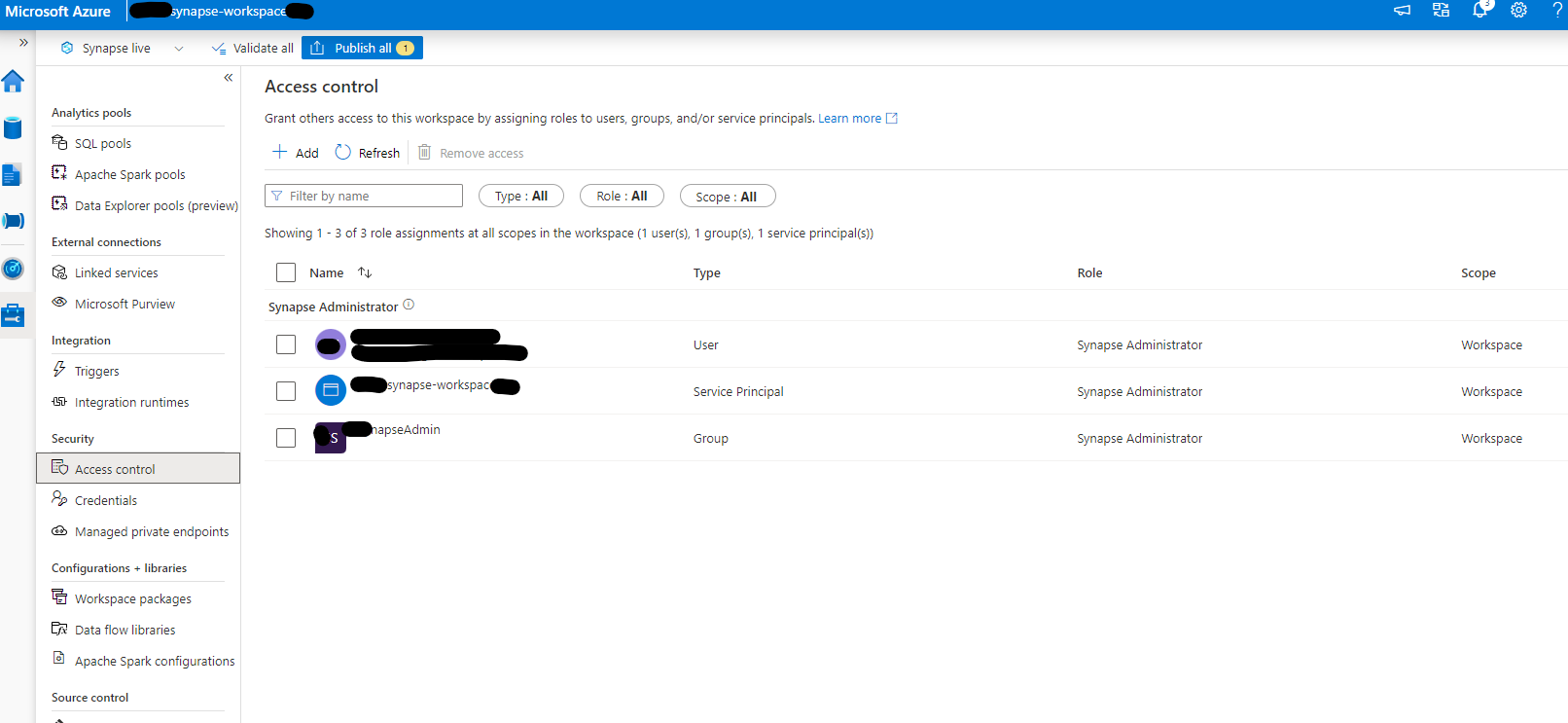
My ID and AzSynapseAdmin roles

Hi @Giri, Seshu ,
Synapse MSI needs to have "Storage blob data contributor" access on the Gen2 account (you have already confirmed that your synapse has access)
also on the workspace level, can you please provide "synapse administrator" role for your Synapse MSI as well as to your User ID?

Hello @Giri, Seshu ,
Thank you for the confirmation. Let me do some research and get back to you.
Sorry for the delay! this problem is solved now. Thanks.
Hello @Giri, Seshu ,
Glad to know that your issue is resolved.
It would be great if you could share the resolution here so that it can be helpful to others.
Hello @Giri, Seshu ,
Per my research, this error occurs when the storage account name is incorrect. Can you please validate the account name from your end again?
Error:
The remote name could not be resolved: 'mystorageaccount.dfs.core.windows.net',Source=System,