Azure Static Web Apps
An Azure service that provides streamlined full-stack web app development.
851 questions
This browser is no longer supported.
Upgrade to Microsoft Edge to take advantage of the latest features, security updates, and technical support.
' cx='32' cy='32' r='32' /%3E%3Ctext x='50%25' y='55%25' dominant-baseline='middle' text-anchor='middle' fill='%23FFF' %3ERJ%3C/text%3E%3C/svg%3E)
Hi there!
I'm attempting to use AAD to authenticate with a Blazor app following these instructions.
When running locally I am able to authenticate/log-in perfectly.
When deployed in an instance of Azure Static Web Apps (url: https://orange-cliff-012dbf103.1.azurestaticapps.net) I get a 404 error message at the URL at the end of the message.
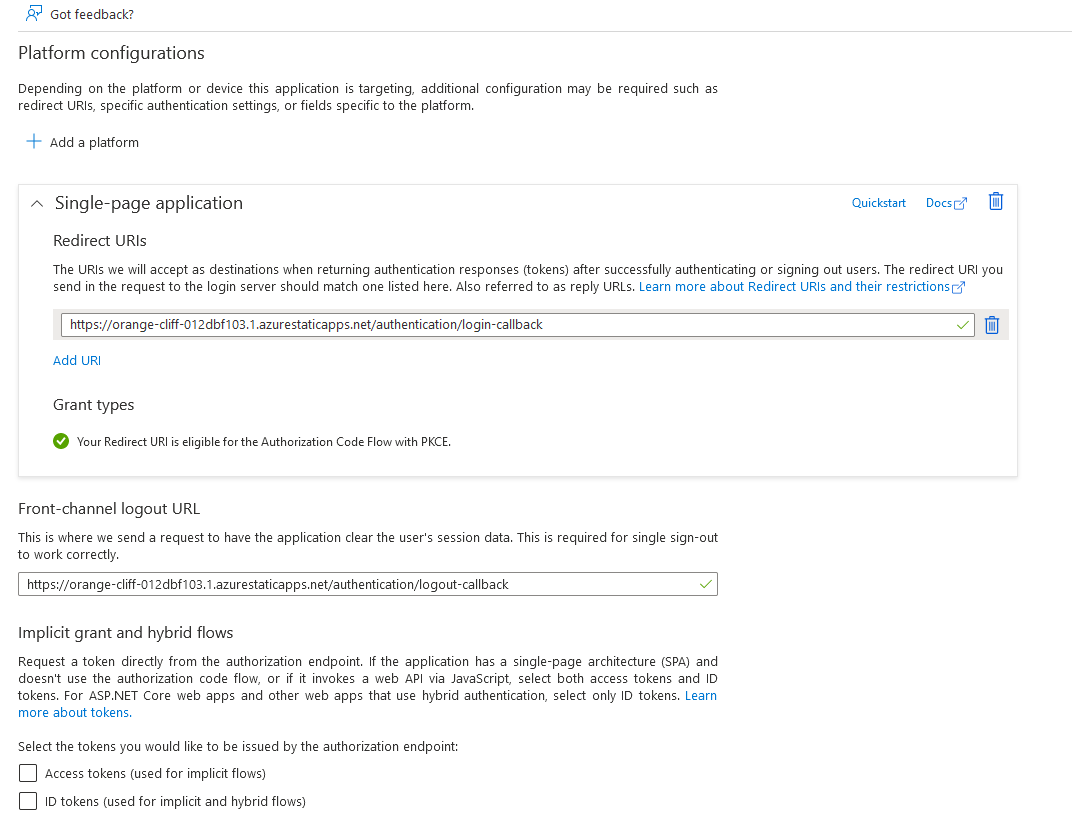
In the SWA I've set-up the Authentication settings as:
Single-page application
Any advice would be greatly appreciated!
Rich
https://orange-cliff-012dbf103.1.azurestaticapps.net/authentication/login-callback#code=0.AToA6ROcNKK5_UutiZ7L9cpbvJ2bdbvZk7hMsf66kIu_oFsJACw.AgABAAIAAAD--DLA3VO7QrddgJg7WevrAgDs_wQA9P_vRl2U0BjyN-0yLIZyHxpcqxi7LfYtaxL2eqxRV5HJBJSccPEt32wKSNuq_-ukaoORTW_nYHW2NGqQIyjtABahRkI_k3e7wyZR9WOlCdLvLTxd6493oY1ecaKhnUIl5vx-U4B38jU1sqNhrP-vySkE8B74nEgt13IiXYxJAtLS3gdNsGAYSV0FkG2UgpulslBUa8XoPKHkVeNY9dekerYY34R7-W_QlVNTwmqPFFsdlSjuWJA4f3aEtiZMhasocev_pHdyjj34I-4Ule3xfCjqEBARklPt8T0R-dCufGvRcrgZf4U9JdUcwqd9On5f4RWi9m-0ScoGo2X5PN3hlp8uTd1aQdO1l96bckVNR3qrTHBAuS8fcvcNMSB27CYLXTlOTkD82rbuZjTH2gsV2qDjX1p4drknEeeNQEiGA7zFICLjbMlLVf1iKodW0x0LMMTFmLr10_LsHyP8KEatB4VWOejQ218xrWvTaV8J6-keSGL2ID58NPLVLVya3nATp1Xh96X5MsRFN7ld8p0TJ7oCF8tVYx3qT06E0RYSp7lB3kIAfwvkFXUUWbrfWXenRCLd7hoxixxdIs47HqChniQ-x0O1_xASrGoYjuj3o1GtOrhTcQ_ptXZwUN24dp6eaGMrnFgejZcuAQfKiAKUqE_LgaLYACavPnLlcJ7IQNfAPfnY_HSo7BZlqCkLGtWwEZAaHLRK-L59lHJ7k5FDqQRpRIegetdAlNERmYntZG1q-fZBWVRbT0t8CU7WljjKji2uY0vAP0wfAvZwuG5J5xdpbArpTDi7T3j6ylHh9s1yjC8RlEWQvbJuNJHlEaP4ZBZspc6KkdsBbO8dElqmDvABGsMdcQXsGzgNBXr0nXRaqGBxclncu_bOJliSVr3XZkzdgVB1K5_UKIHnVl-z6OmkDhnRVoE12aG5iWNbzoiu6_LzCL7-k3Wp-VgQwkOGq9tX_CT7m9U6a7rxx4gu8WSln6Y90m60yVE6cBbOSVn5tSJ3BfaAiW7eJpeL0aeNAkI&client_info=eyJ1aWQiOiJjMzE3OWZmMC0zODFmLTRmZGEtYWZkYS1mNGQ0OGQ4ZDIyMmUiLCJ1dGlkIjoiYmU4NjA0NGItZDMxOS00NjBkLTk4ZmMtNTI0MDA0YmQ3MTMzIn0&state=eyJpZCI6IjA5ODA0MzcxLWQ2YjgtNDA0Yy1hZjlmLWQzZmM0N2RhNjAwZiIsIm1ldGEiOnsiaW50ZXJhY3Rpb25UeXBlIjoicmVkaXJlY3QifX0%3d%7c6TRpHh6M7_-8CzGINM5qcd1WlMj6Tl9rQD_GucCH6Ec&session_state=e9181970-22e0-45f4-806e-4202b7528dcd
 ]1
]1

I have check the documentation you provided(.net core 3.1), and in this article, it use web platform. Then I check the .net 6.0 documentation , and I think your steps are correct. And it should work.
Suggestion:
The reason is that after looking at your description, it seems that the authentication of aad has been successfully, and the 404 error may be caused by your project. We need more details to investigate the issue.
Best Regards
Jason
Apologies, I didn't see this response at the time - thanks for this!
' cx='32' cy='32' r='32' /%3E%3Ctext x='50%25' y='55%25' dominant-baseline='middle' text-anchor='middle' fill='%23FFF' %3EQR%3C/text%3E%3C/svg%3E)
Hi @JasonPan - MSFT ,
I am trapped into the similar issue as yours. Can you share what was the problem with your own project?
Best Regards,
Qasim