Can not deploy an application with group policy that install's a dll. file

James 21 Reputation points
2022-09-08T07:35:37.393+00:00

Hello,
I am trying to run a log in script through group policy to install a dll file.
However, the script just tries to run the application file and states "can not find dll file"
Is there a way for the script to recognise the dll file in the folder?

My script is:
$folder = 'C:\temp\$TEMPORARYDLLREG\crpego.dll'

if (-not (Test-Path -Path $Folder)) {

start-process -FilePath "\\servername\Data\QuickCrpe\QuickCrpeReg.exe" -ArgumentList '/S'  

}  

else { }

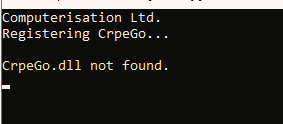
238886-image.png

result after running script

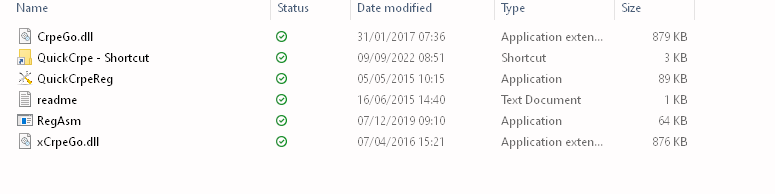
238830-image.png

Result when running the application manually

The application needs to be run as an admin also

Windows for business | Windows Client for IT Pros | User experience | Other
0 comments No comments
{count} votes

Answer accepted by question author
  1. Constantin Heinzler 81 Reputation points
    2022-09-09T08:31:12.277+00:00

    You didn't specify how you manually start the process (from cmd, explorer etc.) but this could be related to the working directory being different.

    You could try adding the -WorkingDirectory parameter to the Start-Process line:

    start-process -FilePath "\\servername\Data\QuickCrpe\QuickCrpeReg.exe" -WorkingDirectory "\\servername\Data\QuickCrpe" -ArgumentList '/S'  
    

    There are plenty ways to pack a PoSh script as installer or binary. Inno Setup for example would allow you to create a installer.


2 additional answers

Sort by: Most helpful
  1. Pavel yannara Mirochnitchenko 13,426 Reputation points MVP
    2022-09-08T17:01:56.433+00:00

    You can try to do this with Group Policy Task Scheduler to execute a script. You can put powershell execution inside .cmd file and point unc path to it in Task Scheduler options.

    0 comments No comments

  2. Pavel yannara Mirochnitchenko 13,426 Reputation points MVP
    2022-09-08T17:04:21.263+00:00

    I see that you experience some problems with the script it self. I would try to keep dll and exe file inside source folder, together with ps1 and see if it will launch it then as it should. Or if you really want to run it from C:\temp, do file copying first.


Your answer

Answers can be marked as 'Accepted' by the question author and 'Recommended' by moderators, which helps users know the answer solved the author's problem.