Community Center | Not monitored
Tag not monitored by Microsoft.

This browser is no longer supported.
Upgrade to Microsoft Edge to take advantage of the latest features, security updates, and technical support.
' cx='32' cy='32' r='32' /%3E%3Ctext x='50%25' y='55%25' dominant-baseline='middle' text-anchor='middle' fill='%23FFF' %3EDF%3C/text%3E%3C/svg%3E)
I've configured a Custom Connector via a local Gateway to use only HTTP API endpoints, but I receive this error message when testing:
{
"message": "Received error payload from gateway service with ID 3091244: Substituted: HttpRequestException:<pi>System.Net.Http.HttpRequestException: An error occurred while sending the
request. ---> System.Net.WebException: The underlying connection was closed: Could not establish trust relationship for the SSL/TLS secure channel. --->
System.Security.Authentication.AuthenticationException: The remote certificate is invalid according to the validation procedure
...
},
"source": "gatewayconnector-eus.azconn-eus-002.p.azurewebsites.net"
}
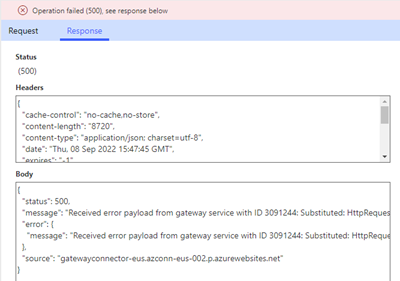
I have confirmed that the API backing this connection is configured for HTTP traffic and that the Custom Connector is pointed at the same endpoint.

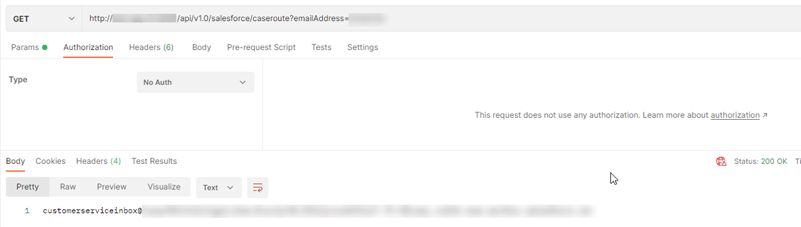
Does this indicate that there's an issue with the Azure certificate, or an issue between Azure and my Gateway? How can I confirm / troubleshoot the true source of the issue?
' cx='32' cy='32' r='32' /%3E%3Ctext x='50%25' y='55%25' dominant-baseline='middle' text-anchor='middle' fill='%23FFF' %3EPD%3C/text%3E%3C/svg%3E)
Did you ever resolve this? What was the issue if you did?
' cx='32' cy='32' r='32' /%3E%3Ctext x='50%25' y='55%25' dominant-baseline='middle' text-anchor='middle' fill='%23FFF' %3ESK%3C/text%3E%3C/svg%3E)
Microsoft Q&A(en-us) does not support Power Platform.
For questions about Power Platform (PowerApps, PowerAutomate, etc.), please ask in the official dedicated community below.
Power Platform Community
├ Copilot Studio
├ Power Apps
├ Power Automate
│ └ Power Automate Desktop
└ Power Pages