Microsoft 365 and Office | SharePoint | For business | Windows
A group of Microsoft Products and technologies used for sharing and managing content, knowledge, and applications.

This browser is no longer supported.
Upgrade to Microsoft Edge to take advantage of the latest features, security updates, and technical support.
' cx='32' cy='32' r='32' /%3E%3Ctext x='50%25' y='55%25' dominant-baseline='middle' text-anchor='middle' fill='%23FFF' %3EMA%3C/text%3E%3C/svg%3E)
I'm trying to create a Sharepoint site. When I enter the site name, MS automatically generates a "Group email address" that's says "Another group with the same alias exists." That would be pretty much impossible - because the "alias" is the exact same name as my company with LLC after it. So something else is going on. It looks like maybe MS automatically created a Communication site for my account. (I didn't do it. I didn't even know it was there until I stumbled upon it.) Could it be that the Communication site took the alias? And if so, how the heck do I create a Sharepoint site? Do I have to give it a different site name (and let MS generate a different Group email alias)???
A group of Microsoft Products and technologies used for sharing and managing content, knowledge, and applications.

Would you tell me whether your issue has been resolved or have any update ?
I am looking forward to your reply.
Thanks,
Echo Du
MS couldn't automatically create a Communication site for one user account.
You could follow these steps to solve your issue:
1.View the details of this alias group
Go to the Microsoft 365 admin center page, and then click Active groups option under the Groups section, select this alias group to view the detail pane.
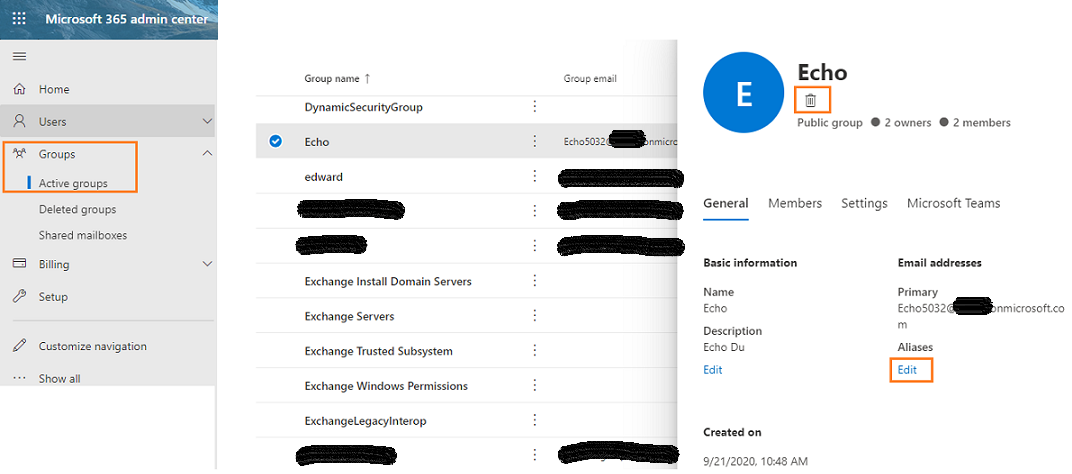
2.On the detail pane, If you want to use this alias, you could choose delete or edit this alias group.
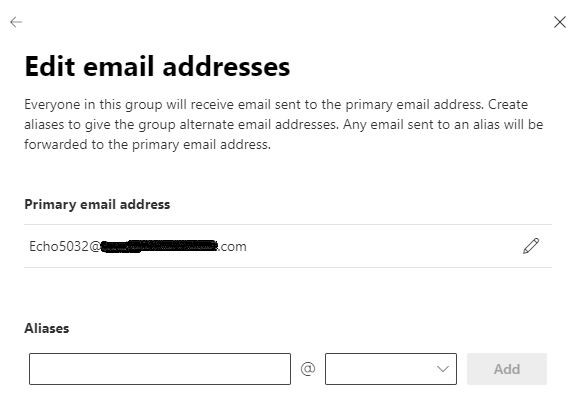
3.Of course, you could entry another group name when creating a SharePoint Site.
You could refer to this article Unable to create the Office 365 group as there is already a group with the same alias.
Thanks,
Echo Du
======================
If an Answer is helpful, please click "Accept Answer" and upvote it.
Note: Please follow the steps in our documentation to enable e-mail notifications if you want to receive the related email notification for this thread.