Note
Access to this page requires authorization. You can try signing in or changing directories.
Access to this page requires authorization. You can try changing directories.
One way to add leads to a quick campaign is by selecting them on the Leads list and clicking the Create Quick Campaign button. You can also create an Advanced Find query and add all of the results to a quick campaign.
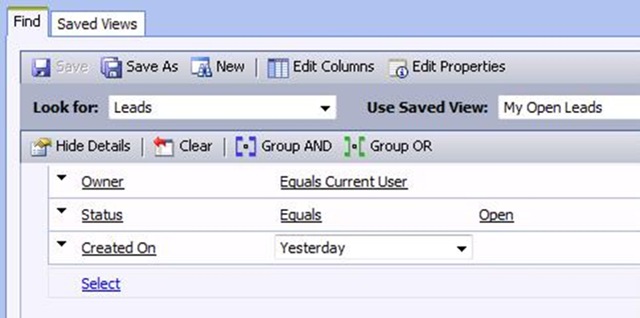
To capture only leads you imported, the second option (Advanced Find) is your best bet, but you need to know when the leads were uploaded. Here’s an example of an Advanced Find query that would find all of your own, active leads created the previous day:
Enjoy your weekend.
Comments
- Anonymous
August 10, 2007
PingBack from http://msdnrss.thecoderblogs.com/2007/08/10/understanding-quick-campaigns/