Note
Access to this page requires authorization. You can try signing in or changing directories.
Access to this page requires authorization. You can try changing directories.
By default when you run a command through PowerShell to retrieve values with registry keys, the response shows the values as being empty. Here’s an example – I use the following command to set an excluded DC:
Set-ExchangeServer -Identity CSX2K71 -StaticExcludedDomainControllers excludeme.csx2k7dom.com
The key appears as expected in the registry (within MSExchange ADAccess | Profiles | Default) :
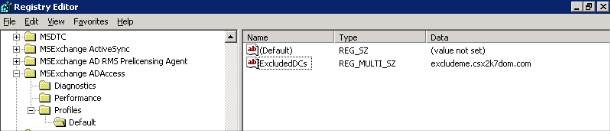
However, when you try to retrieve the settings using the default command, you get the following output:

In order to retrieve the registry values, you must add the –Status command as follows:
Get-ExchangeServer -Identity CSX2K71 -Status | fl Name, StaticExcludedDomainControllers

Further details about usage of the Get-ExchangeServer commands can be found on TechNet (https://technet.microsoft.com/en-us/library/bb123873.aspx).
Posted by Chris Stevenson (UK Premier Field Engineer)